Last verified July 15, 2026. Counts and prices checked inside a paid TrendTrack account.
The fastest way to find a proven Shopify store to model is not scrolling Google, TikTok or a Facebook group.
It is querying a database that already knows which stores are scaling, then filtering it down to the handful that match your niche. That database is TrendTrack’s Shops module, and this is how you drive it. It sits inside a wider suite, and how the platform works maps all of it.
TrendTrack’s Shops database indexes 1.87M Shopify stores and lets you filter them with 17 filters: niche, traffic, best-seller price, creation date, apps and more. Every store carries an estimated monthly and daily revenue, so you can rank a whole niche by traffic and read estimated size at a glance.
Disclosure: some links on this page are affiliate links. If you subscribe through them we may earn a commission at no extra cost to you. We tested every TrendTrack feature mentioned here on a paid account.
Search the database in four steps
You do not need to learn all 17 filters to get value on day one. The workflow is short: open the module, stack two or three filters, sort, and read the store that surfaces.
Plan check, and it is good news: the Shops database, all 17 filters and the Est. Revenue column are included from Starter ($59/mo, or $42/mo annually), with unlimited shops since January 2026. What moves up to Pro ($89/mo) is cross-filtering these stores by their live ad activity, which pulls from the Ads module.
Step 1: open Shops
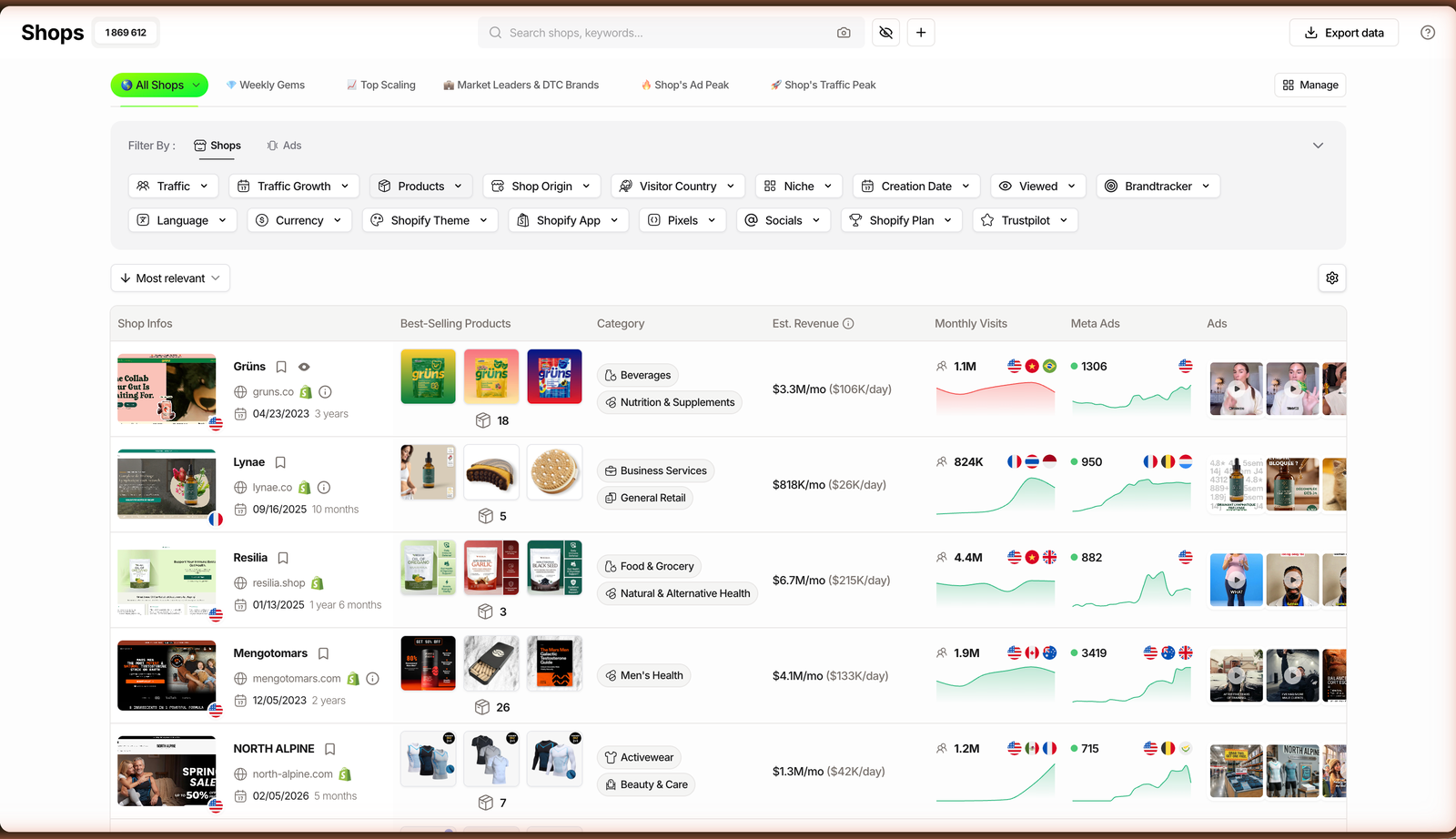
Inside TrendTrack’s Shops database, the module opens on a live grid of stores with a search bar reading “Search shops, keywords…”.
Above the grid sit six saved views: All Shops, Weekly Gems, Top Scaling, Market Leaders & DTC Brands, Shop’s Ad Peak and Shop’s Traffic Peak. They are shortcuts, not filters, so start on All Shops and narrow from there.
Step 2: stack the filters
Filters live in a rail beside the grid, in two groups: Shops (the 17 below) and Ads (the cross-filters that need the Pro plan).
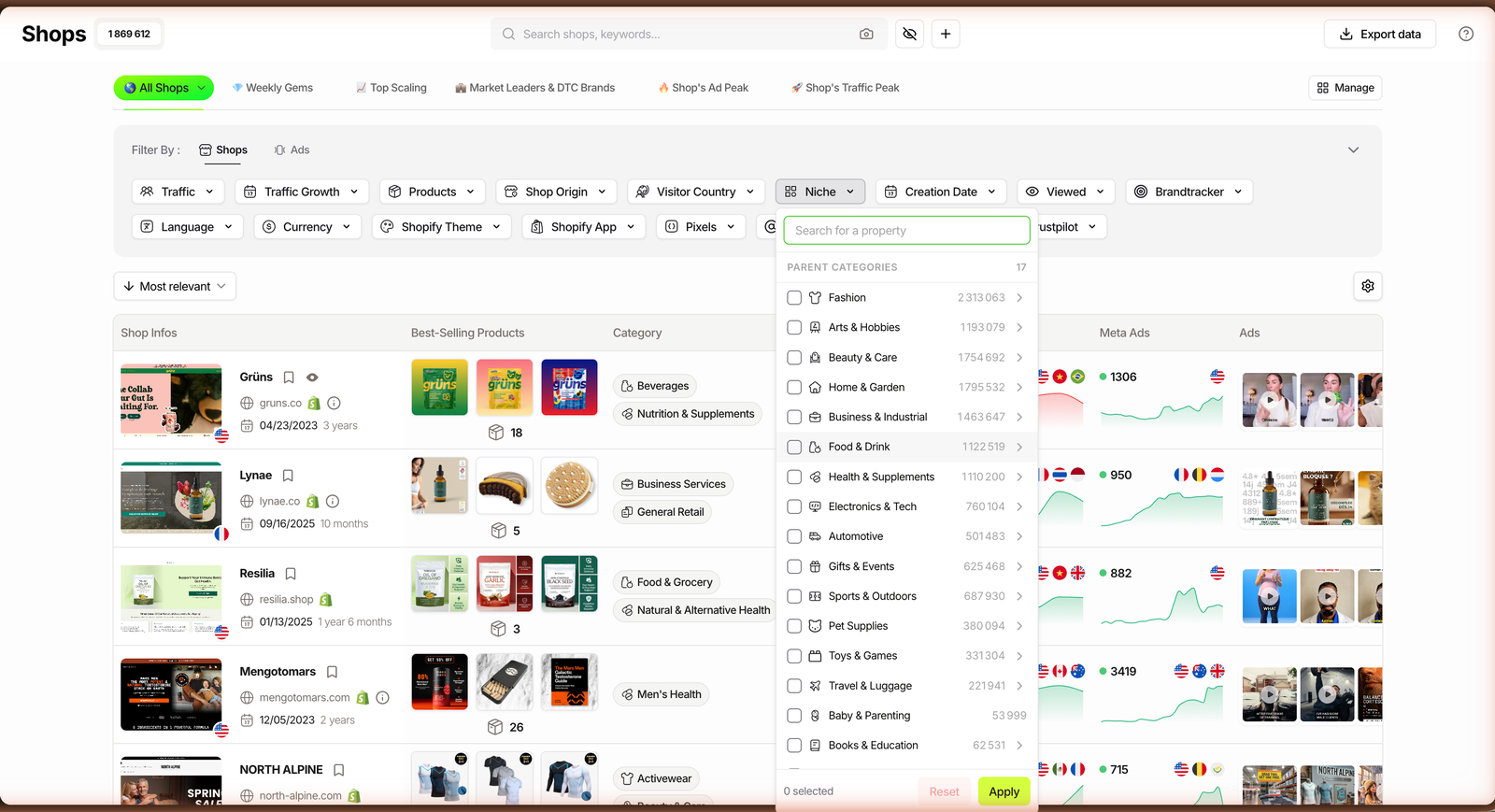
The one most people open first is Niche. It splits the catalog into 17 parent categories, each with a live count: Fashion, Home & Garden and Beauty & Care each sit above 1.7M tagged stores, and a single store can carry more than one niche.
| Filter | What it does | Best for finding |
|---|---|---|
| Traffic | A min/max monthly visitor range, 0 to 10,000,000. | Stores at a chosen scale. |
| Traffic Growth | Rules for rising or falling traffic over 1, 3 or 6 months. | Stores climbing right now. |
| Products | Catalog size plus best-seller price, $0 to $10,000. | One-product stores vs full catalogs. |
| Shop Origin | The store’s home country, include or exclude. | Local or overseas operators. |
| Visitor Country | Audience country in Main, Among or Exclude mode. | Stores selling into your market. |
| Niche | 17 parent categories with live counts. | A whole category at once. |
| Creation Date | Launch date, presets and seasonal events. | Brand-new or seasonal stores. |
| Viewed | All, Yes or No, based on what you have opened. | Skipping stores you have seen. |
| Brandtracker | All, Yes or No, based on what you track. | Your existing watchlist. |
| Language | The store’s language. | Market-specific stores. |
| Currency | The store’s checkout currency. | Region targeting. |
| Shopify Theme | Filter by theme, each with a count. | Theme and build research. |
| Shopify App | Include or exclude by installed app. | Stores running a given tool. |
| Pixels | 11 ad and analytics pixels, include or exclude. | Stores advertising on a platform. |
| Socials | Facebook, Instagram, TikTok, YouTube and more. | Stores active on a channel. |
| Shopify Plan | All, Shopify Plus only, or non-Plus. | Bigger, established brands. |
| Trustpilot | Score and review count range, 1 to 5. | Reputation screening. |
You rarely need more than three at once. Two well-chosen filters already cut 1.87M stores down to a readable shortlist.
Step 3: sort and read Est. Revenue
Above the grid, the sort menu offers Most relevant, Most monthly visits, Most live ads, Fastest growing, Most products and Last added. For sizing a niche, Fastest growing and monthly visits are the two that matter most.
The number most people come for is hidden by default. Open Manage shop view (the gear icon), enable the Est. Revenue column, and every store shows an estimated figure per month and per day.
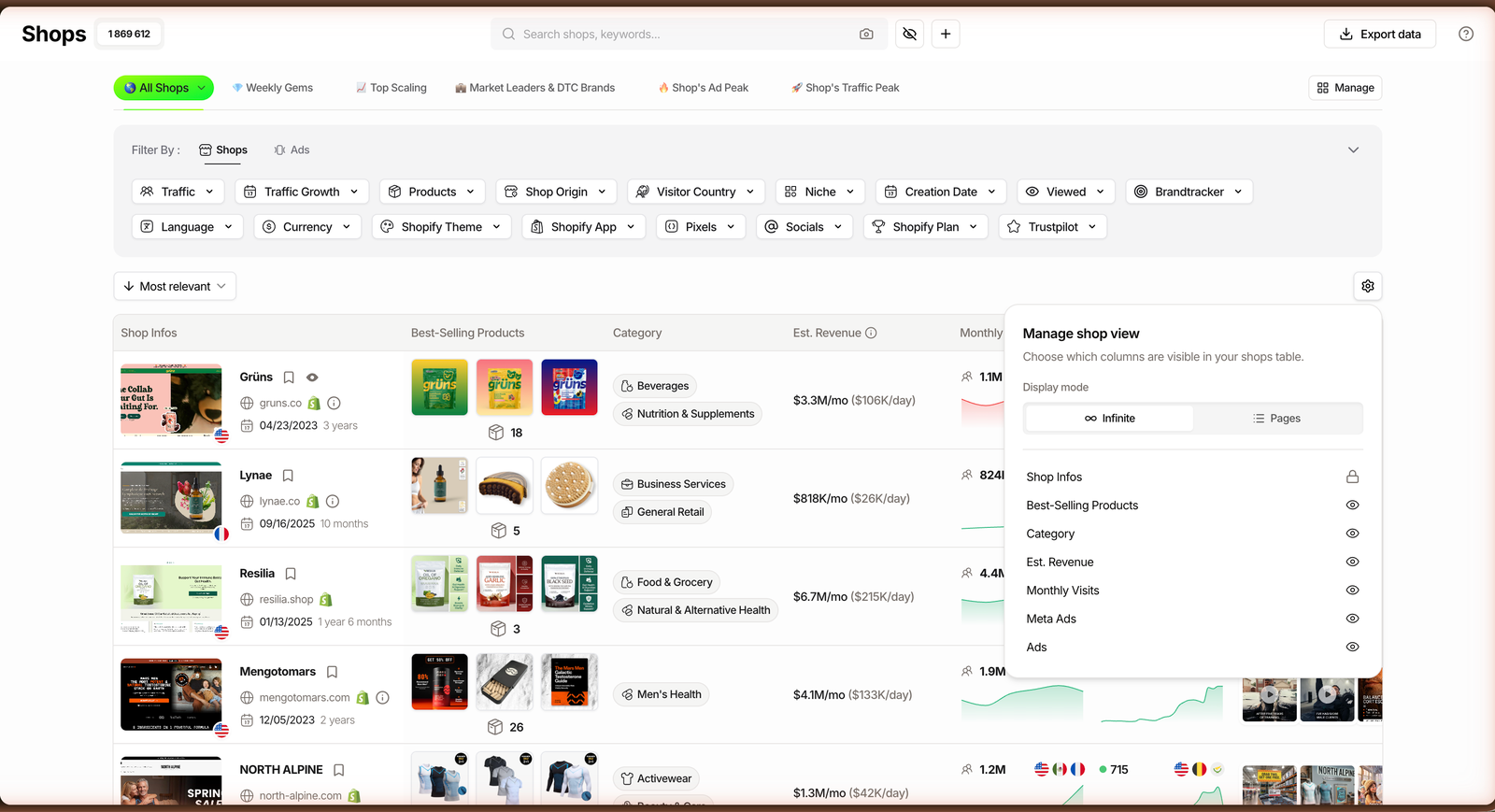
Treat that figure as an estimate for ranking, not an audited P&L. It is directional, and it is enough to tell a $3M/month leader from a store that only looks busy.
Step 4: open a store’s analytics
Click any store and its full profile opens. The header shows the domain, age, country, currency, niches and theme, with tabs for Shop Analytics, Similar Shops, Meta Ads, Google Ads and their email marketing flows.
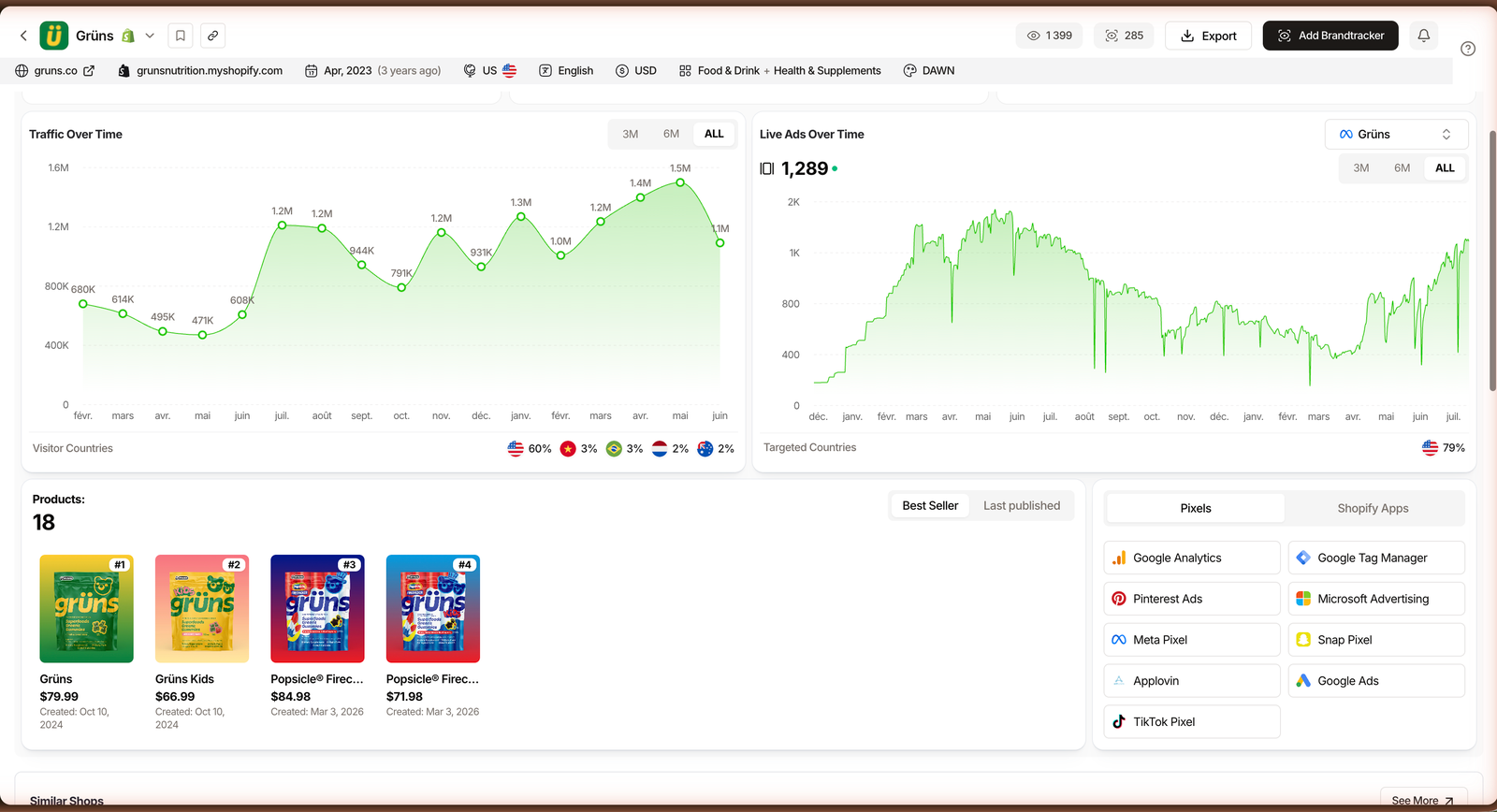
Inside Shop Analytics you get monthly visits with their trend, Traffic Over Time, Live Ads Over Time, the products with their launch dates, and the pixels and apps the store runs.
Related guide
Brandtracker Tutorial: Track a Store’s Ads, Tests, Emails & LPs
Found a store worth watching? Track its entire ad operation.
What the database actually shows
The filters get you to a store. The profile is where the real signal lives, and one chart does more work than the rest.
Visitor Countries vs Targeted Countries puts organic audience next to advertising target side by side. When the two disagree, you are looking at a store that found demand it was not even chasing.
Source: TrendTrack Shops module, checked July 2026.
Every product carries its creation date, so a store that just published three items on the same day is telling you it is testing. Best-seller price sits right there too, which is your first read on margin.
An x-ray of a single store is what the free Chrome extension does. The database does the opposite: it searches all 1.87M at once, then hands you the individual store to inspect.
One more entry point is worth knowing. The camera icon in the search bar is AI Image Search: paste or drop a product photo and TrendTrack returns the stores selling it, added in March 2026.
Three ways operators search it
The same 17 filters serve very different jobs. Here are three combinations that map to how real sellers actually open the module.
| Goal | Filters to stack | Sort by |
|---|---|---|
| Spot a fresh product | Niche + Creation Date (last 30 days) + best-seller price | Fastest growing |
| Size up a market | Niche + Traffic (high) + Traffic Growth rising | Most monthly visits |
| Audit a niche | Niche + Shopify Plus + Trustpilot score | Most live ads |
The product scout
New to a niche and hunting for a product to test? Set Niche, cap best-seller price to your margin range, and set Creation Date to the last 30 days.
Sort by Fastest growing. Young stores that are already climbing are the clearest signal that a product is catching, before it saturates every feed.
The scaler tracking a market
Already selling and want to know who the real leaders are? Filter your niche, push Traffic high, add a rising Traffic Growth rule, then sort by monthly visits and read the Est. Revenue column.
The top of that list is your competitive set. Open each one and read its visitor countries and live ads to see where the demand and the budget are going.
The niche auditor
Researching a category before you commit? Combine Niche with the Shopify Plus filter and a Trustpilot floor to isolate the established brands, not the one-week tests.
Then let AI Image Search and Similar Shops widen the map. Drop a product photo, and the stores already selling it become your shortlist.
Where the database stops
The honest limits matter as much as the filters. First, this is a Shopify database. WooCommerce, Amazon and custom builds are out of scope, which is fine if dropshipping and DTC testing are your world, less so if they are not.
Second, Est. Revenue and traffic are estimates. They are excellent for ranking a niche and terrible as a quoted fact, so cross-reference before you build a plan on them. That is also the honest frame we use in our full TrendTrack review.
Related guide
TrendTrack Pricing: Which Plan Is Right for You
What Starter, Pro and Business actually unlock.
Third, cross-filtering stores by their live ads sits behind the Ads module, which starts on Pro. The database itself is on Starter, so you can open the database on a free account and see the workflow before you decide how deep to go.
FAQ
How many Shopify stores does TrendTrack’s database have?
TrendTrack’s Shops database indexes about 1.87 million Shopify stores as of July 2026, and it keeps growing. Every store is enriched with estimated traffic, its niche, the apps and theme it runs, and an estimated revenue, so the count is not just a number: each entry is queryable with the module’s 17 filters.
Is the Shops database included in the Starter plan?
Yes. The Shops module, all 17 filters and the Est. Revenue column are available from the Starter plan at $59/mo (or $42/mo billed annually), and since January 2026 Starter includes unlimited shops. What moves up to Pro ($89/mo) is cross-filtering those stores by their live ad activity, which pulls from the Ads module.
Can I see a Shopify store’s revenue?
You can see an estimated monthly and daily revenue per store. TrendTrack hides the Est. Revenue column by default; enable it from Manage shop view and every store shows a figure per month and per day. Treat it as a directional estimate for ranking a niche, not an audited number.
How do I find winning stores in a specific niche?
Open Shops, set the Niche filter to your category, add a traffic or traffic-growth rule to surface stores that are climbing, then sort by monthly visits or fastest growing and read the Est. Revenue column. Open the top results to read their visitor countries, product launch dates and live ads.
Does the Shops database only work for Shopify stores?
Yes. The database is built specifically for Shopify stores, which is where most dropshipping and DTC testing happens. Non-Shopify sites are out of scope. For the ad side of any brand, Shopify or not, you use the Ads module and the one that ranks Facebook pages by ad activity instead.
The short version
Shops turns “which store should I model?” into a query. Pick a niche, add a growth rule, sort by monthly visits, read the estimated revenue, and open the winners.
Two filters and a sort are enough to start, and it all runs on the entry plan.
Ready to query 1.87M Shopify stores?
The Shops database, all 17 filters and Est. Revenue are included from $59/mo (or $42/mo billed annually), with unlimited shops. Ad cross-filters start on Pro.