Last verified July 2026. Tested on a paid TrendTrack account; page counters and sort options read live inside the app.
You save a competitor’s ad, you admire one clever creative, and you decide the page behind it must be printing money. That single-ad read is how most sellers judge a rival, and it is the wrong signal.
One ad tells you an ad exists. It does not tell you whether that page is launching in waves, how many creatives are live right now, or what it spends to keep them running. The wider map, module by module, sits in what TrendTrack actually is.
That is what a facebook advertisers spy is for: ranking the pages, not the posts. Here is how TrendTrack’s Advertisers module does it.
A Facebook advertisers spy ranks the pages behind the ads, not the ads one by one. TrendTrack’s Advertisers module indexes 2,487,285 pages and sorts them by ads launched, live ads and estimated EU spend. It starts on the Pro plan, not Starter.
Disclosure: some links on this page are affiliate links. If you subscribe through them we may earn a commission at no extra cost to you. We tested every TrendTrack feature mentioned here on a paid account.
Plan check: the Advertisers and Ads modules start on Pro ($89/mo, or $62/mo billed annually), which caps you at 1,000 advertisers (Business is unlimited). Starter ($59) covers Shops, 2 Brandtrackers and the free Chrome extension, but not the advertiser index. If ranking pages is why you are here, you want a Pro trial, or see how the plans compare.
What the Advertisers module actually shows
Open the module and you get a ranked list of pages, not a wall of creatives. Each page is a competitor, and every row is built to answer one question: how hard is this advertiser pushing right now?
Source: TrendTrack Advertisers module, checked July 2026.
The most useful column is the one Facebook’s own Ad Library never gives you: Last 14 days: N ads launched. It flags pages that just dumped a fresh batch of creatives, which is how you catch a scale-up as it happens rather than months late.
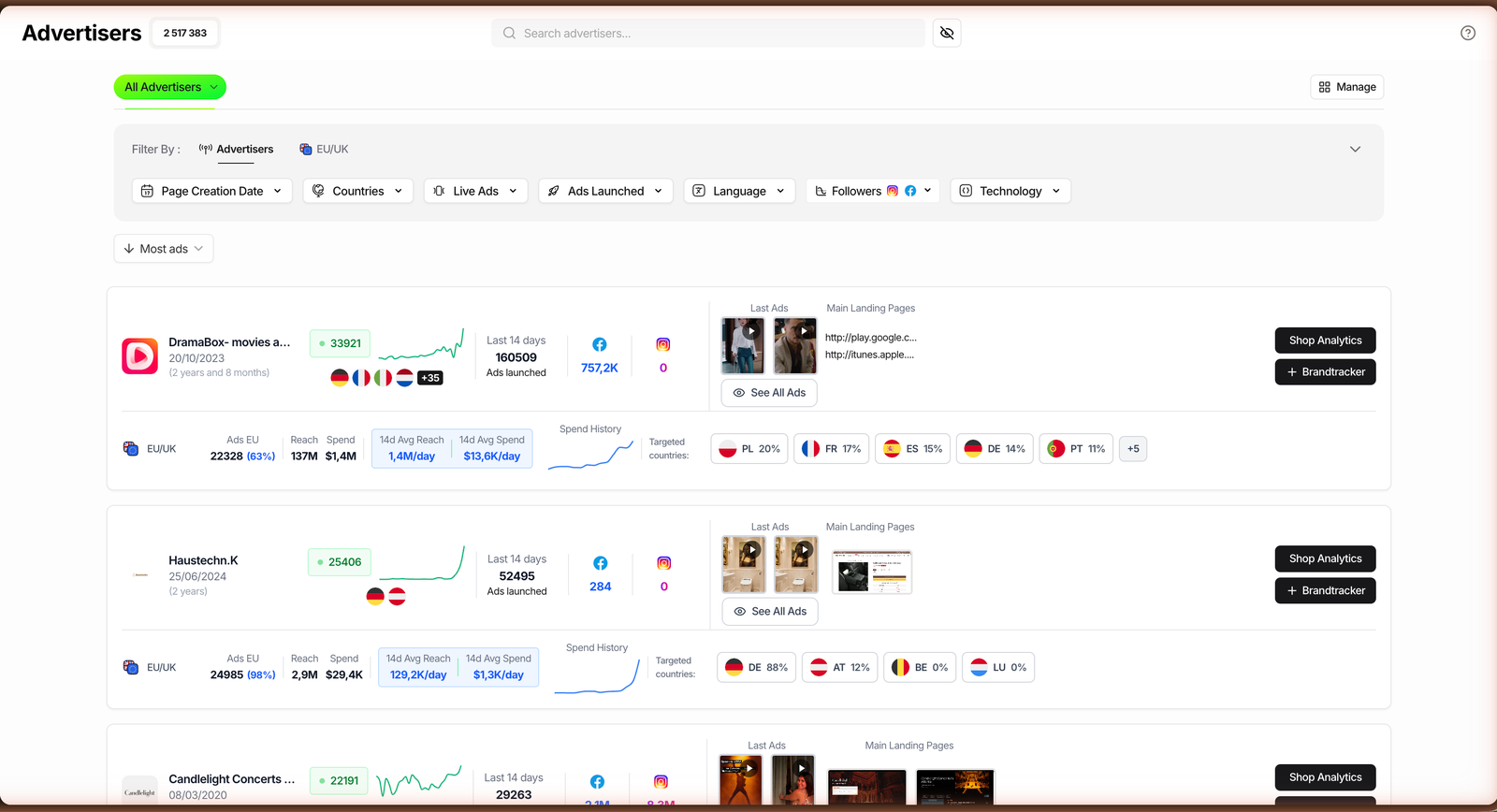
Read a single row left to right and you get the whole picture: the page and its age, a live-ads sparkline, the 14-day launch count, FB and IG followers, thumbnails of the Last Ads, the Main Landing Pages, and two shortcut buttons, Shop Analytics and Brandtracker.
Below each row sits an EU/UK line: Ads EU (count and share), Reach, Spend, a 14-day average reach and spend per day, and the targeted countries. Keep in mind that spend is estimated from EU/UK transparency data, not an audited number.
Three ways operators rank advertisers
The module earns its keep when you stop browsing and start sorting for a job. Same screen, three different reads depending on who you are. The core move is always the same three steps.
Scout pages that just went explosive
If you are still hunting for a product to model, sort the list by Ads Launched (14d). Pages that just pushed dozens or hundreds of new creatives are testing hard, and heavy testing usually means something is working.
Open the top rows, glance at the Last Ads thumbnails to see the angle, then click through to the Main Landing Pages to read the offer. Some pages launch in genuinely large waves, so treat the biggest numbers as testing intensity, not proof of profit.
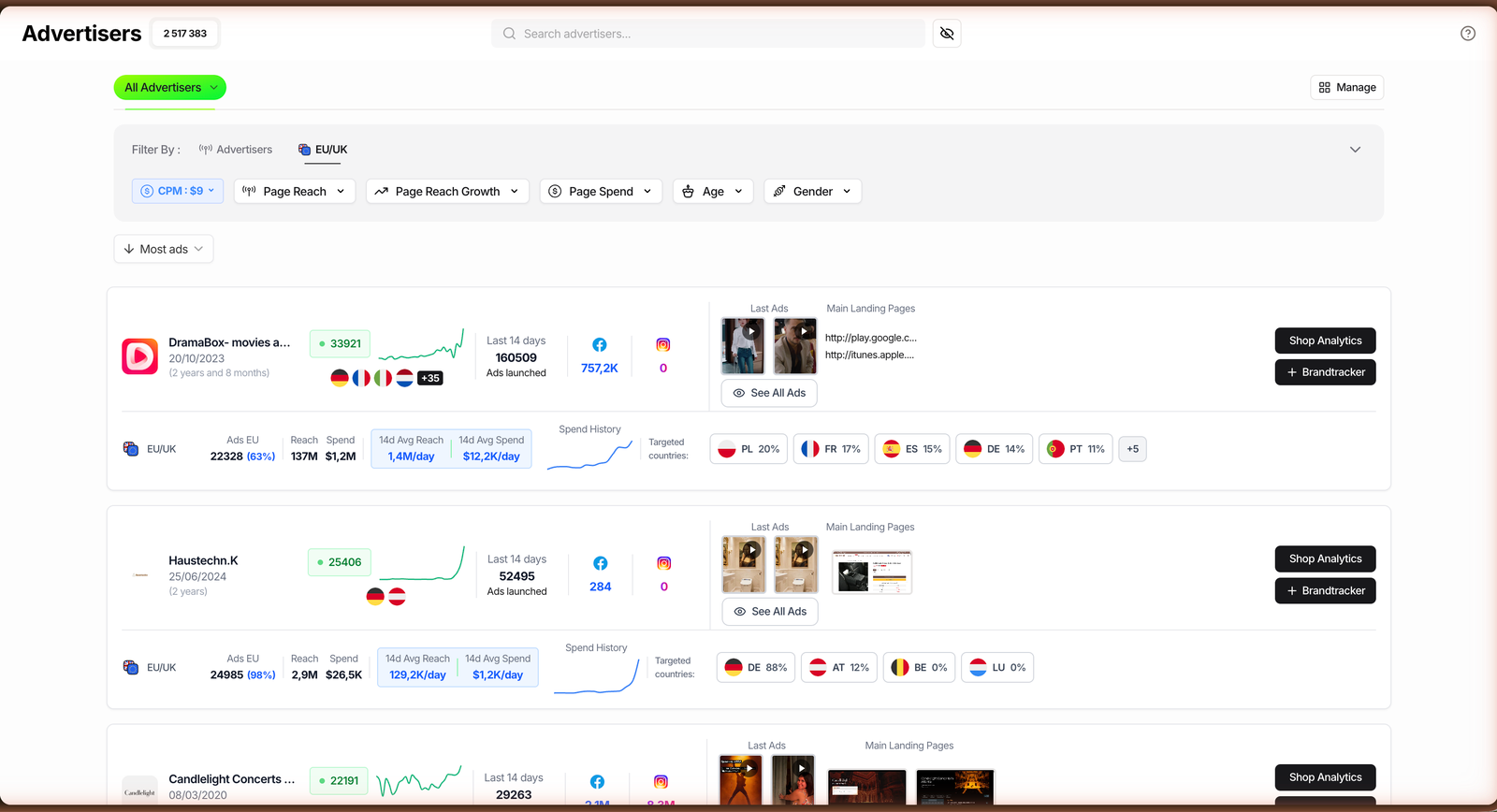
The result is a shortlist of pages in active scale-up, ranked by effort, instead of one screenshot you happened to swipe past.
Track a rival’s launch cadence
Already know your competitors? Filter down to a niche or a specific page and watch the live-ads sparkline week over week. A flat line means steady spend; a jump means a new test wave you should go read.
Pair that with the 14-day launch count and you can tell the difference between a page coasting on winners and one throwing everything at the wall. That cadence is the tell for when a rival is about to scale.
See the Advertisers module live
Rank a whole niche by EU ad share
Running for a brand or an agency, you often want the map, not one page. Sort by Highest EU ads % and add a Countries filter to line up who owns paid attention in a market.
Then read the 14-day average spend per day (estimated) and the targeted countries to see where the budget is really going. It turns a vague “who are the big players” question into a ranked, sourced list.
Related guide
Ads Library Tutorial: Spy 337M Meta, TikTok & Google Ads
Once a page looks hot, rank its individual creatives by Ad Rank.
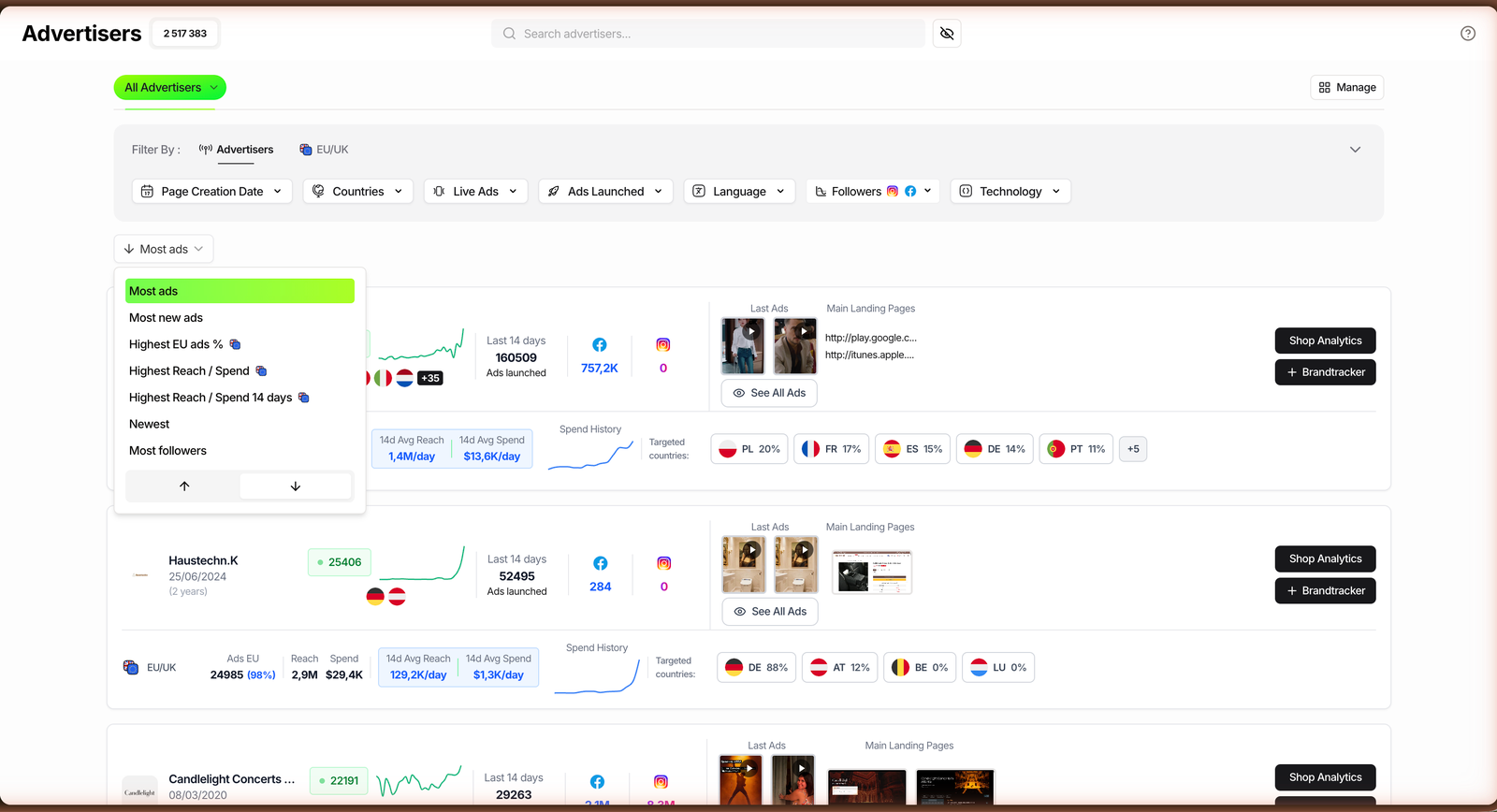
The filters and sorts that matter
You do not need all of them. These are the controls that actually change which pages rise to the top, and who each one is for.
| Filter / Sort | What it does | Best for |
|---|---|---|
| Ads Launched (14d) | Ranks pages by fresh creatives pushed in the last two weeks. | Catching scale-ups |
| Most ads / Live Ads | Sorts by total creatives currently running. | Sizing a competitor |
| Highest EU ads % | Surfaces pages heaviest in the EU/UK transparency data. | Mapping a market |
| Highest Reach / Spend (14d) | Ranks by estimated reach and spend per day. | Finding big budgets |
| Followers (FB / IG) | Filters by audience size on each platform. | Separating brands from testers |
| Page Creation Date | Limits to new or established pages. | Spotting new entrants |
| Countries | Filters advertisers by targeted market. | Local research |
| Technology | Narrows to pages on a given stack or app. | Niche and stack scouting |
Stack two of these and the list gets sharp fast: Highest EU ads % plus a Countries filter, or Ads Launched (14d) plus a follower floor to skip the tiny test pages.
Where the Advertisers module stops
It is a ranking tool, so be honest about its edges. The spend and reach figures come from EU and UK transparency rules only, which means there is no audited US spend number, and everything outside Europe is inferred rather than shown.
What ranking pages gives you
- Pages sorted by real activity, not one creative
- 14-day launch counts to catch scale-ups early
- Estimated EU spend and targeted countries
- One click to Shop Analytics or Brandtracker
Where it stops
- Spend is estimated, EU/UK only
- No certified US budget figure
- Ranks pages, not their funnels end to end
- Locked behind Pro, not Starter
The other limit is depth: the module ranks and points, it does not walk a competitor’s whole funnel. When one page is worth a real teardown, send it to the Brandtracker and read its emails, hooks and landing pages in one place. We cover the full workflow in our full TrendTrack review.
Related guide
Brandtracker Tutorial: Track a Store’s Ads, Tests, Emails & LPs
Turn a ranked page into a full-funnel teardown.
FAQ
What is a Facebook advertisers spy tool?
It is a tool that ranks the pages behind Facebook ads, not the ads one at a time. Instead of scrolling creatives, you see which advertisers are most active. TrendTrack’s Advertisers module indexes 2,487,285 pages and sorts them by ads launched, live ads, estimated reach and estimated EU spend, so you can shortlist competitors by real effort.
How do you rank Facebook pages by ad activity?
Open the Advertisers module, then sort. Use Ads Launched (14d) to catch pages testing hard, Live Ads to size a competitor, or Highest EU ads % to map a market. Read the EU/UK line under each row for estimated reach, spend per day and targeted countries, then open the Main Landing Pages to see the offer.
Which TrendTrack plan includes the Advertisers module?
Not Starter: the Advertisers module starts on Pro ($89/mo, or $62/mo billed annually), which covers up to 1,000 advertisers. Business ($149/mo) makes it unlimited, while Starter ($59) gives you Shops, 2 Brandtrackers and the free extension but no advertiser index. See how the plans compare on the pricing page.
Advertisers vs the Ads module: what is the difference?
The Ads module ranks individual creatives, more than 337M of them, by signals like Ad Rank. The Advertisers module ranks the pages, 2.49M of them, by how much they are advertising. Use Advertisers to find who is scaling, then Ads to study which of their creatives are actually winning.
Can you see how much a Facebook advertiser spends?
You can see an estimate for the EU and UK. Europe’s ad transparency rules expose reach and spend, and TrendTrack converts them into an estimated spend per day using a configurable CPM. There is no audited figure and no certified US spend, so treat the numbers as directional, useful for ranking rivals, not for accounting.
Verdict: who the Advertisers module is for
If you spy on ads one screenshot at a time, this module reframes the job. It is strongest for scalers and agencies who want competitors ranked by real activity and market share, and lighter if you only ever need a single winning creative.
Just remember the honest parts: spend is estimated, it is EU/UK only, and the whole thing lives on Pro. Within those lines, it is the fastest way to stop guessing which pages matter.
Want your competitors ranked instead of screenshotted?
Rank 2.49M pages by ad activity and estimated EU spend. The Advertisers module starts on Pro ($89/mo, or $62/mo annually), and the free Chrome extension lets you x-ray a store before you commit.