Last verified July 2026. Counters, flows and release dates checked live inside a paid TrendTrack account.
Every marketing email you have ever admired was sent to someone else first. TrendTrack keeps 6,076,119 of them in one place, and since March 2026 you no longer need a burner inbox to read them.
That is the whole idea behind an email marketing swipe file: stop guessing subject lines and offers, and study what live stores actually mail their buyers. Where Emails fits in the rest of the suite is laid out in TrendTrack explained in five minutes.
The Emails module turns that swipe file into a search box. Here is what it holds, how three kinds of operators use it, and where it runs out of road.
TrendTrack’s Emails module is a searchable swipe file of 6M+ real store emails. You filter by flow (Welcome, Abandoned Cart), campaign type and seasonal event (Black Friday, Cyber Monday), then open any email to read its subject line, copy and offer. No newsletter signup required since March 2026.
Plan check: the Emails module is on every plan, but Starter ($59/mo) caps you at 30 mail credits. Pro ($89/mo, or $62/mo billed annually) and Business ($149/mo) unlock unlimited email views. Full split in the Pro plan breakdown.
Disclosure: some links on this page are affiliate links. If you subscribe through them we may earn a commission at no extra cost to you. We tested every TrendTrack feature mentioned here on a paid account.
What sits inside a 6M-email swipe file
Open the module and you get a grid of email previews, each one tagged with the store that sent it and the date it went out. Think of it as a shared inbox that never asked you to subscribe.
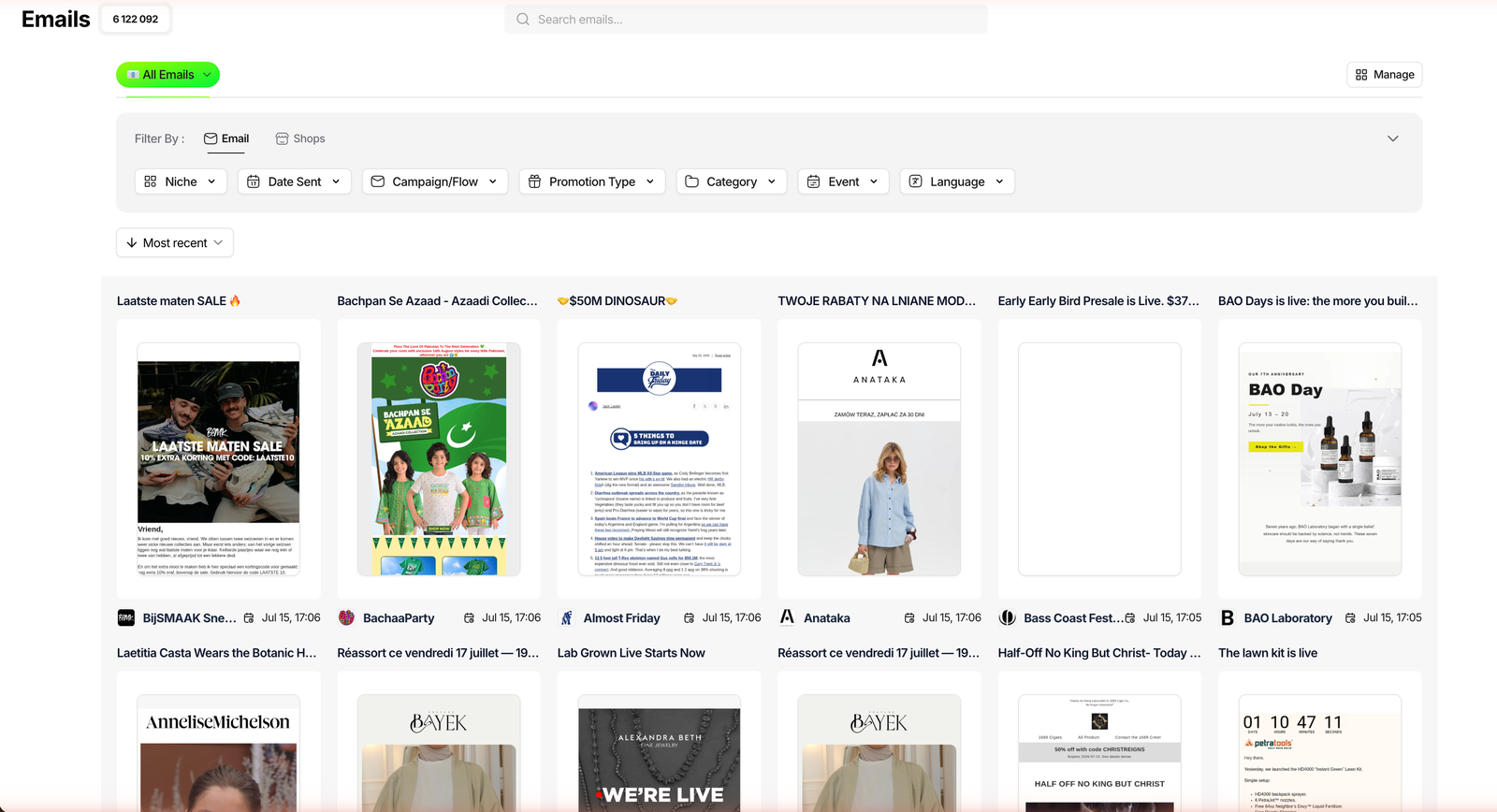
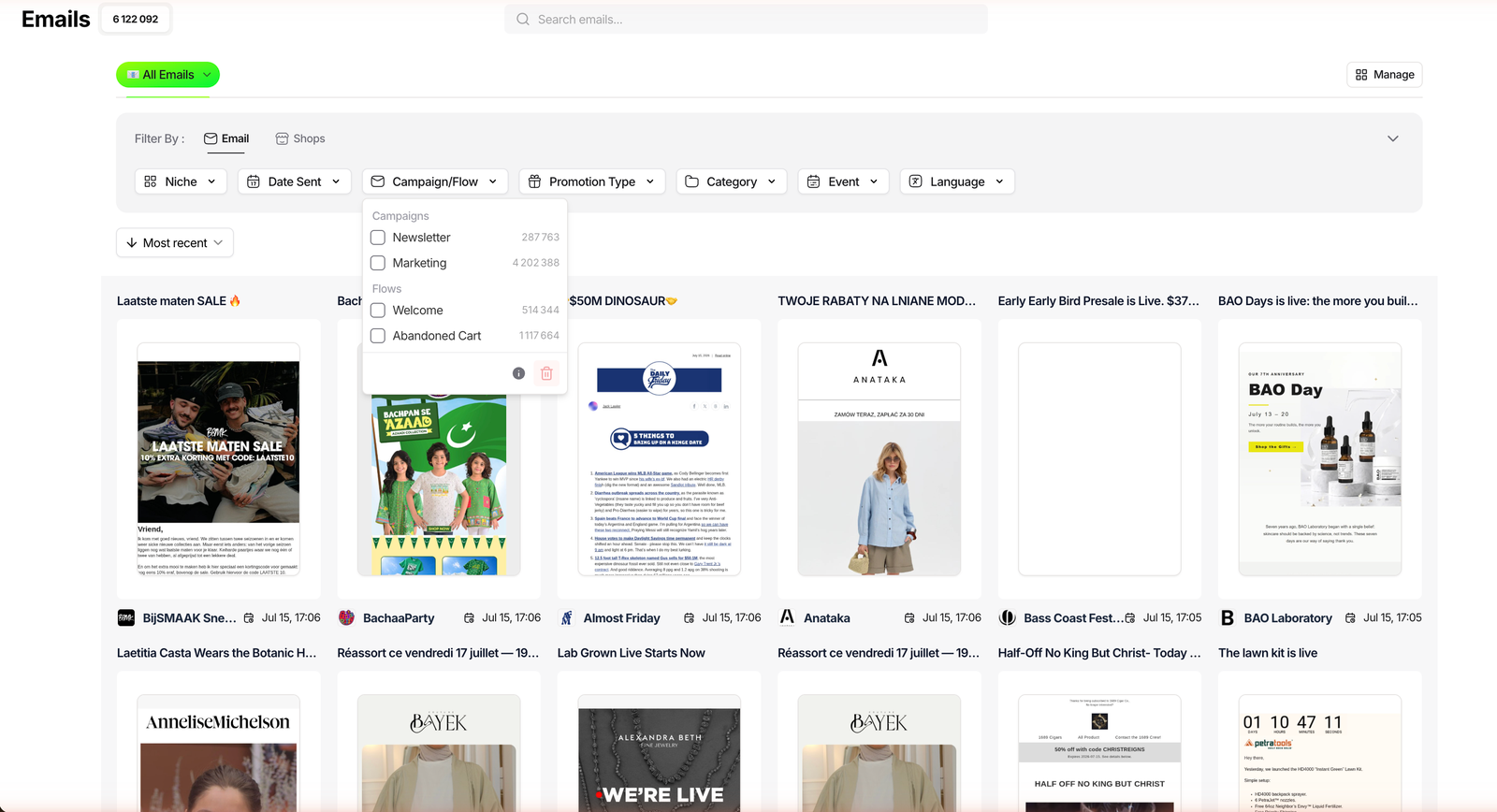
The volume is the point. The library separates one-off campaigns (Marketing sits above 4.1M emails, Newsletter around 285,000) from automated flows, which is where the reusable structure lives.
On top of that split, every email carries a Category tag for the job it does. There are seven: Event, Launch, Product, Promotional, Relational Campaign, Survey and Win-back, so you can ask for Win-back emails in beauty and get a shortlist instead of a firehose.
TrendTrack Emails module, counters checked July 2026.
Those flow numbers matter more than the headline total. A million real abandoned-cart emails is a structural map of how stores recover a sale, and you can read it without touching your own send reputation. The headline count grows every week, so treat any figure here as a floor, not a ceiling.
Three ways operators use the swipe file
The module is the same for everyone. What changes is the job you bring to it. Here are the three we run most often on a paid account.
If you are hunting for offer angles
New stores often have a product but no pitch. Filter Category to Promotional, add your niche, and you get hundreds of live discount emails from stores already selling something adjacent.
You are not copying the design, you are reading the angle: what they discount, how they frame urgency, which benefit leads the subject line. Screenshot the three or four subject lines that keep reappearing in your niche, because a pattern across many senders beats any single clever line. That is faster than inventing offers from a blank page.
If you are rebuilding your email flows
This is where the flow tags earn their keep. Pull the Welcome flow (513,810 emails) to see how stores introduce themselves, then the Abandoned Cart flow (1,117,339 emails) to map recovery sequences step by step.
Read ten of each in your niche and the pattern gets obvious: email one sells the brand, email two handles the objection, email three drops the code. Watch the timing too: the gap between the trigger and each send, and how the discount deepens across the sequence.
Rebuild yours in the ESP most Shopify brands send from with a proven skeleton instead of a hunch. Timing and discount depth are exactly what stores get wrong from a blank flow.
If you are mapping a competitor’s promo calendar
The Event filter carries roughly twenty seasonal moments, each with its own counter: Black Friday (128,916), Christmas (159,580), Flash Sale (159,716), Cyber Monday (29,618) and more.
Filter to a single event and sort by date, and you can see when brands start warming their list, how deep the discounts run, and how long the push lasts. Do it for last year’s Black Friday and you get a week-by-week template for this year’s, from the first teaser to the final “last chance” send. That is a calendar you can plan against months ahead.
How to pull the swipe file, filter by filter
The workflow is short once you stop scrolling the feed and start treating it as a query. Four moves.
Open the Emails module
From the workspace sidebar, open the Emails module. It loads sorted by Most recent, so the first screen is already a live feed of what stores mailed today.
Filter to the emails that matter
The left panel is the whole game. Set Campaign/Flow to isolate automated sequences, add Category for the job the email does, and layer Event for seasonal pushes.
Read the subject line, copy and offer
Open any preview to study the three things worth copying: the subject line that earned the open, the body structure, and the exact offer. Note the discount depth and the call to action, not the colors.
Save what you will reuse
Screenshot the sequences you want to model, or cross into a single store’s profile to see its emails alongside its ads. Group them by the job they do, welcome, recovery, launch, so the file mirrors the flows you are actually building. A swipe file only pays off if you can find the example again when you sit down to write.
| Filter | What it does | Example value |
|---|---|---|
| Campaign/Flow | Split one-off campaigns from automated flows | Abandoned Cart 1,117,339 |
| Category | Sort by the job the email does | Promotional, Win-back, Launch |
| Event | Isolate a seasonal moment | Black Friday 128,916 |
| Niche | Same 17 store categories as Shops | Beauty, Fashion, Home |
| Date Sent | Window results by send date | Last 7 or 30 days |
| Shops (cross-filter) | Restrict to a store profile | Any tracked store |
Related guide
Brandtracker Tutorial: Track a Store’s Ads, Tests, Emails & LPs
Follow one competitor’s emails, ads and landing pages in a single feed.
Where the email swipe file stops
The module is an inspiration and structure tool, not an analytics suite. Be honest about the gap before you lean on it.
You see what was sent, not how it performed. There are no open rates, no click rates and no verified send frequency attached to a preview, and nothing tells you whether an email actually landed in the inbox or the spam folder. A subject line that appears often is popular with senders, which is a signal, but it is not a measured win.
Workaround: to read one competitor’s full email cadence in context, open that store in the Brandtracker and use its Emails tab. You lose the cross-store breadth but gain a single brand’s sequence next to its ads and landing pages.
Used that way, the swipe file feeds ideas and the Brandtracker confirms which brands actually keep sending them.
FAQ
What is an email marketing swipe file?
A curated collection of real marketing emails you keep for reference and inspiration. Instead of guessing subject lines or offers, you study what live stores actually send. TrendTrack turns this into a searchable database of 6M+ competitor emails, filterable by flow, campaign type and seasonal event, so you build a swipe file without subscribing to a single newsletter.
Can you see a competitor’s abandoned cart emails?
Yes, and the Abandoned Cart flow alone holds over 1.1M captured emails as of July 2026. Filter Campaign/Flow to Abandoned Cart, pick a niche or store, and read the exact recovery sequence: subject lines, discount size and timing. The Welcome flow (513,810 emails) works the same way.
Do you have to subscribe to a store to read its emails?
No. Since March 2026, TrendTrack captures competitor emails without burner subscriptions, so you are not flooding a throwaway inbox to collect them. You open the Emails module, filter, and read previews of emails that were already sent, dated and attributed to the sending store.
Which plan unlocks the Emails module?
Every plan includes the Emails module, but Starter ($59/mo) caps you at 30 mail credits. Pro ($89/mo, or $62/mo billed annually) and Business ($149/mo) give unlimited email views. If you plan to browse the swipe file daily, Pro is the realistic floor.
The bottom line
The Emails module is the quiet workhorse of TrendTrack: a 6M+ swipe file that saves you from writing flows blind. It is strongest for operators rebuilding sequences and planning promo calendars, and lighter if you only wanted send analytics. For how it fits the rest of the toolkit, see our full TrendTrack review.
Stop guessing subject lines.
Read what live stores actually send. The Emails module ships on every plan, with unlimited views on Pro ($89/mo, or $62/mo annually) and the free Chrome extension to start.