
Last verified July 15, 2026. Filters and counters checked inside a paid TrendTrack account.
Open the Shops filters and most sellers reach for the obvious ones: niche, traffic, best-seller price. Then they stop.
The two filters that actually separate a real brand from a here-today dropshipper sit further down the list. One reads a store’s ad tracking stack. The other reads its reputation. The 15 filters around them, and the modules they sit in, are mapped in what TrendTrack actually is.
They are the Pixels filter and the Trustpilot filter, and we ran both on a paid account inside TrendTrack’s Shops module. Here is what they show and how to drive them.
TrendTrack’s Shops module screens its 1.87M-store index by the exact ad pixels a store runs and by its Trustpilot rating. Set any of 11 pixels to Include or Exclude, filter by star score (1 to 5) and review count, and read a competitor’s tracking stack in seconds. Available from Starter.
Disclosure: some links on this page are affiliate links. If you subscribe through them we may earn a commission at no extra cost to you. We tested every TrendTrack feature mentioned here on a paid account.
What the Pixels and Trustpilot filters actually reveal
These are two of the 17 filters in the Shops module. If you want the whole panel, start with the full Shops database tutorial, then come back for these two specialist screens.
The Pixels filter is a lookup on a store’s tracking scripts. A pixel is the snippet a platform drops on a site to measure conversions, so the pixels a store carries tell you which ad channels it actually runs.
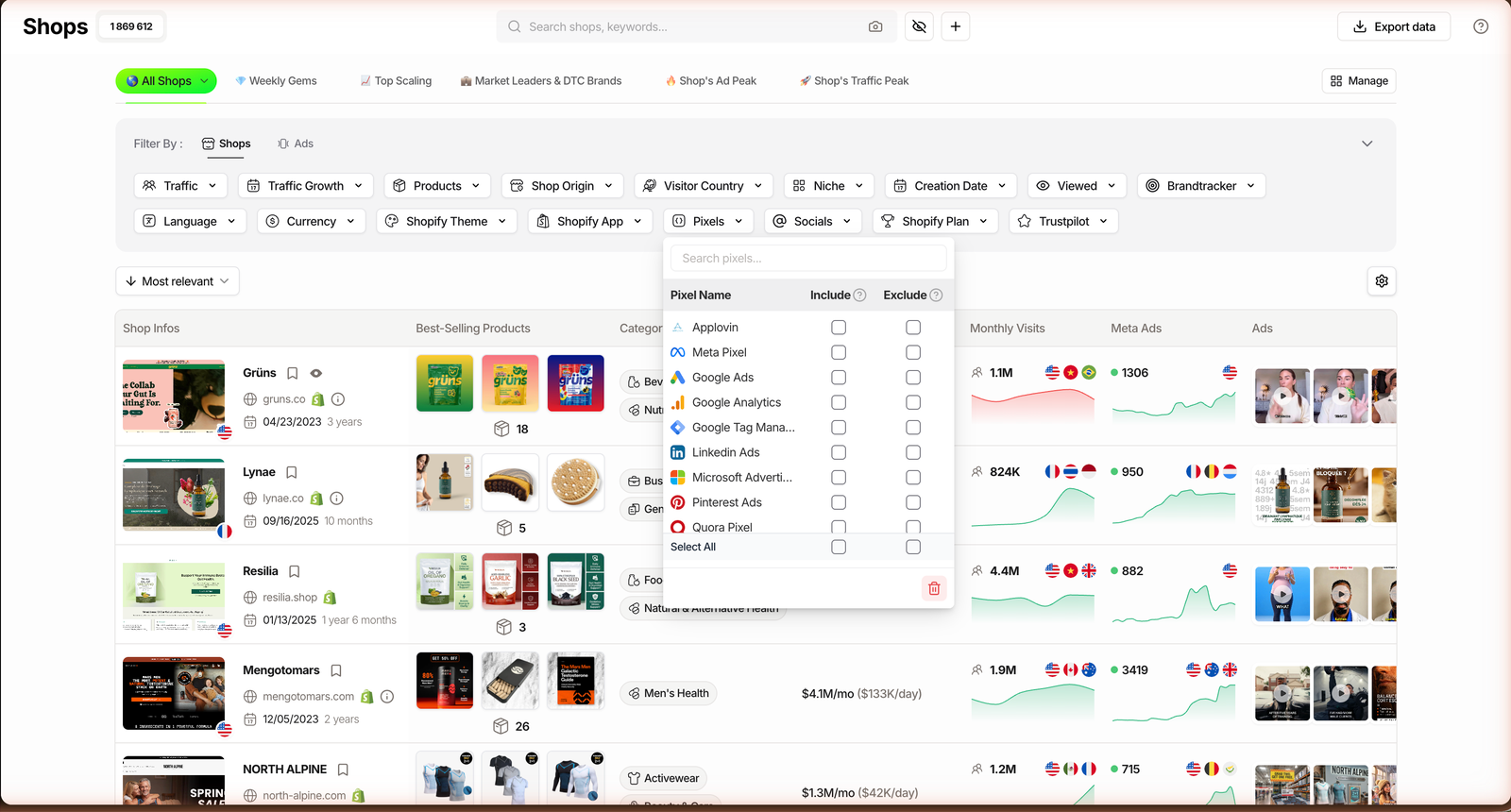
You get 11 pixels to Include or Exclude: Applovin, Meta, Google Ads, Google Analytics, Google Tag Manager, LinkedIn, Microsoft, Pinterest, Quora, Snap and TikTok.
Read that list like a map of a store’s paid channels. Here is what each one signals.
| Pixel | What it signals about the store |
|---|---|
| Meta | Runs Facebook and Instagram ads |
| TikTok | Runs TikTok ads or a TikTok Shop |
| Google Ads | Runs Google Search, Shopping or YouTube ads |
| Google Analytics + GTM | A mature measurement and tag setup |
| Tests Pinterest ads, often decor, fashion, DIY | |
| Snap | Runs Snapchat ads, skews younger |
| Applovin | Uses mobile and app-install ad networks |
| Microsoft | Runs Bing and Microsoft Advertising |
| LinkedIn / Quora | Niche or B2B traffic tests, rare for DTC |
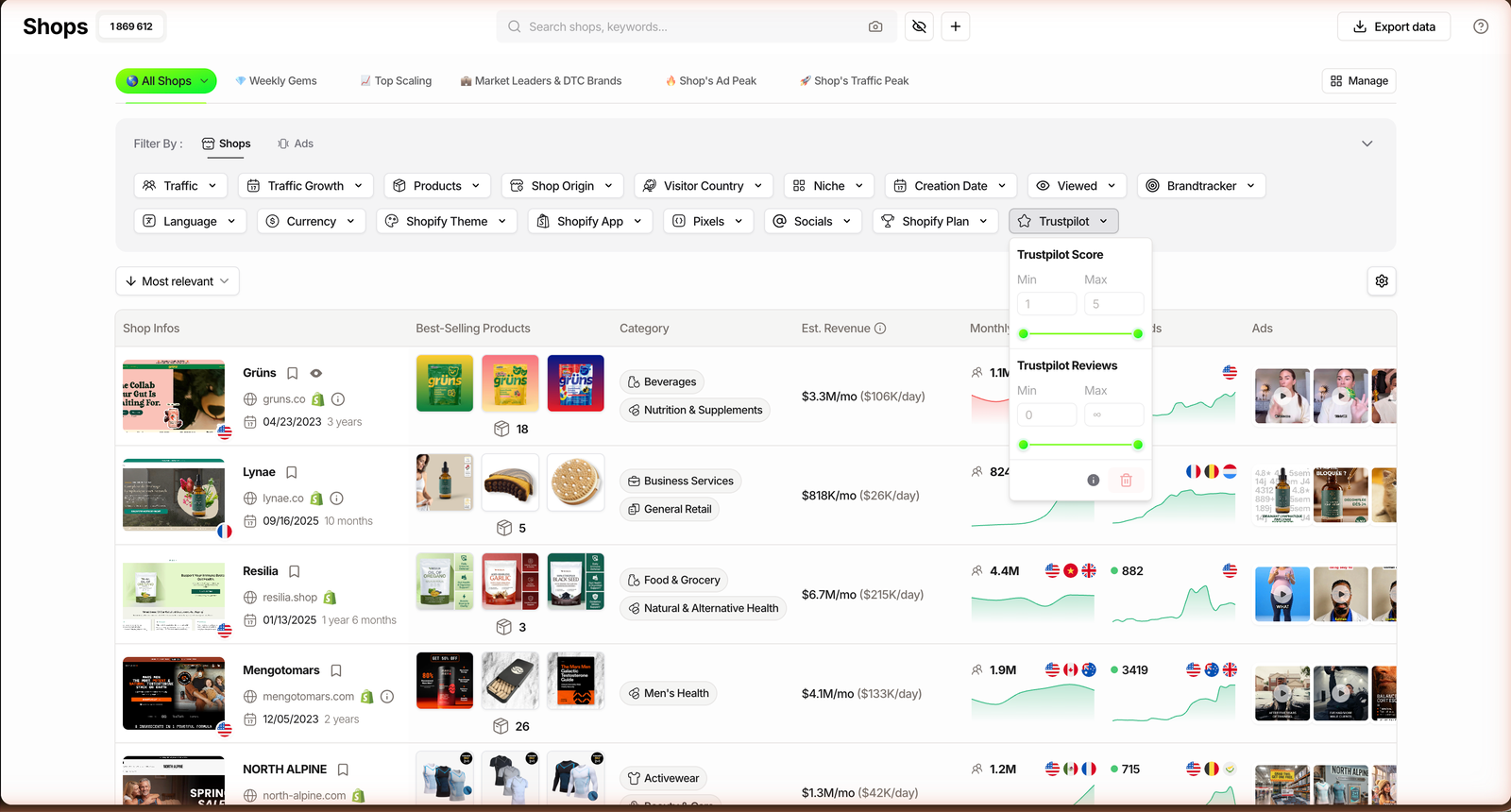
The Trustpilot filter works the other way. It screens by star score, from 1 to 5, plus a minimum and maximum review count, so you can demand both a good rating and enough reviews to trust it.
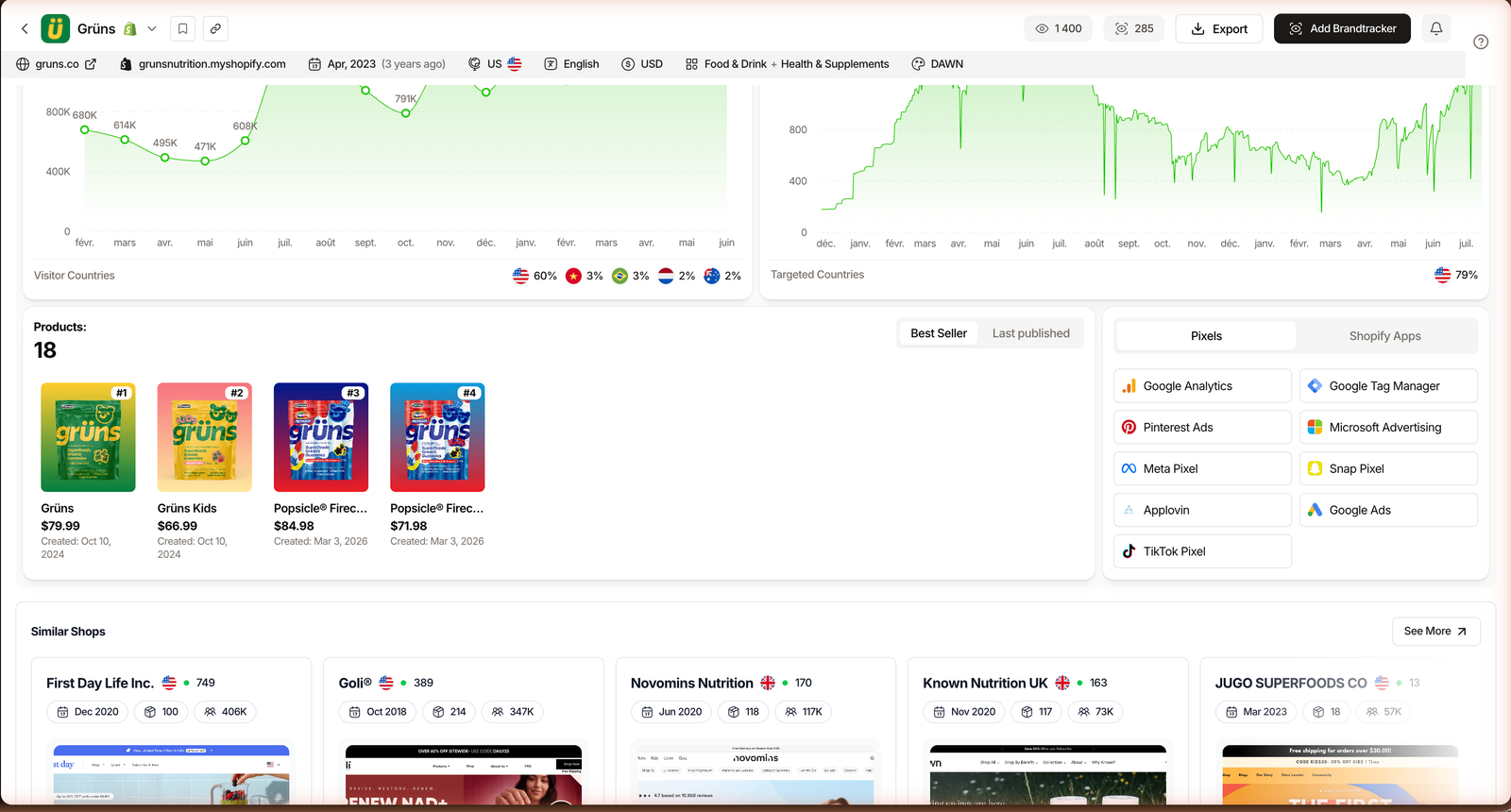
That pairing matters. A 4.9 built on 6 reviews is noise; a 4.4 across 3,000 reviews is a real brand. The score comes straight from Trustpilot, and each store’s Shop Analytics page shows its score and review count too.
How to filter Shopify stores by pixels and Trustpilot, step by step
The workflow is three moves: open the module, add the Pixels filter, then layer Trustpilot on top. Here it is at a glance, then in detail.
Step 1: Open the Shops module
From the sidebar, open Shops. The filter panel groups the 17 store filters, with Pixels and Trustpilot near the bottom of the list.
Plan check: the Shops module and all 17 filters, Pixels and Trustpilot included, are on every plan from Starter up, at $59/mo (or $42/mo billed annually). Starter has included unlimited shops since January 2026. The Ads and Advertisers modules are what start on Pro, not store research.
Step 2: Add the Pixels filter (Include / Exclude)
Open Pixels and you get the 11 platforms, each with an Include and an Exclude toggle. Include narrows results to stores that carry that pixel; Exclude removes them.
Combine the two. Set Meta to Include to keep only Facebook and Instagram advertisers, or set Meta to Exclude and TikTok to Include to isolate stores betting on TikTok instead. That single move already reshapes the whole result set.
Step 3: Layer the Trustpilot score and review count
Now open Trustpilot and set a floor. A score of 4 and up with 100 or more reviews is a solid “real brand” threshold; drop the floor to surface weaker or newer stores.
The two filters stack, so you are now looking at stores that both run a given ad channel and carry the reputation you asked for. Sort by monthly visits and the shortlist writes itself.
Three ways to use it
The same two filters do very different jobs depending on what you are hunting. Three recipes we actually run:
| Goal | Filter combo | What it surfaces |
|---|---|---|
| Model real brands | Meta Include + Trustpilot 4+ with 100+ reviews | Established Meta advertisers worth studying |
| Find TikTok-first rivals | TikTok Include + Meta Exclude, sort by visits | Stores scaling on TikTok without a Facebook pixel |
| Screen out low trust | Trustpilot under 2, or exclude 0-review stores | Thin dropshippers to skip when sourcing |
Recipe one is the daily driver. Include the Meta pixel, demand a real Trustpilot score, add your niche, and you can screen the full 1.87M-store index down to a handful of proven brands to model.
Once a store passes that screen, the natural next step is its ads. Knowing it runs Meta is one thing; seeing the exact creatives and how long they have run is where the real intel lives.
Related guide
Ads Library Tutorial: Spy 337M Meta, TikTok & Google Ads
Once you know a store’s pixels, pull its live ads and copy.
Recipe two flips the pixel logic to find TikTok-native competitors, the ones a Facebook-only search would never show you. Set TikTok to Include and Meta to Exclude, then confirm the live ads on each store.
Recipe three is defensive. When you are sourcing or vetting a niche, a Trustpilot floor near zero surfaces the thin, low-rated stores so you can steer clear rather than copy them.
The limits (and the workaround)
Pixel detection reads what TrendTrack crawled. A brand-new pixel or a server-side setup can slip through, so treat the filter as a strong signal, not a legal audit.
Trustpilot has its own blind spot. A missing score usually means a younger store that has not collected reviews yet, not a bad one, so do not let an empty rating alone knock a store out.
What the filters nail
- Which ad channels a store actually runs
- Reputation weighted by review volume
- Include and Exclude in one pass
Where to double-check
- Server-side or brand-new pixels can be missed
- No Trustpilot score is not a red flag alone
- Filters sort stores, not product quality
The workaround is to cross-read. Pair these filters with monthly visits and the estimated revenue column, then open Shop Analytics to see the detected pixels and apps in context. Est. Revenue and traffic are estimated, so treat them as directional, not audited.
FAQ
What does the Pixels filter in TrendTrack actually detect?
It detects which ad and analytics pixels a Shopify store has installed, across 11 options: Applovin, Meta, Google Ads, Google Analytics, Google Tag Manager, LinkedIn, Microsoft, Pinterest, Quora, Snap and TikTok. Each can be set to Include or Exclude. A Meta pixel signals the store runs Facebook and Instagram ads; a TikTok pixel signals TikTok ads or TikTok Shop. It reads what TrendTrack crawled, so treat it as a strong signal, not a legal audit.
Can I check any Shopify store’s Trustpilot score in TrendTrack?
Yes, within the indexed stores. The Trustpilot filter screens by star score (1 to 5) and by minimum review count, and each store’s Shop Analytics page shows its score and number of reviews. A high score backed by hundreds of reviews points to an established brand; a missing score often just means a younger store, not a bad one.
Do I need a paid plan to filter by pixels and Trustpilot?
No upgrade beyond the entry plan. The Shops module and all 17 filters, including Pixels and Trustpilot, are available from Starter ($59/mo, or $42/mo billed annually), which has included unlimited shops since January 2026. The Ads and Advertisers modules are what start on Pro, not store research.
How do I find competitors that only run TikTok ads?
In the Shops module, open the Pixels filter, set TikTok to Include and Meta to Exclude, then sort by monthly visits. That surfaces stores tracking TikTok conversions without a Facebook pixel, a rough proxy for TikTok-first advertisers. Layer a niche and a traffic floor to tighten the list, then open a store to confirm its live ads. Our hands-on TrendTrack review tests the rest of the suite the same way.
Read any store’s tracking stack before you model it.
Filter 1.87M stores by 11 pixels and Trustpilot score from Starter ($59/mo, $42/mo annually). Start with the free Chrome extension and a free trial, no ad-spy plan required.