Last verified July 15, 2026. Every step below was checked against the live Facebook Ad Library and a paid TrendTrack account.
The Facebook Ad Library is Meta’s free, public archive of the ads running across Facebook and Instagram. Anyone can open it, type a brand, and see every ad that brand is running right now, no account and no cost.
That is the whole promise, and it is a genuinely useful one for competitor research. This guide walks the full tool, every filter, and exactly what each ad card reveals. Then it shows where the free tool stops, and what fills the gap when you need more than a list. If you want the whole ladder rather than one tool, start with the competitor ad spying guide.
The Facebook Ad Library is Meta’s free public database of active ads, at facebook.com/ads/library. Search any advertiser or keyword to see the ads they run across Facebook, Instagram, Messenger and the Audience Network, filtered by country, category and format. No login needed to browse.
Disclosure: some links on this page are affiliate links. If you subscribe through them we may earn a commission at no extra cost to you. We tested every TrendTrack feature mentioned here on a paid account.
Free, no login
What is the Facebook Ad Library, exactly?
Meta built the Ad Library to comply with ad disclosure rules. Every advertiser running ads on Facebook or Instagram has its live creatives listed here, open to anyone who wants to look.
It started as a political transparency tool and quietly grew into the biggest free ad archive on the internet. Marketers, journalists and ecommerce operators now use it for very different jobs off the same database.
You do not need a Facebook account to browse it, and it costs nothing. You type a brand or a keyword, pick a country, and you get the ads that advertiser is running across Meta’s surfaces right now.
Keep in mind: for a normal commercial ad you see the creative and its start date, never the spend. Budget and audience numbers show only for ads about social issues, elections or politics.
One naming thing trips people up. Meta renamed Facebook to its parent brand, so you will see it called both the Facebook Ad Library and the Meta Ad Library. Same tool, same URL, same database.
If you searched either name, this is the page you wanted. It is also the Meta counterpart to the Google side of the same job, so serious competitor research usually means checking both platforms rather than assuming one covers the whole market.
That split is the honest caveat before you lean on it. The Ad Library shows what a competitor runs and when they started, but for an ecommerce store you get the what, not the how much. Reading it well is mostly about knowing which questions it can actually answer.
How do you search the Facebook Ad Library?
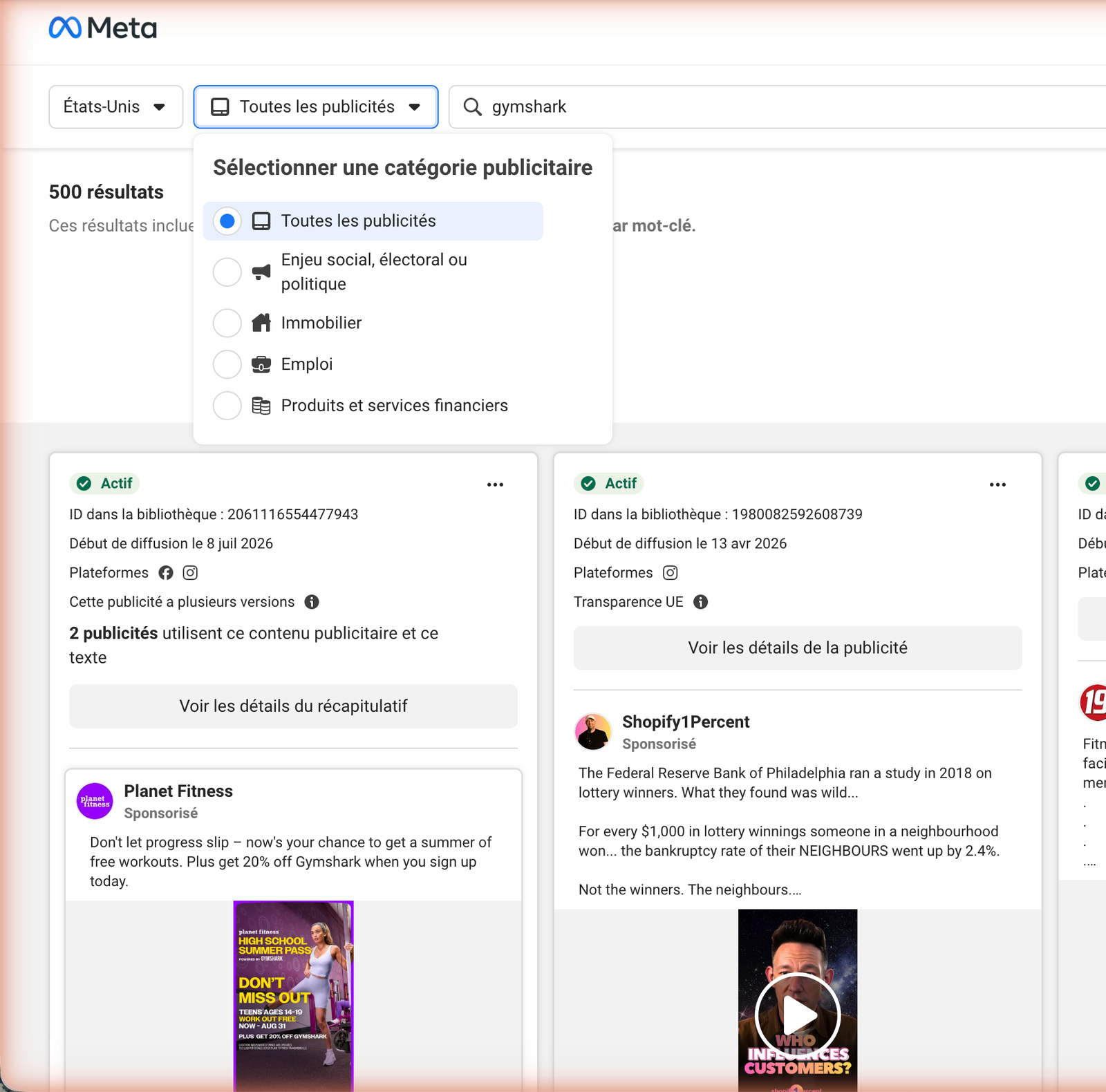
The mechanics take about two minutes to learn, and most of the skill is in choosing the right country and category before you read a single ad.
Search by keyword or by advertiser
You have two ways in. Search by advertiser to pull up everything one brand is running, which is what you want when you already know your competitor. Search by keyword to see every advertiser using a word or phrase, which is how you scout a product angle across the market.
Advertiser search is precise. Keyword search is broad, and it returns a wall of ads from anyone touching that term, so treat it as a starting net rather than a clean list.
A practical habit: start with a keyword to map who is active in your niche, then switch to advertiser search on the two or three names worth studying. The keyword pass tells you the field, the advertiser pass tells you the players.
Pick your country and ad category
The Ad Library always runs inside one country at a time. A US seller studying US demand does not want a competitor’s German ads muddying the results, so set the country first.
Then choose the ad category. “All ads” covers commercial creatives. The separate issues, elections or politics category is the only one that unlocks spend and impression ranges, which is why political researchers and ecommerce operators use the same tool very differently.
For product research you will live in “All ads” the whole time. Just know that the empty spend fields you see there are a category limit, not a sign your competitor is spending nothing. Absence in the Ad Library is almost always a question, not an answer.
What filters does the Facebook Ad Library have?
Once you are inside an advertiser or a keyword, a row of filters narrows the results. None of them rank ads for you, but the right combination cuts a messy result set down to what matters.
| Filter | What it does | Note |
|---|---|---|
| Country | Limits results to one market | Set this first, always |
| Ad category | All ads, or issues / elections / politics | Politics unlocks spend |
| Platform | Facebook, Instagram, Messenger, Audience Net | Isolate one surface |
| Media type | Image, video, meme or no image | Filter to video for hooks |
| Active status | Active or inactive ads | Active means running now |
| Language | Narrows by ad language | Useful in mixed markets |
In practice, two filters do most of the work. Country keeps you honest about which market you are reading, and media type set to video pulls the creatives where the real hooks live. The rest are trims.
What can you see on each ad?
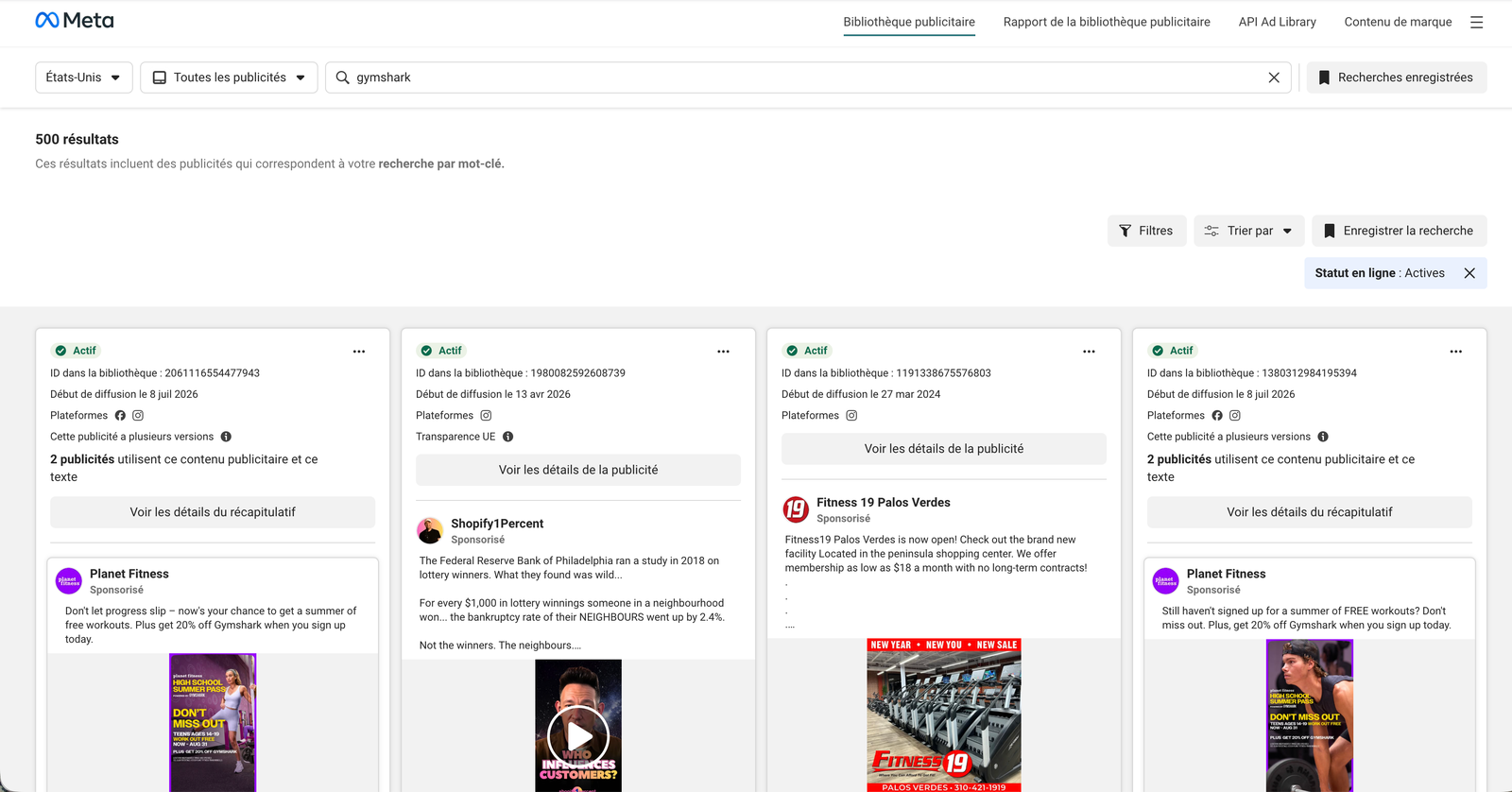
Open any card and the Ad Library gives you a consistent block of information. It is shallower than a paid tool, but everything it shows is straight from Meta.
Each ad shows the full creative, the caption, the destination, and the line that matters most for spy work: “Started running on [date]”. You also see the platforms it ran on, and a note when an ad has multiple versions behind one creative.
That multiple-versions flag is a quiet tell. When a brand runs one concept across five variations, it is A/B testing copy or thumbnails, which means the concept is working hard enough to be worth optimizing. A single lonely creative is often a test that never earned a follow-up.
Click through to the destination too. The Ad Library sends you to the exact landing page a competitor drives traffic to, which is a free look at their offer, their price point and their checkout flow. Reading the ad and the page it points to together tells you far more than the creative alone.
There is one real data point hiding in there. Because of EU transparency rules, ads shown in the European Union display total EU reach and a per-country breakdown, even for non-political commercial ads.
If your competitor advertises in the EU, that reach figure is the closest thing to a spend proxy the free tool gives you. Outside the EU, most commercial cards show no reach at all, which is the single biggest blind spot for a US-only seller reading US ads.
What the Facebook Ad Library does not show you
The free tool is honest about what it is: a disclosure archive, not a competitive intelligence platform. Four gaps show up the moment you use it for weekly research rather than a one-off look.
The two that hurt most are spend and winners. Outside the EU you cannot tell a $500 test from a $50,000 campaign, and nothing marks the creative that is actually carrying the budget. You are left guessing which of twenty live ads matters.
The tool also cannot hand you a competitor you have not already named, so discovery is entirely on you. If finding unknown players is the goal, you eventually want something that can rank Facebook pages by ad activity instead of waiting for you to type a name you might not know yet.
| What you want to see | In the Ad Library |
|---|---|
| The actual creatives a brand runs | Yes |
| When each ad started running | Yes |
| Reach on non-political ads | Limited (EU only) |
| US spend on commercial ads | No |
| Which ad is actually winning | No |
| A sort by how long an ad has run | No |
| Competitors you do not already know | No |
Then there is history. The Ad Library is a snapshot of what is live, with no timeline of how long an ad has run or when a brand ramped a test. Once an ad stops, it drops out of your view, and the story of how a campaign built over weeks is gone.
Keyword search has the same shallow feel. It is useful for casting a net, but it returns everything using a word, with no way to sort the survivors from the flops.
None of this makes the tool bad. It makes it free, and free tools are built to disclose, not to strategize.
Reading one competitor end to end
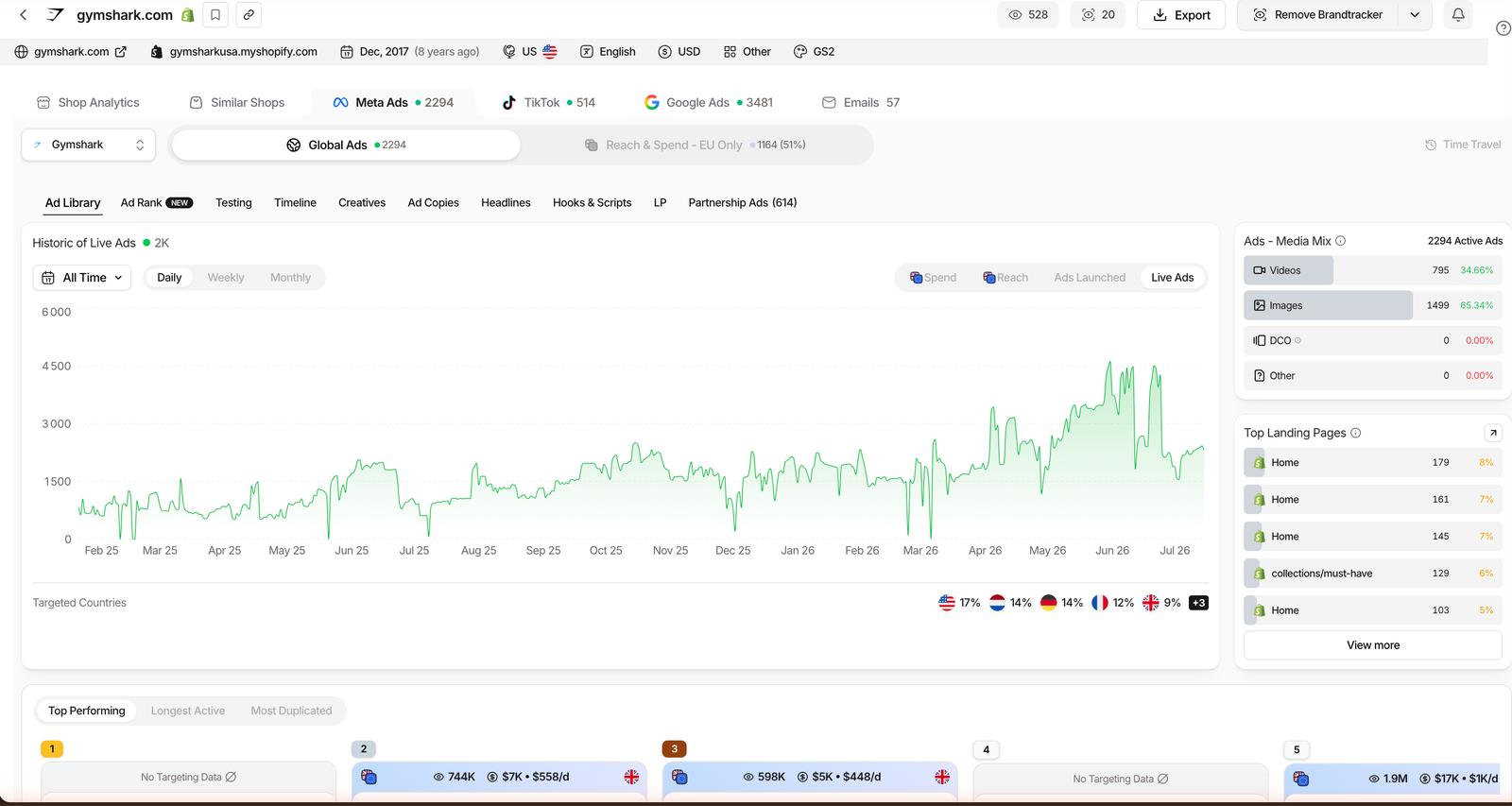
To show what those gaps cost in practice, here is one competitor run all the way through. We did this on a paid TrendTrack account, which indexes Meta, TikTok and Google ads on top of the same public data the Ad Library draws from.
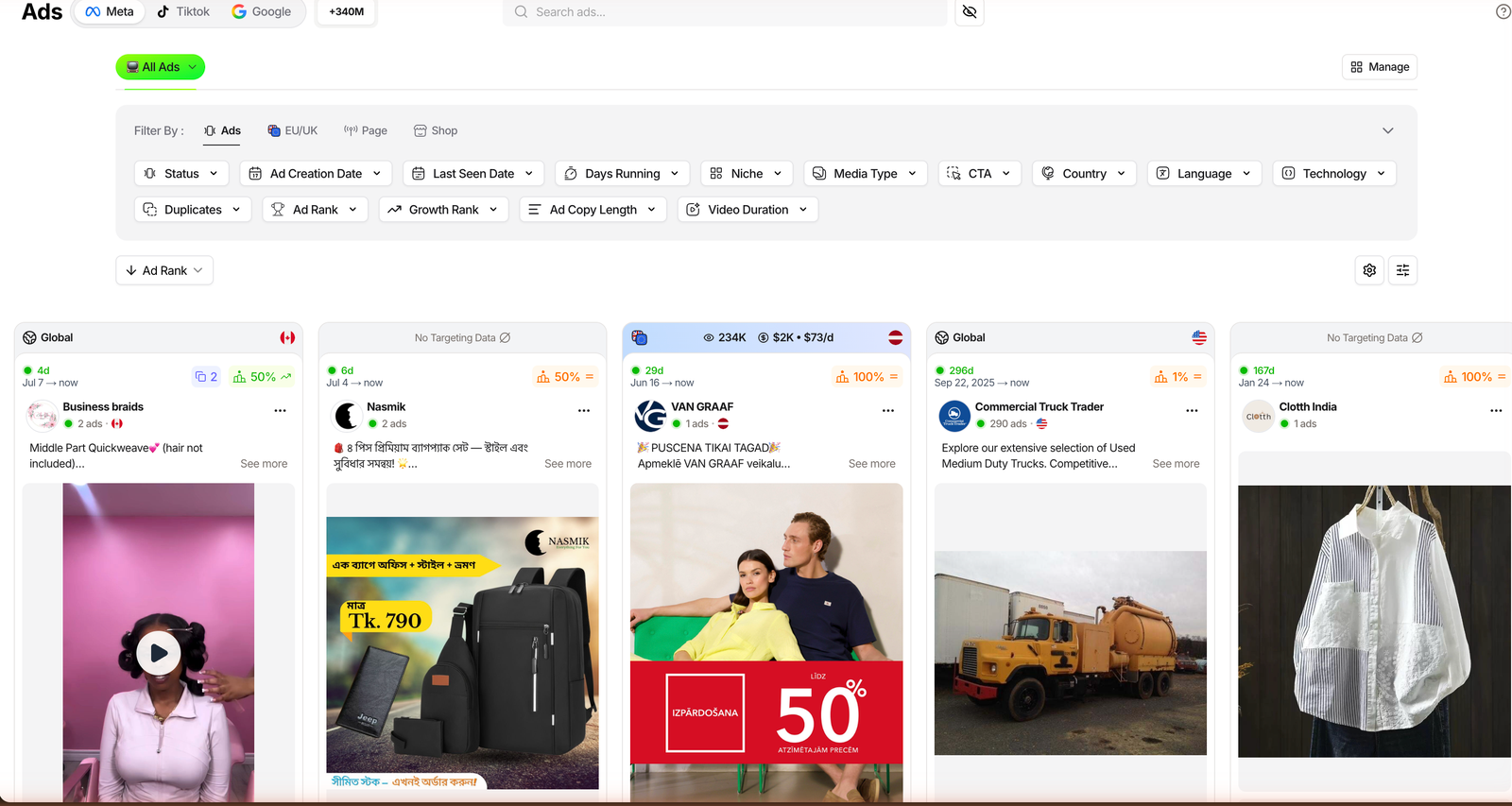
Start where the Ad Library leaves off: which ad is winning. Instead of a flat list, the Meta ads sort by Ad Rank, a ranking that floats the creatives most likely to be scaling to the top. In two clicks you are looking at the ad a brand probably puts most of its budget behind, not the eighteen tests around it.
This is the gap that matters most. A brand might have twenty live creatives and put 80% of its budget behind two of them, and in the free Ad Library those two look identical to the eighteen tests around them. Ranking is what separates the ad you should model from the noise.
Related guide
Ads Library Tutorial: Spy 337M Meta, TikTok & Google Ads
The full step-by-step on the Ads module, across all three platforms.
Next, the money question the Ad Library dodges. TrendTrack’s Meta Ads module reads estimated spend from the same EU and UK reach the free tool shows, then converts it with a configurable CPM. It is a firm signal on Meta and a directional one elsewhere, but it turns “they run ads” into “their budget looks roughly like this.” Keep in mind that number is an estimate, not audited spend.
Plan check: the Ads and Advertisers modules start on Pro ($89/mo). Starter ($59) covers the Shops database, two Brandtrackers and the free extension, but not ad spy.
Last, the part the Ad Library never touches: history and hooks. Track the brand and you get a timeline of every ad’s lifespan, so you can read how long a creative has survived, the single most reliable proxy for a winner.
The tracker even transcribes competitor video ads, so you can study the exact hook someone opens with instead of squinting at a muted clip. Put the three steps together and one afternoon gives you the winner, a spend estimate and the script, none of which the free tool would have handed you.
See it on a free TrendTrack account
When the free Ad Library is all you need
None of this means you should skip the Facebook Ad Library. For a quick check on one brand you already know, on zero budget, it is the right tool, and paying for anything else would be overkill.
The honest split is frequency and depth. Occasional lookups stay free. Weekly research, where you track budgets, discover new players and watch which ads survive, is where a paid tool starts to pay for itself.
Use the Ad Library for
- A quick look at one known brand
- Reading EU reach on a competitor
- Free, occasional research
Reach for a spy tool when
- You need the winner, not all ads
- You want US spend estimates
- You track history and discover rivals
A simple test tells you which side you are on. If you find yourself typing the same five competitors into the Ad Library every Monday, screenshotting cards into a doc, and trying to remember which ad was there last week, you have outgrown the free tool.
That manual routine is exactly the work a spy database automates, with the winner ranking and history the public tool never had. Until you hit that point, the free Ad Library is not a compromise. It is the correct choice, and reaching for anything heavier would just be paying to feel busy.
FAQ
Is the Facebook Ad Library free?
Yes. It is a free public tool at facebook.com/ads/library, with no Facebook account needed to browse. It shows ads running across Facebook, Instagram, Messenger and the Audience Network.
Is the Facebook Ad Library the same as the Meta Ad Library?
Yes. Meta renamed Facebook to its parent brand, so “Meta Ad Library” and “Facebook Ad Library” point to the same tool and the same URL. The name changed, the database did not.
Can I see how much a competitor spends on Facebook ads?
Not for regular commercial ads. Spend and impression ranges only show for ads about social issues, elections or politics. For ecommerce ad spend you need estimated data from EU and UK reach, which a third-party tool reads.
Can I search the Facebook Ad Library by keyword?
Yes, within one country and category, but the search is broad and returns every advertiser using that word, with no winner ranking or angle sort. Dedicated ad spy databases add ranking and filtering on top.
Does the Facebook Ad Library show EU ad reach?
Yes. Because of EU transparency rules, ads shown in the EU display total reach and a per-country breakdown, even for non-political ads. Outside the EU, most commercial ads show no reach or spend.
The bottom line
The Facebook Ad Library is a strong free tool, and most people underuse it. Learn the filters, lock the country, and filter to video, and you already read competitor creative better than most sellers who open it.
What it will never give you is the one thing that moves budget: which ad is winning, for how long, and who else is quietly scaling the same play. That gap is exactly where a paid spy tool begins.
Want the winning ad, not just the list?
TrendTrack ranks Meta, TikTok and Google ads, estimates competitor spend, and transcribes the hooks your rivals open with. Ad spy starts on Pro ($89/mo, or $63/mo billed annually). Starter ($59) covers Shops but not the Ads module.