
Last verified July 2026. We walked through every TikTok Creative Center section and cross-checked TrendTrack’s TikTok data on a paid account.
The same product keeps sliding past you on TikTok. Different accounts, same hook, same 15 seconds. You want to know if it is a real trend or three people chasing the same clip.
That question is exactly what TikTok Creative Center answers, and it is free. It is TikTok’s own library of the ads, sounds and hashtags that are working right now. This guide walks every section you would actually open, then shows where it stops and what picks up from there.
TikTok Creative Center is TikTok’s free trend and ad discovery hub, at ads.tiktok.com/business/creativecenter. Browse top-performing ads, trending hashtags, sounds and creators, plus keyword insights, filtered by region and industry. No ad account or budget needed.
What is TikTok Creative Center?
TikTok Creative Center is run by TikTok for Business, and it is open to anyone. You do not have to be an advertiser, and you do not have to run a single campaign to use it.
Think of it as the platform showing its own hand. Instead of guessing what performs on TikTok, you get TikTok’s read on the ads, sounds, hashtags and formats that are moving in your market. For a tiktok dropshipping seller or anyone building organic content, that is a free look at demand before you produce anything.
The hub splits into a few core areas: a Top Ads dashboard, a Trends section for hashtags, songs and creators, and a Keyword Insights tool. Each one filters by region and industry, so you read your market, not a global blur.
It is built for advertisers, but that framing is misleading. You never touch a budget to use it, and the same data that helps a media buyer helps anyone posting organic content or scouting a product. Scrolling your own For You page shows you what TikTok thinks you like. Creative Center shows you what is working across a whole industry, which is a very different question.
Is it free, and do you need a TikTok account?
Yes, it is completely free. There is no paywall and no credit card, which is why it lands in almost every roundup of free ad spy tools.
Most dashboards open without logging in at all. You can browse Top Ads, hashtags and songs as a guest. A free TikTok or TikTok for Business login unlocks the deeper views, saving ads, and some export actions, but you never pay.
The short answer: treat it as a free public library. If a section asks you to sign in, a standard TikTok account clears it at no cost.
How do you find top-performing TikTok ads?
The Top Ads dashboard is the part most people come for. It surfaces real ads that are performing well on TikTok, with their video, the brand, and performance signals attached.
The filters are where it earns its keep. Narrow by region to match your market, by industry to match your niche, and by objective if you care about conversions rather than reach. Then sort by click-through rate, likes, or 6-second view rate to push the strongest creatives to the top.
Read those metrics as ranges, not gospel. Creative Center shows performance as bands and index scores, not the advertiser’s real dashboard, so they signal “this beat most ads in its category” rather than an exact number you can bank on.
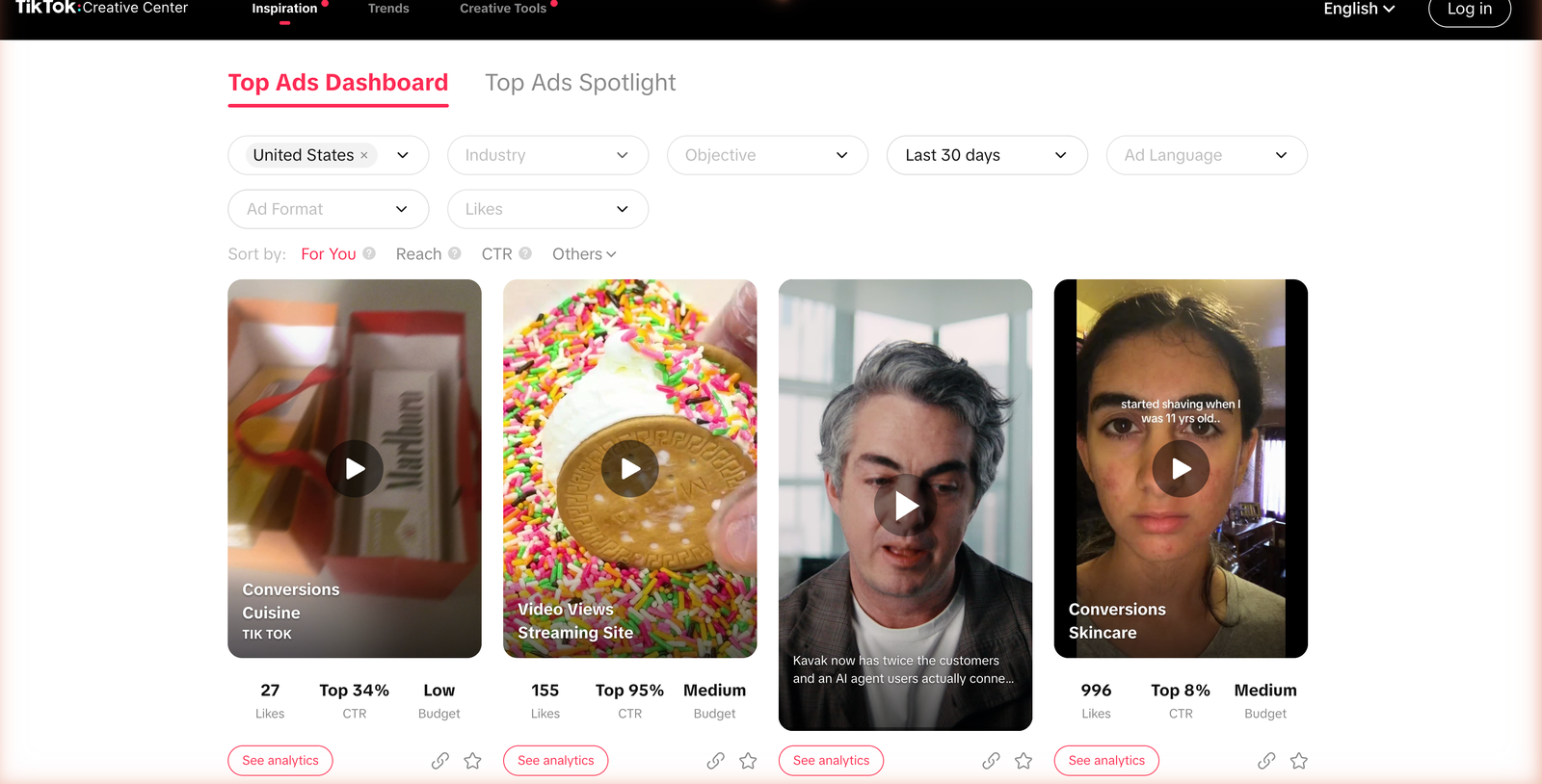
Open any card and you get more than the clip. Each top ad carries an analytics view: interaction and CTR trends over time, the audience it reached by age, gender and region, and a row of similar ads. That is a free teardown of a creative that is already working, which beats guessing at your own from scratch.
The trick is to read structure, not just watch the video. Note how the first three seconds hook, when the product appears, and where the call to action lands. Those beats repeat across winning ads in a niche, and Creative Center hands you a dozen examples to spot the pattern.
How do you read the Trends tab?
Ads are only half the story on TikTok. The Trends section covers the organic signals that decide whether a video travels: hashtags, songs and creators.
Songs
Creators
Videos
Trending Hashtags ranks tags by post volume and views, with a chart of how each one is climbing or cooling. Filter by region and industry and you see which themes are heating up in your niche, not on the app as a whole. Each tag opens to the videos using it, so you read how a theme is actually being played before you jump on it.
Trending Songs does the same for audio, which matters more than most sellers admit. Riding a sound while it is still rising is one of the cheapest ways to buy reach on TikTok. Trending Creators and Trending Videos round it out, showing who and what is breaking out versus what is already saturated.
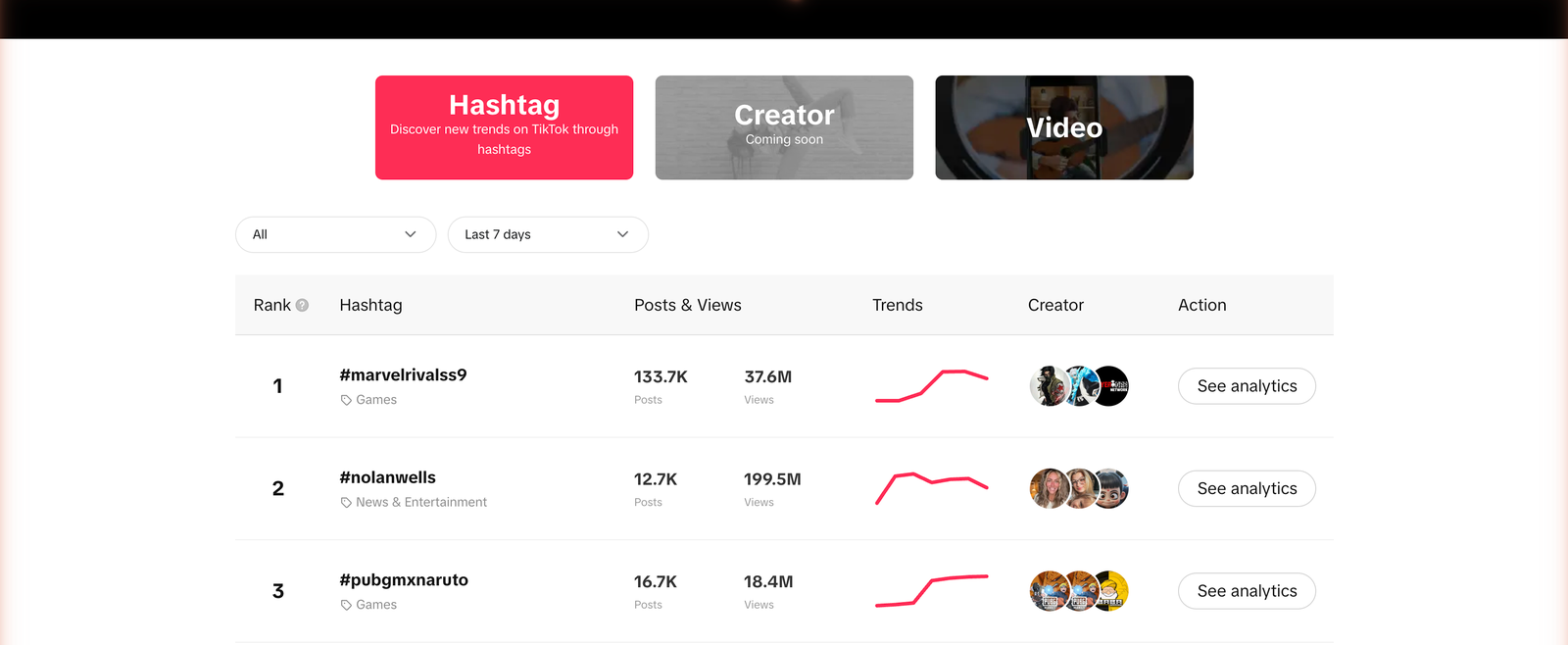
Here is what that means for your store. If a hashtag and a sound are both rising in your category, that is a window. Pair them with a proven ad angle from the Top Ads tab and you are building on three signals instead of a hunch.
How do you use Keyword Insights and Top Products?
Keyword Insights lets you search ads by the words inside them, not just by brand. Type a term and you see how much it is used in ad scripts, how it trends, and the CTR and conversion signals attached. It is the closest thing Creative Center has to searching creative by angle.
Try this: search a benefit rather than a product, like “back pain” instead of “posture corrector.” You surface the angles rivals lead with, which is usually where the click comes from, not the product name.
Some regions also surface a Popular or Top Products view, tied to what is selling and getting posted around tiktok shop. If your plan is to sell on TikTok Shop, that is a quick read on which categories have momentum before you commit stock.
Cross-reference it with the Top Ads tab and you get a fuller picture. A category that shows up in both trending products and heavily-run ads has real pull, not just a spike from one viral clip.
Used together, these tools answer three questions for free: what angle to lead with, what sound to ride, and what category is moving. That is a strong start, and for a lot of sellers it is enough.
What TikTok Creative Center will not show you
Creative Center is a genuinely good free tool, and it sits at the honest end of the best ad spy tools for TikTok. But it is built to inspire, not to investigate. A few gaps show up the moment you use it for real competitive research.
The difference is the same one that separates the facebook ad library from a proper spy tool. A native library shows you ads; it does not connect them into a story about who is winning and why. Creative Center leans even further toward inspiration, which is great for ideas and thin for research.
| What you want | In Creative Center |
|---|---|
| Top-performing ads and trends | Yes |
| The Shopify store behind an ad | No |
| One rival’s full ad history over time | No |
| A rival’s ads next to their organic posts | No |
| Meta and Google ads in the same view | TikTok only |
The core limit is that Creative Center is curated and anonymous. It shows you strong ads, but not who is behind them, not how long each has run, and not everything a single competitor is doing. It is a highlight reel, not a database you can interrogate.
That is the exact line where tiktok ad spy tools begin. If your question is “who is scaling this product, and what does their whole TikTok funnel look like,” you have outgrown the free tool.
Related guide
The best TikTok ad spy tools compared
How Creative Center stacks up against paid TikTok ad spy.
From a trending ad to the store behind it: one run in TrendTrack
Disclosure: some links on this page are affiliate links. If you subscribe through them we may earn a commission at no extra cost to you. We tested every TrendTrack feature mentioned here on a paid account.
Here is the workflow Creative Center cannot finish, run end to end on a paid TrendTrack account. Say you spotted a product ad in Top Ads and you want the store, the budget signal and the full funnel behind it.
Start in TrendTrack’s Ads module and open the TikTok tab, which shipped on June 8, 2026 next to Meta and Google. Now you can filter that same style of ad by Ad Rank, days running, or the technology behind the site, so you can screen for Shopify stores specifically.
Days running is the filter to lean on. An ad that has stayed live for weeks is spending money to stay there, which is the closest thing to a proven winner you can read from the outside. That single signal is what Creative Center never exposes.
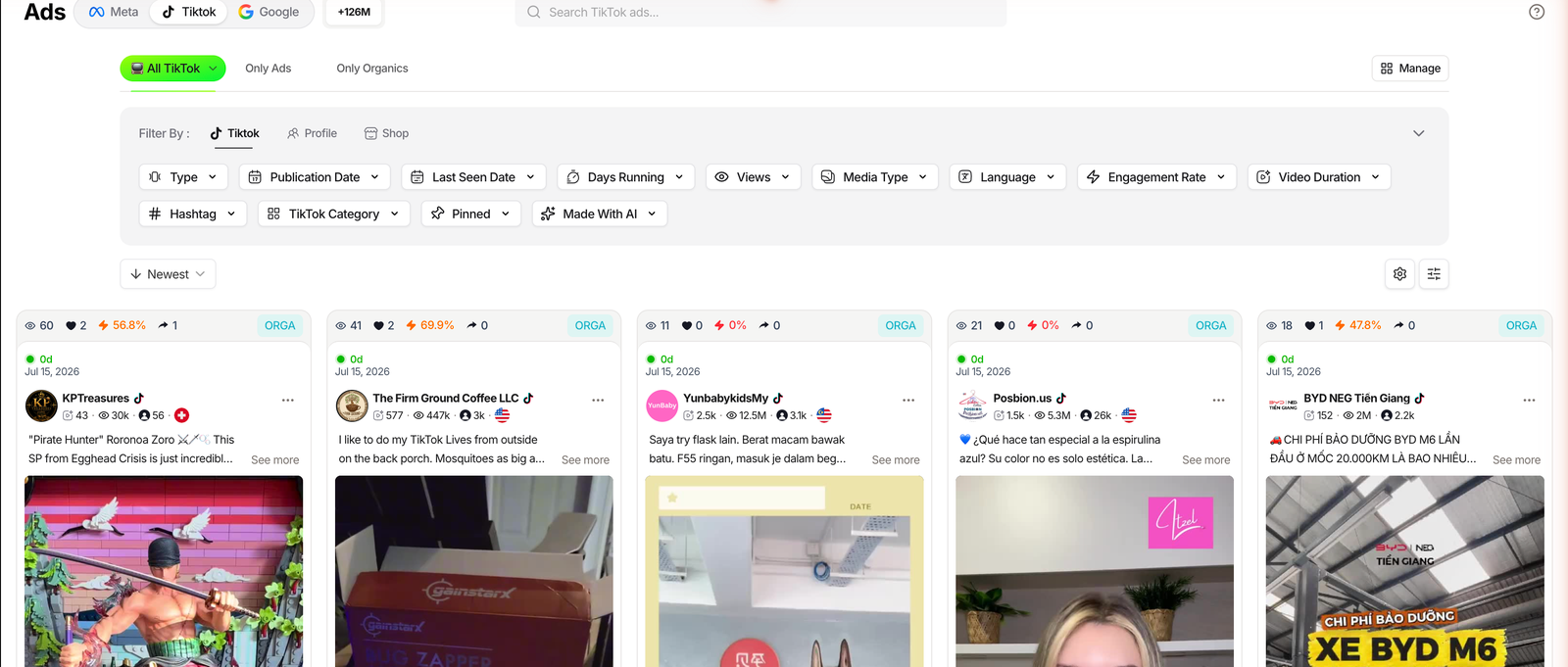
That single filter closes the biggest gap. Creative Center shows the ad; TrendTrack tells you it belongs to a Shopify store you can now open and study.
Related guide
TrendTrack Ads library, step by step
Filter TikTok, Meta and Google ads by Ad Rank and reach.
A Brandtracker follows a store’s whole funnel, not just one channel, so a single slot covers its Meta, TikTok and Google ads plus its email flows. For this run, the TikTok tab is the one that matters.
Open it and you get the view Creative Center will never give you: one competitor’s paid ads and organic posts side by side, split by share, with their Link in Bio, top hashtags and best videos ranked by views and likes. It is the difference between admiring a clip and mapping the account that posted it.
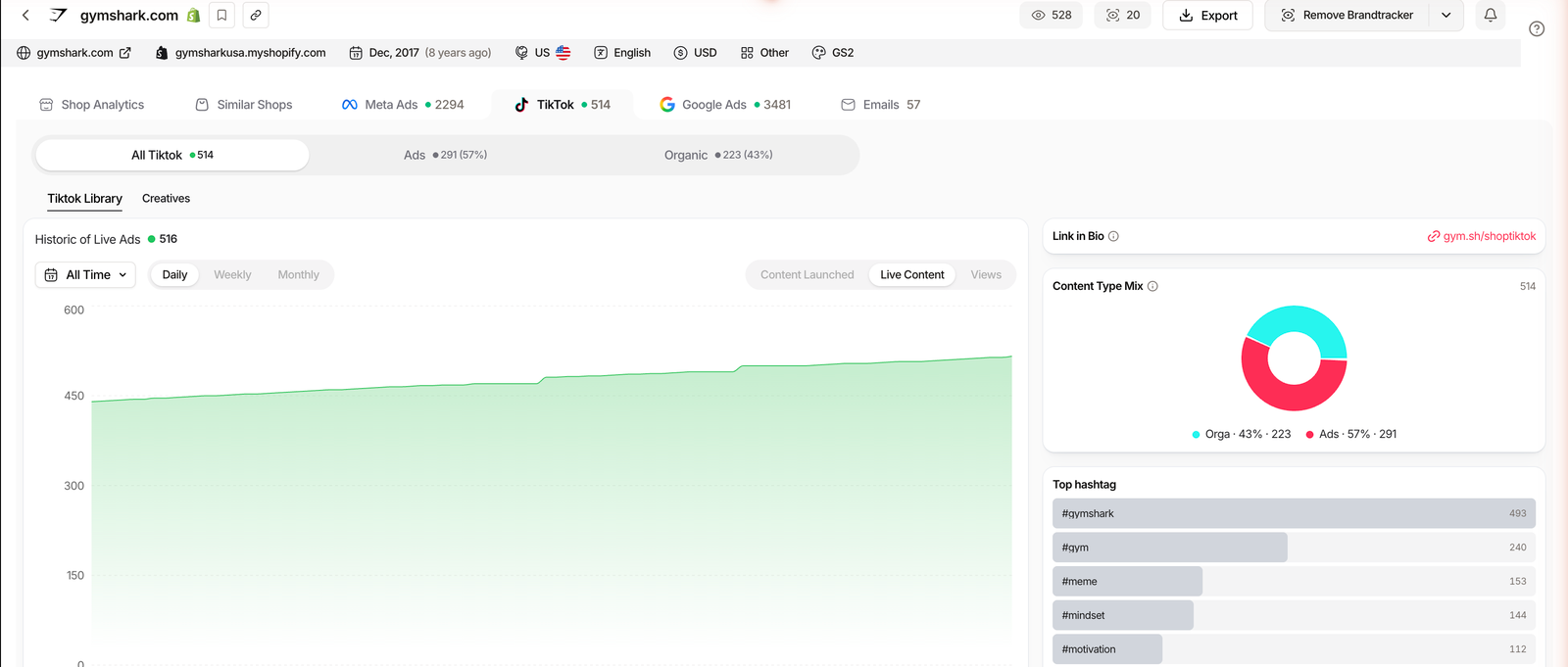
TrendTrack, checked July 2026. The 57/43 split is one store’s tracked TikTok content on the test account, shown as an example.
Read that split and you learn how the brand actually grows. A store putting 43% of its TikTok content into organic is riding creators and sounds, not just paid reach, and its Content Type Mix, top hashtags and best-performing videos tell you which posts did the work. The ad library alone would have hidden all of it.
That is the whole run: a trend in Creative Center becomes a named store, a budget signal, and a full paid-plus-organic funnel you can watch over time. TrendTrack also tracks TikTok organic content, not just ads, which is the piece almost no ad library touches.
Plan check: TikTok ad spy lives in the Ads module, which starts on Pro ($89/mo, or $63/mo billed annually). Starter ($59) covers the Shops database, two Brandtrackers and the free extension, but not the Ads module.
See the TikTok ads module live
FAQ
Is TikTok Creative Center free?
Yes, it is entirely free, run by TikTok for Business. Most dashboards open without an account, and a free TikTok login unlocks the deeper views and exports. There is no paywall and no credit card at any point.
Is there a TikTok version of the Facebook Ad Library?
The closest match for paid ads is Creative Center’s Top Ads dashboard, though it is curated rather than exhaustive. Other platforms run their own free libraries too, including the Google Ads Transparency Center for Search, YouTube and Shopping ads.
How do you find trending TikTok ads?
Open the Top Ads dashboard under Inspiration, set your region and industry, then sort by click-through rate, likes or 6-second view rate over your chosen period. Adjust the objective, such as conversions or traffic, to match your own goal.
Can you see which store is behind a TikTok ad?
No. Creative Center stops at the brand shown on the video and never links an ad to a Shopify store. To connect a TikTok ad to a store, its estimated reach and its organic content, you need an ad spy tool such as TrendTrack’s Ads module.
How is TrendTrack’s TikTok data different from Creative Center’s?
TrendTrack indexes TikTok ads at scale and ties each one to a store, with Ad Rank, days running, and, inside a Brandtracker, a split of one competitor’s ads versus organic posts over time. TikTok ad spy starts on the Pro plan.
The bottom line
TikTok Creative Center is a free tool you should have open every week. Learn the Top Ads filters, watch the rising hashtags and sounds, and use Keyword Insights, and you already read the platform better than most sellers ever will.
The honest split is by how you work. If you post organic content and want ideas, hooks and rising sounds, Creative Center may be the only tool you need. If you buy media and screen products every week, you will keep bumping into its edges.
Where it stops is ownership. It will not tell you who is scaling a product, how long they have run it, or what their organic side looks like. The moment those questions matter, a spy database takes over.
Want the store behind the trend?
TrendTrack ties TikTok ads to real Shopify stores, splits their ads from their organic posts, and tracks the whole funnel over time. TikTok ad spy starts on Pro ($89/mo, or $63/mo billed annually). Starter ($59) covers Shops and the extension.