Last verified July 17, 2026. Every TrendTrack figure, price and plan limit below was checked on a paid account, and the screenshots were taken the same day.
Take a $29.90 order. The product costs you $8.40, shipping adds $4.10, so you file it away as a 58% margin and go looking for more volume.
Then the ad account bills you. At an $11 cost per order, that same sale clears $4.90, and the margin you were running your business on was never 58%. It was 16.4%.
Your net profit per order is the selling price minus the product cost, the shipping, the payment fee, any other per-order cost, and the ad spend it took to win the sale. Divide it by the selling price and you have your net margin. Most profit calculators stop before the ad spend, which is the line that decides whether the order was worth taking.
Disclosure: some links on this page are affiliate links. If you subscribe through them we may earn a commission at no extra cost to you. We tested every TrendTrack feature mentioned here on a paid account.
The calculator
Type your own numbers over the example. Everything recalculates as you go, and nothing is sent anywhere.
One field carries more weight than the rest: ad spend per order. Take your total ad spend for a period and divide it by the orders that came in during the same period, rather than borrowing the CPA your best campaign reported.
How the calculator does the math
Your true cost per order is never just the supplier invoice. It is the product, the shipping you cover, the cut your payment processor takes, and the per-order share of everything else: apps, packaging, the refunds you know are coming.
Subtract all of that from the selling price and you get gross profit per order. Divide it by the price and you get gross margin, the number that tells you what a normal dropshipping margin looks like before a single ad runs.
| Line | Amount | Where it comes from |
|---|---|---|
| Selling price | $29.90 | What the customer pays |
| Product cost | -$8.40 | Supplier invoice |
| Shipping cost | -$4.10 | Your side of the delivery |
| Payment fee | -$0.90 | 3% of the price in this example |
| Other cost per order | -$0.60 | Apps, packaging, refunds spread out |
| Gross profit per order | $15.90 | A 53.2% gross margin |
| Ad spend per order | -$11.00 | The CPA you actually pay |
| Net profit per order | $4.90 | A 16.4% net margin |
Net profit is simply gross profit minus that ad spend. Two more numbers fall out of the same line: your breakeven ROAS is the price divided by the gross profit (1.88 here, or one divided by your gross margin), and your max CPA is the gross profit itself, $15.90, the point where the sale stops paying for itself. If ROAS is the figure your ad account reports, the breakeven ROAS calculator works the same order from that side.
The payment fee stays a field you fill in rather than a number we hardcode, because processors and plans do not charge the same thing. Open your plan’s current processing rate and type what you see.
Margin is not markup: markup is measured against your cost, margin against your selling price. A product bought at $10 and sold at $20 carries a 100% markup but a 50% margin. This calculator works in margin, because margin is what tells you how much room a sale leaves you.
Reading your number
Once ads are inside the calculation, the percentage stops being a vanity metric and starts being a decision. Here is how we read it, and these are working thresholds from running stores, not an industry benchmark anyone measured for you.
| Net margin | What it means | Worth scaling? |
|---|---|---|
| Below 0% | Every order costs you money. More volume digs the hole faster. | No |
| 0 to 10% | One refund or one bad week of CPMs flips the order negative. | Limited |
| 10 to 20% | Workable, as long as the CPA holds where it is today. | Yes (with a tight CPA) |
| Above 20% | Room to test creatives, absorb returns and survive a bad week. | Yes |
Only three levers move that number: the price, the cost of the order, and the CPA. Raising the price is usually the fastest of the three, and it is also the one that changes your ad math, so scale that number to a monthly figure before you decide the store is working.
Watch out if you priced with a markup rule of thumb. A “3x the product cost” habit sounds generous, but once shipping, fees and an $11 CPA land on a cheap product, that comfortable-looking price can put you in the first row of the table.
Go further: pressure-test the inputs with real data
The arithmetic here is not the hard part. The hard part is that two inputs, your price and your CPA, are the ones you are most likely to guess, and a calculator fed with guesses returns a confident guess.
Related guide
How to read a competitor’s real ad spend
EU/UK transparency data turns reach into an estimated daily spend.
Price first. Instead of asking a forum what your product should sell for, you can screen the best-seller price of 1.87M Shopify stores: TrendTrack’s Shops module indexed 1 868 025 stores when we checked it on July 13, 2026, and its Products filter takes both a product count and a best-seller price range, from $0 to $10,000.
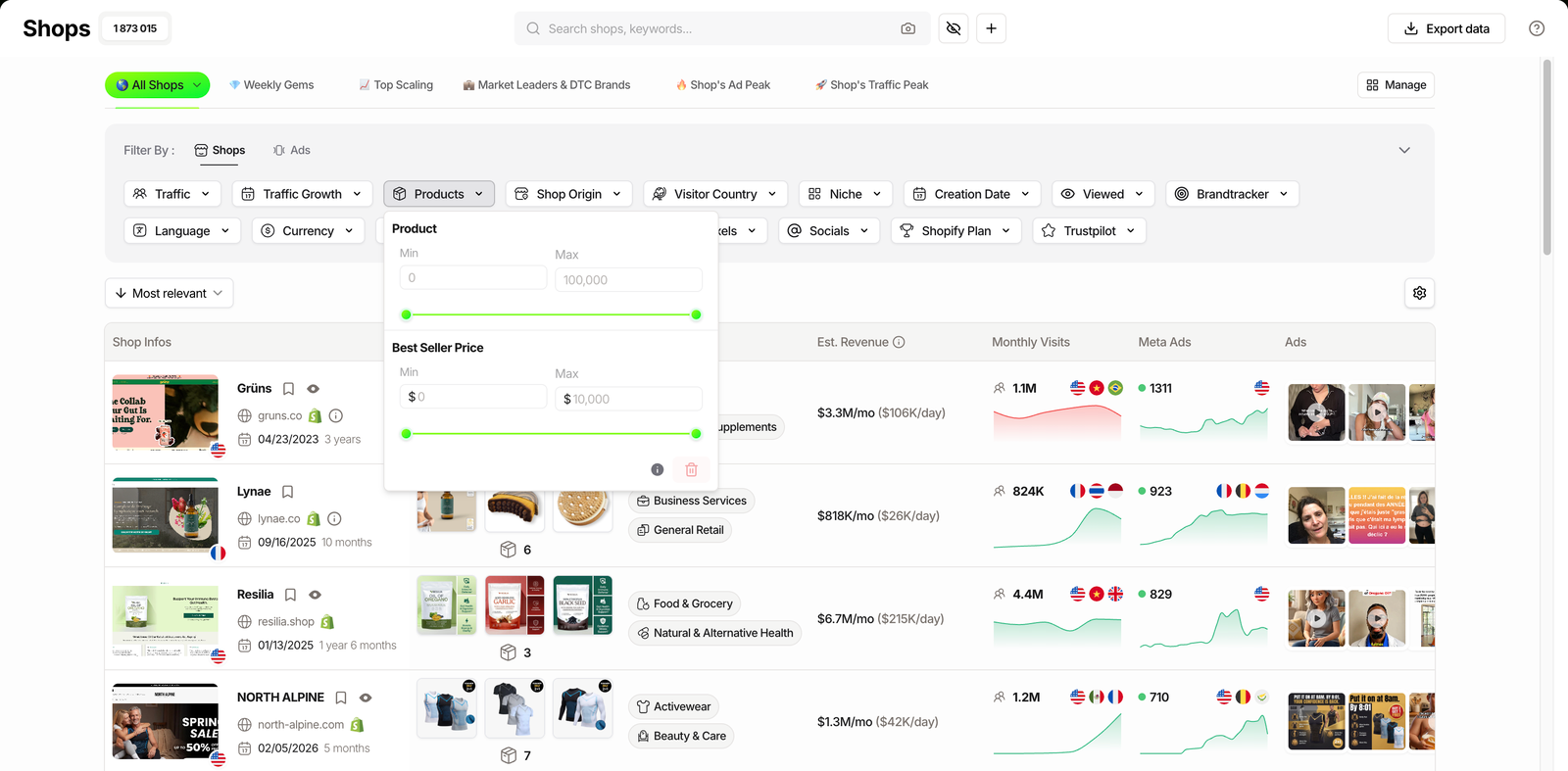
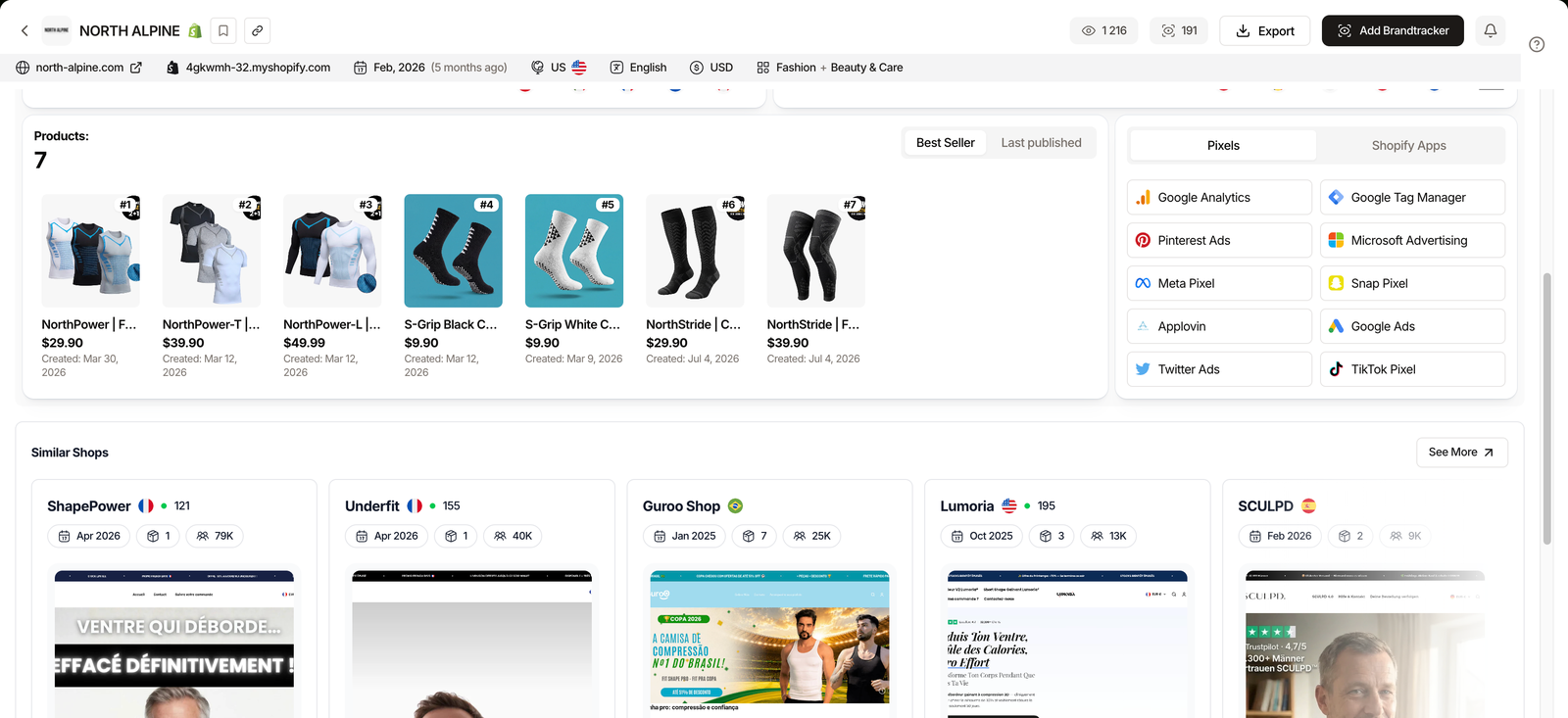
From there, open any store and the fiche gives you its products with their price and their publication date, which is how you spot what a competitor launched recently rather than what they have been selling for two years.
The same module carries an Est. Revenue column, hidden by default, that puts a monthly and a daily figure on a store. Treat it the way it is labeled: it is an estimate read from the outside, not audited revenue, so it is useful for ranking candidates and useless as a promise. How that figure is built, and how to cross-check it, is the subject of the revenue checker tutorial.
Source: TrendTrack app headers, checked July 13, 2026.
Plan check: the Shops module, best-seller prices and Est. Revenue included, is in Starter ($59/mo, or $41/mo billed annually). The Ads and Advertisers modules, the ones that show what competitors spend, are not: the Pro plan unlocks it at $89/mo (or $62/mo billed annually). See the full plan breakdown before you pick.
FAQ
What is a good profit margin for dropshipping?
There is no single number, and anyone quoting one is guessing for you. What matters is the margin left after ad spend, not the gross margin on the product.
Below 10% net, one refund or one CPM increase flips the order negative. Above 20% net, you have room to test creatives and absorb a bad week. Run your own inputs through the calculator: the honest answer is whatever survives your real CPA.
How do you calculate dropshipping profit margin?
Take the selling price, subtract everything the order costs you: product cost, shipping, payment fee, any per-order costs, and the ad spend it took to get the sale.
That gives net profit per order. Divide it by the selling price and you have your net margin. The gross version skips the ad spend, which is why it always looks better than the bank account does.
Is margin the same as markup?
No, and mixing them up is the most common pricing mistake. Markup is measured against your cost, margin against your selling price. A product bought at $10 and sold at $20 carries a 100% markup but a 50% margin.
The calculator works in margin, because margin is what tells you how much room a sale actually leaves.
Should I include ad spend in my profit margin?
If you buy traffic, yes. Ad spend is a variable cost per order, exactly like shipping: no ads, no order.
Leaving it out gives you a number that looks healthy while the store loses money. The clean way to think about it: your gross profit per order is the maximum CPA you can pay before the sale stops being worth it.
What is breakeven ROAS and how do I get it?
Breakeven ROAS is the return on ad spend where you stop losing money on paid traffic. It is your selling price divided by your gross profit per order, which is the same as 1 divided by your gross margin. A 40% gross margin means a breakeven ROAS of 2.5: every dollar of ad spend has to bring back $2.50 in revenue just to break even, before profit.
The number to watch
Gross margin tells you whether the product was bought well. Net margin, ads included, tells you whether the business works, and it is the only one of the two your bank account agrees with.
The rest is input quality: get your real CPA, check your price against what comparable stores charge, and the calculator does the boring part.
Guessing your selling price, or checking it?
TrendTrack screens 1.87M Shopify stores by best-seller price, niche and traffic, from $59/mo (or $41/mo billed annually). Its Chrome extension is free, with no usage limit, if you just want to x-ray a store before you commit.