Last verified July 17, 2026. Counts read live in the Ads module on a paid account; the Google tab shipped July 1, 2026 per the What’s new changelog.
Google now carries more indexed ads than any single platform TrendTrack tracks. The Ads module counts 88M+ of them, and 67.8M are Search text ads alone.
That whole index went live on July 1, 2026, when Google joined Meta and TikTok as the third platform in the Ads module. We ran it on a paid account to see exactly what a competitor’s Search, Shopping and YouTube ads look like from the outside, and how to pull them up in about a minute. A quick primer on the tool explains the two other ad platforms the module indexes.
TrendTrack’s Ads module has a Google tab covering 88M+ Google ads across Search, Shopping, Maps and YouTube. Search any advertiser, filter by channel and format, then open each ad’s live status, run time and a link back to Google’s own transparency tool. Ad spy starts on Pro ($89/mo).
Disclosure: some links on this page are affiliate links. If you subscribe through them we may earn a commission at no extra cost to you. We tested every TrendTrack feature mentioned here on a paid account.
Live counts read in the Ads module, checked July 17, 2026. Estimated and growing daily.
Set up your first Google ad search, step by step
The Google tab lives inside the same Ads module as Meta and TikTok, so if you have ever pulled up a Facebook ad in TrendTrack, this is the same screen with a different platform selected. Start here, then read what it reveals.
Open the Google tab
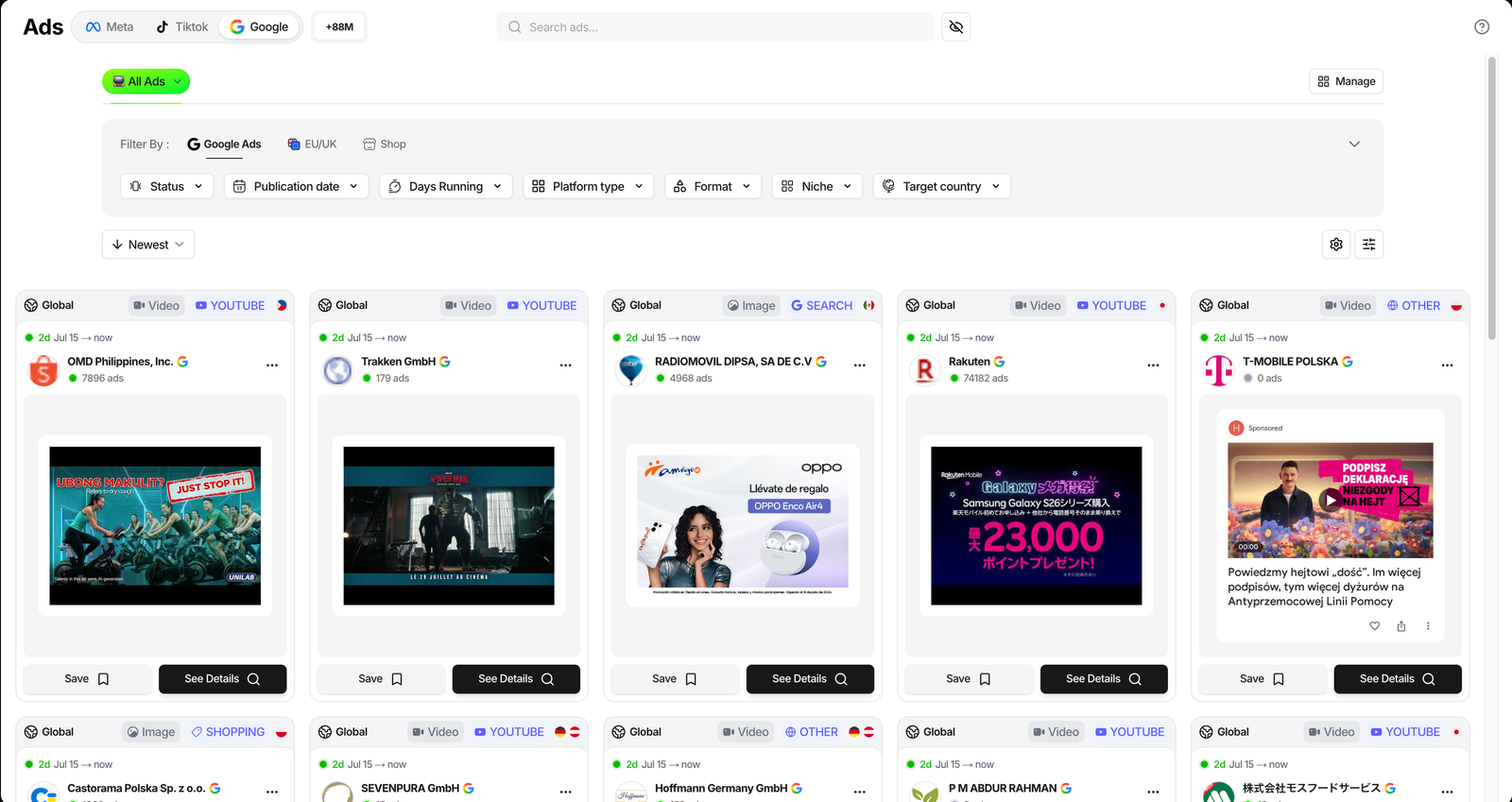
Inside the Ads module, the top of the screen has three platform tabs: Meta, Tiktok and Google. Click Google and the grid reloads with Google ads only. The TikTok side is covered in the TikTok spy tutorial.
The counter next to the tabs jumps to the Google index, 88M+ ads the day we checked. Every card now carries a small channel badge, so you can tell a YouTube video ad from a Search or Shopping unit at a glance.
Search an advertiser or keyword
Use the search bar to type a competitor’s brand, its domain, or a keyword you expect in their copy. The Google index supports full-text search, so a product name or an angle pulls back matching ads even from advertisers you did not name.
That is the difference from Google’s own tool, which only answers for an advertiser you already know. Here you can start from a phrase and let the competitors surface.
Read the ad cards
Each card shows the advertiser, how many active ads they run, the date range the creative has been live, and the channel and format badges. The grid sorts by Newest by default, and you can switch to Longest Active or other orders to push proven creatives up.
Open the detail modal
Click See Details on any card to open the full ad. This is where the real signal sits, and we break it down in the next section.
Plan check: the whole Ads module, Google included, starts on Pro ($89/mo, or $62/mo billed annually). Starter ($59) covers the Shops database, two Brandtrackers and the free Chrome extension, but not ad spy. If Google spying is why you are here, budget for the Pro plan pricing.
What the Google tab actually shows you
The value of Google ad spy is that Google is not one ad surface, it is five. A competitor’s Search text ads, Shopping product ads and YouTube video ads all say different things about their strategy, and the Google tab keeps them separate.
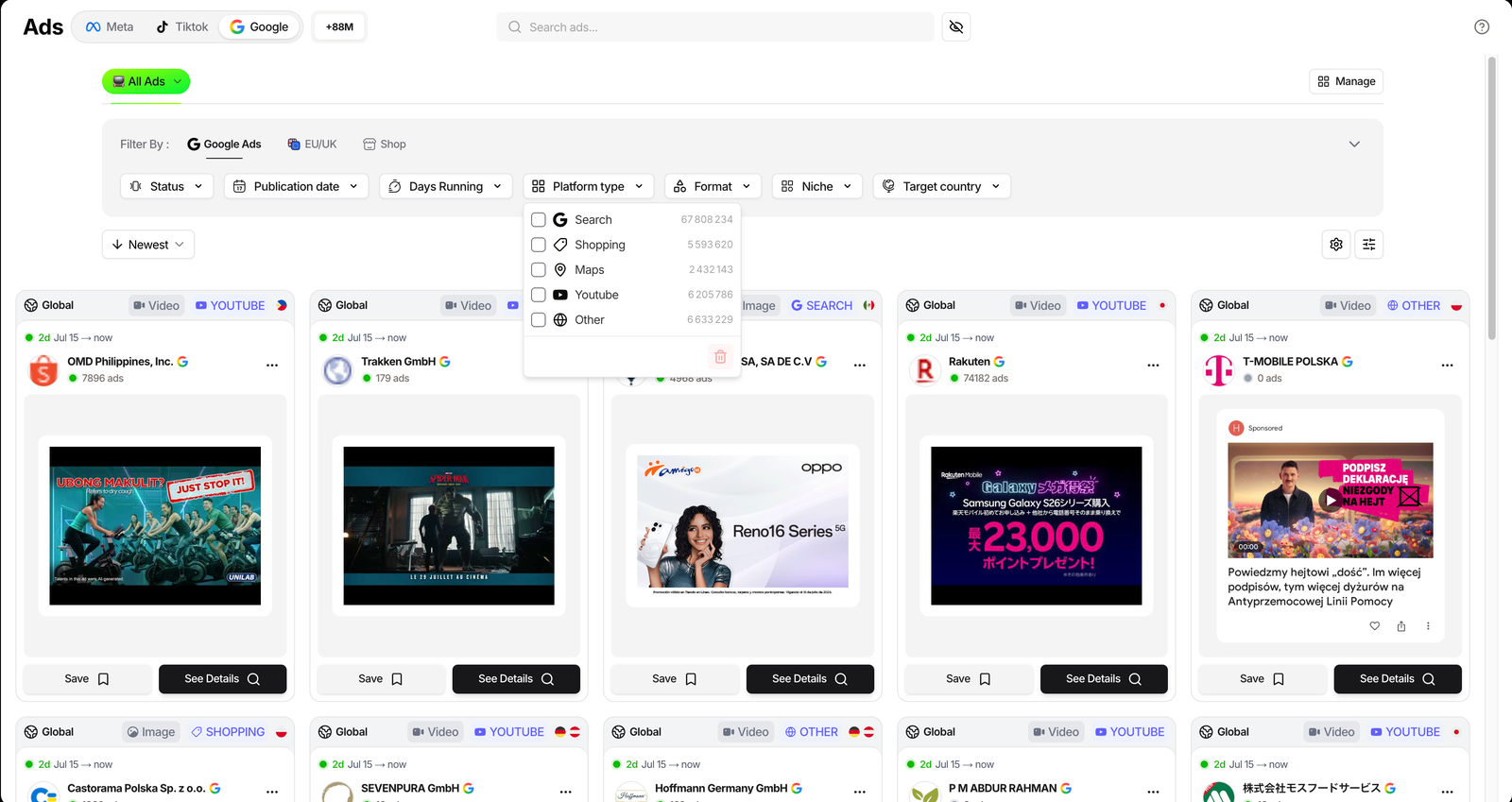
The Platform type filter splits the index by surface, each with its own live count: Search dominates at 67.8M, then Other, YouTube, Shopping and Maps. The Format filter cuts a second way, by Text, Image and Video, so you can isolate a brand’s video creative from its text ads.
Between those two filters, Days Running and Publication date, you can go from 88M ads to just the long-running YouTube video ads a single competitor launched this month. That is a precise question the free tools cannot answer.
| Filter | What it does | Options |
|---|---|---|
| Platform type | Split ads by Google surface | Search 67.8M, YouTube 6.2M, Other 6.6M, Shopping 5.6M, Maps 2.4M |
| Format | Isolate creative type | Text 53.2M, Image 25.2M, Video 10.3M |
| Status | Live vs paused ads | All, Active, Inactive |
| Days Running | Filter by run length | Min / Max |
| Publication date | When the ad first ran | Date range presets |
| Target country | Where the ad shows | Include / Exclude, per country |
| Niche | Store category behind the ad | 17 niches |
Two more filter groups sit next to Google Ads: EU/UK, which adds reach where transparency data exists, and Shop, which applies store-level filters like traffic and Shopify apps to the ads. You can spy on Google ads and screen the store behind them in the same query.
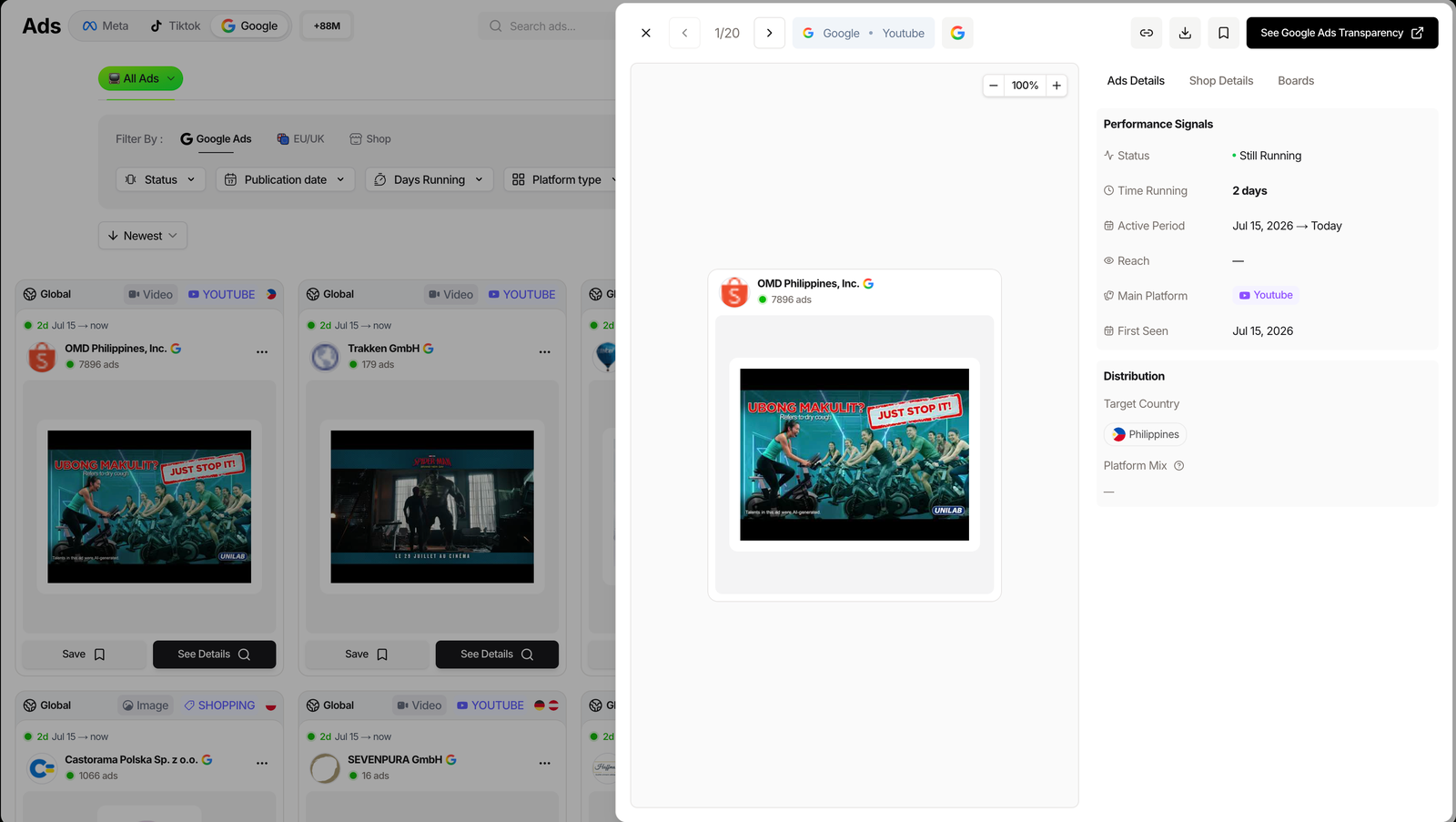
Open a card and the detail modal reports Performance Signals: whether the ad is still running, how long it has been active, its active period and first-seen date, and the main channel it runs on. A See Google Ads Transparency button links straight back to Google’s own record, so you can cross-check the source in one click.
3 ways to use Google Ads spy
The screen is the same for everyone. What you do with it depends on where you are.
Beginner: map the active advertisers in your niche
Set the Niche filter to your category and the Target country to your market, then sort by Newest. You get a live feed of the brands running Google ads in your space right now.
Reading which products they push on Search, and which they promote through Shopping, is a free read on where demand is heading, drawn from where competitors put their money.
Scaler: track one competitor’s whole Google footprint
Add a store to your Brandtracker and its Google Ads tab breaks that one competitor’s ads down by channel over time. You stop checking ad by ad and start watching a brand’s Google strategy as a single dashboard.
Pair it with the Notifications toggle and you get alerted when they launch new ads, instead of finding out weeks later.
Related guide
TrendTrack Ads Library: Filter 337M Ads
The same module, across Meta, TikTok and Google in one place.
Brand: model a competitor’s YouTube creative
Set Platform type to YouTube and Format to Video, then filter by a rival’s name. You get the video ads they are actively funding, and video is expensive, so a live YouTube ad is a strong signal a brand believes in that concept.
Study the first few seconds, the offer and the framing. It is one of the cheapest ways to learn what creative a competitor is willing to pay to run.
Where the Google tab shines
- Search, Shopping and YouTube in one view
- Channel and format filters with live counts
- Full-text search, not just by advertiser
- Same workspace as Meta and TikTok
Where it is still thin
- Google reach data is sparser than Meta
- Spend figures are estimated, not audited
- Ad spy is locked behind Pro
Where the free tools stop, and this one keeps going
Google runs its own free ad database, Google’s own Ads Transparency Center, and it is genuinely useful for a quick look at one advertiser you already know. It shows the current ads, but no run-time history, no cross-store search and no ranking of which creative is carrying the budget.
Related guide
Google Ads Transparency Center: The Complete Guide
How to get the most out of Google’s free public tool first.
Be honest about the limits on TrendTrack’s side too. Google’s reach and spend data is thinner than Meta’s, so a Google ad’s reach often reads as unavailable.
Treat any Google spend figure as directional, and lean on run time and ad volume as your real signal. We cover the whole module in our full TrendTrack review.
FAQ
Is Google Ads spy included in the free TrendTrack plan?
No, the whole Ads module (Meta, TikTok and Google) starts on Pro ($89/mo, or $62/mo billed annually). Starter ($59) covers Shops, two Brandtrackers and the free Chrome extension, but not ad spy. If Google ad spying is why you are here, you need Pro.
What Google ad formats can you see?
All of them. The Platform type filter splits the index into Search, Shopping, Maps, YouTube and Other, and the Format filter splits by Text, Image and Video. YouTube video ads and Search text ads sit side by side, each tagged with a channel badge on the card.
How is this different from Google’s own Ads Transparency Center?
Google’s free tool shows an advertiser’s current ads, but no run-time history, no cross-store search and no ranking. TrendTrack keeps the timeline, lets you filter 88M+ ads by channel and niche, and links back out to the Transparency Center from each ad.
When did TrendTrack add Google Ads?
The What’s new changelog dates the Google tab to July 1, 2026, making Google the third ad platform after Meta and TikTok. It was live and counting 88M+ ads when we checked on July 17, 2026.
Can you see how much a competitor spends on Google Ads?
Not as cleanly as on Meta. The EU/UK transparency rules that power estimated Meta spend are thinner for Google, so reach often reads as unavailable. Treat any Google spend figure as directional, and use the run time and ad volume as your real signal.
The bottom line
Google spy used to mean squinting at your own search results or typing one competitor into Google’s free tool. The Google tab turns it into a real database: 88M+ ads, split by channel, searchable by keyword, with the store behind each one one filter away.
It is not perfect, Google’s reach data stays thinner than Meta’s, so read spend as directional. But for seeing which Search, Shopping and YouTube ads a competitor is actually running, it beats every free option, and it lives in the same tab as your Meta and TikTok spying.
Ready to see a competitor’s Google ads?
The Google tab covers 88M+ ads across Search, Shopping and YouTube, in the same module as Meta and TikTok. Ad spy starts on Pro ($89/mo, or $62/mo billed annually). Starter ($59) covers Shops but not the Ads module.