Last verified July 2026. Walked through on a paid TrendTrack account (Agency trial), spying on Gymshark’s TikTok as the live example.
Ask most sellers to spy on a brand’s TikTok and they open TikTok’s own Creative Center, sort the paid ads, and screenshot a few hooks.
That covers one half of the account. The other half, the organic posts, is where the angles are actually born, and it is roughly 44% of what a brand ships on TikTok. What else sits in the account is covered in the tool in plain English.
A real TikTok spy tool shows you both sides. Here is how TrendTrack does it.
TrendTrack’s Brandtracker follows a brand’s full TikTok, paid ads and organic posts, in one dashboard. You get the Ads vs Organic split, a Content Type Mix donut, the Link in Bio, top hashtags, and posts ranked by views, likes and shares. TikTok tracking shipped June 8, 2026, and starts from $59/mo.
Plan check: a Brandtracker, with its Meta, TikTok, Google and Emails tabs, is included from Starter ($59/mo, or $42/mo billed annually) with 2 trackers. Searching TikTok ads across the whole library sits in the Ads module, which starts on Pro ($89/mo, or $62/mo annually). See the full pricing breakdown.
Disclosure: some links on this page are affiliate links. If you subscribe through them we may earn a commission at no extra cost to you. We tested every TrendTrack feature mentioned here on a paid account.
Spy on a brand’s TikTok in four moves
Do not treat the TikTok tab as a feed to scroll. Treat it as a funnel: point it at a store, split ads from organic, then sort each side by what performed.
Four moves get you there.
1. Add or open a Brandtracker
From the Brandtracker module, search the store by name, page or URL and add it as a tracker. Since May 2026 one slot watches the whole store, so every page it runs on TikTok comes with it.
For this walkthrough we opened our existing Gymshark tracker rather than a fresh one, so the history was already populated.
2. Open the TikTok tab
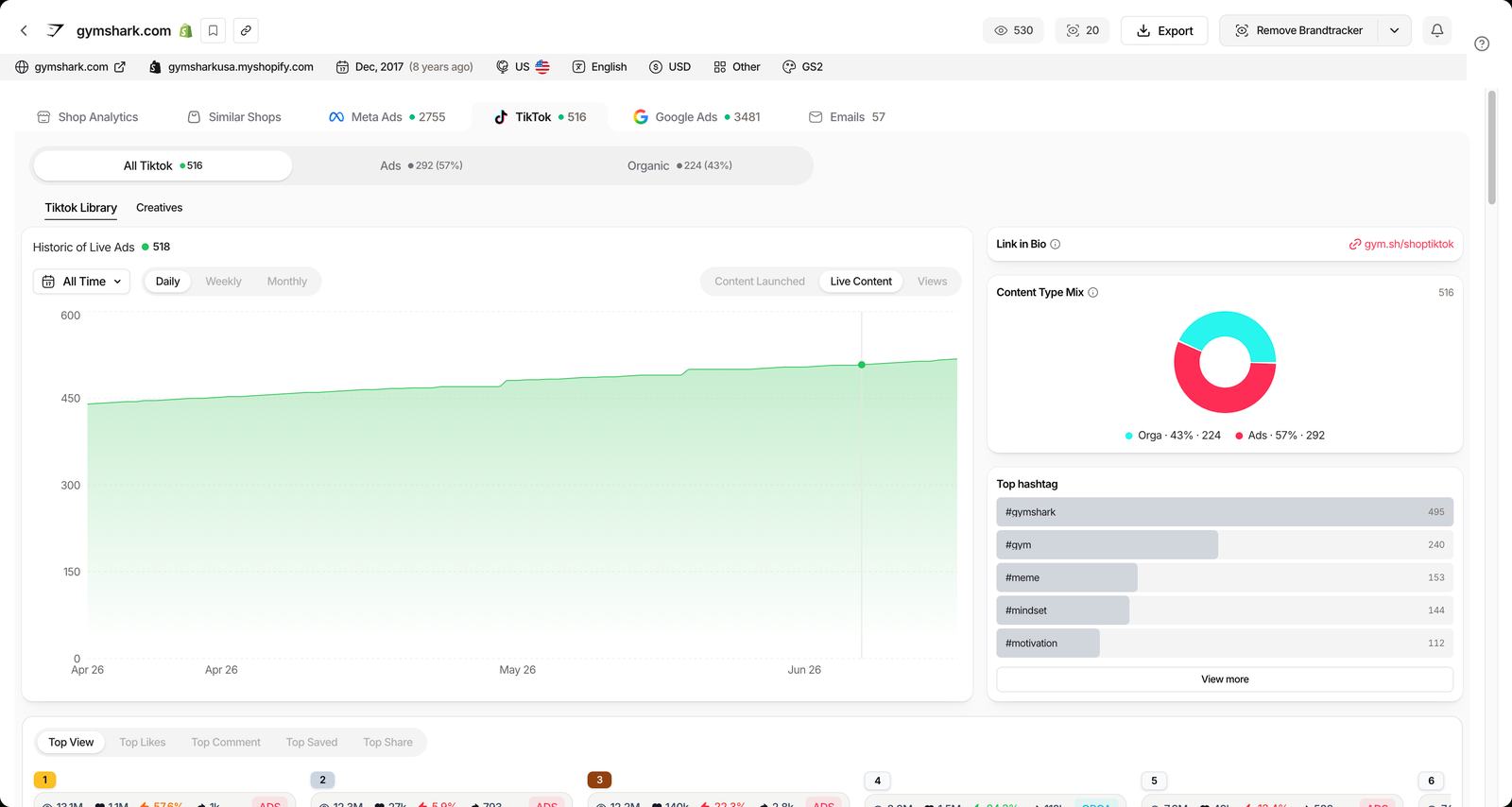
Inside the tracker, the tabs run Shop Analytics, Similar Shops, Meta Ads, TikTok, Google Ads and Emails. Click TikTok.
The header loads the account totals at a glance: all TikTok content, then how it divides between paid and organic.
3. Read the Ads vs Organic split
This is the move that separates TrendTrack from an ad-only spy tool. For Gymshark the split ran Ads 292 (57%) and Organic 224 (43%) across 516 tracked posts when we checked.
Ads carry an ADS badge, organic posts do not. So you can see, in one screen, how much of a brand’s TikTok is boosted spend versus content that earned its reach.
4. Sort by Top View or Top Likes
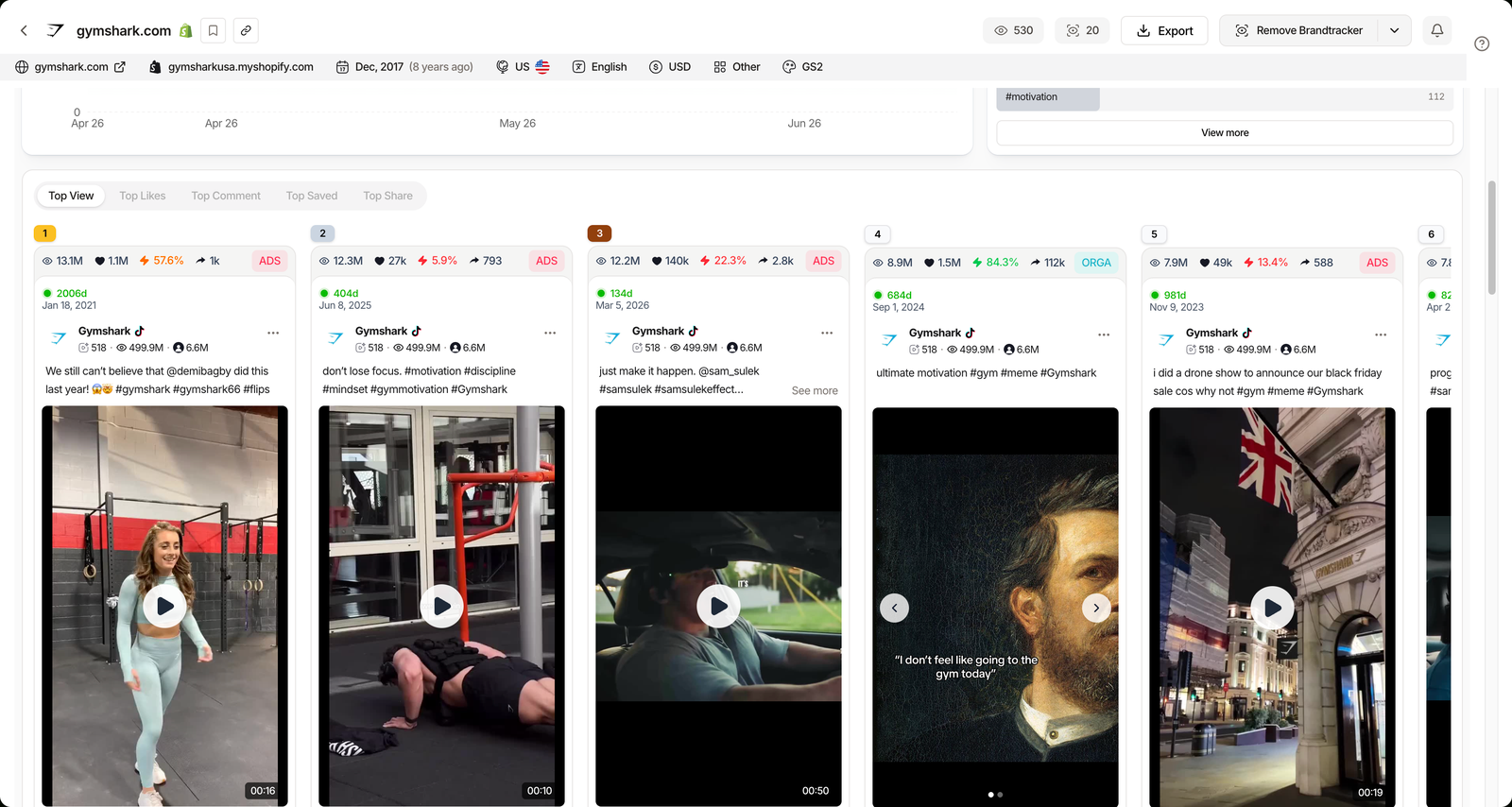
The ranked lists cover Top View, Top Likes, Top Comment, Top Saved and Top Share. Each row shows the metric, the ADS or organic badge, and how long the post has stayed live.
Sort by Top View and the biggest post we saw cleared 13.1M views, with the top-liked post near 1.1M likes. Start there, because those are the angles the brand already validated with an audience.
Related guide
Brandtracker Tutorial: Track a Store’s Ads, Tests, Emails & LPs
The TikTok tab lives inside a full-store tracker. Set one up end to end.
What the TikTok view actually reveals
The four moves get you looking. The value is in the panels around the ranked lists, because each one answers a different research question. If you want to poke at it yourself, the fastest entry is the free Chrome extension plus a paid trial.
| Sub-view | What it shows | Signal to steal |
|---|---|---|
| Ads vs Organic | Share of paid vs organic posts | How reliant they are on spend |
| Content Type Mix | Donut of organic vs ads | Their content strategy balance |
| Link in Bio | Where TikTok traffic is sent | The funnel behind the content |
| Top hashtags | Tags used most, with counts | Distribution and reach plays |
| Top View / Likes | Posts ranked by performance | Proven hooks and formats |
| TikTok Library | Creatives and live-content history | What is running right now |
The Top hashtags panel is quietly useful. For Gymshark, their own branded tag led the list at 495 uses, which tells you how much a mature brand leans on owned hashtags versus trend-chasing.
The Historic of Live Ads chart tracks content launched, live content and views over time, so a sudden spike reads as a new push, not background noise.
The Link in Bio panel is the quiet tell for the funnel: it surfaces where a brand routes TikTok traffic, whether that is a shop landing page, a giveaway, or a TikTok Shop. Match it against the top posts and you can see which content is actually pointed at a sale.
Source: TrendTrack app, checked July 2026. Reach and spend figures are estimated.
Tracker TikTok versus the library-wide search
TrendTrack has two TikTok surfaces, and mixing them up costs you time. One follows a single brand, the other searches every advertiser at once.
| Question | Brandtracker TikTok tab | Ads module TikTok tab |
|---|---|---|
| Scope | One brand | All brands |
| Organic posts | Yes | No |
| Best for | Watching a competitor | Finding new ads at scale |
| Starts on | Starter ($59/mo) | Pro ($89/mo) |
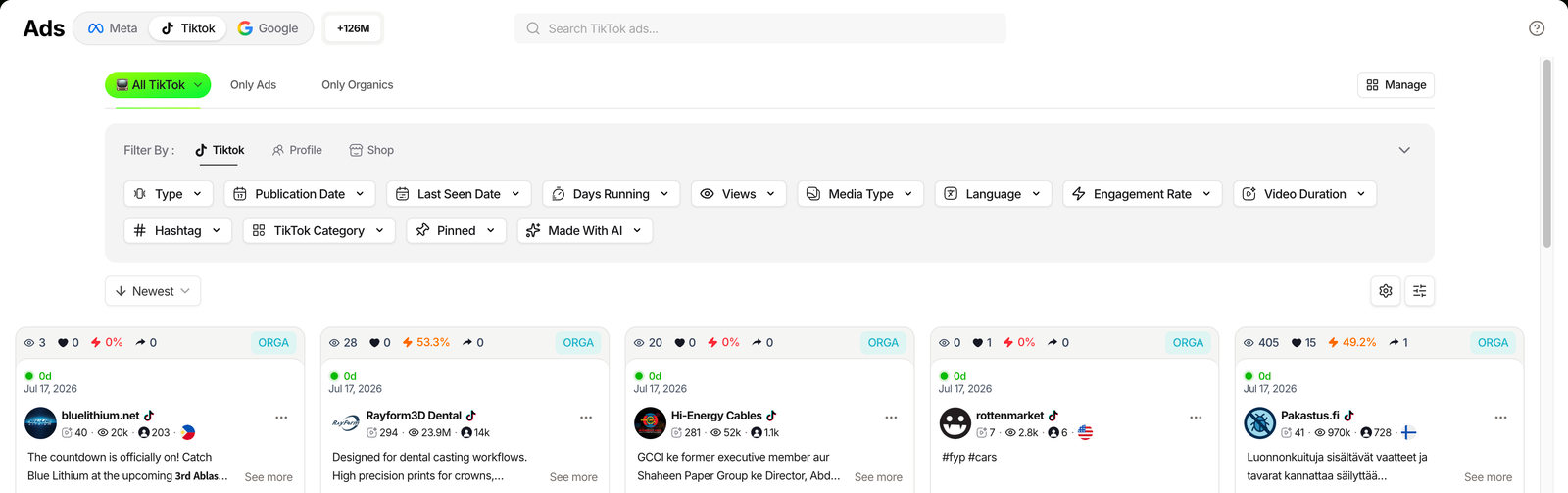
Rule of thumb: if you already know the competitor, track it. If you are hunting for creatives across a niche, use the library-wide TikTok search in the Ads module.
Three ways sellers use it
The beginner: hunt angles before paying for ads
If you have no budget yet, the organic side is a free idea bank. Sort a proven brand’s Top View posts, note which hooks repeat, and you have a shortlist of formats that already worked without a media buy behind them.
Because organic reach is earned rather than bought, a post that cleared millions of views tells you the concept resonated on its own. That is a safer angle to model than an ad you cannot tell was propped up by spend.
The scaler: monitor a competitor’s cadence
Turn on the tracker’s TikTok notifications so a New TikTok ads event pings you when a rival launches. Pair that with the Historic of Live Ads chart and you can tell when a competitor is testing hard versus coasting.
The brand: steal hooks and hashtags
Cross-reference the Top hashtags panel with the top-performing posts. That pairing shows you not just which videos landed, but which tags carried them, so you can borrow the distribution play and not only the creative.
Where the TikTok view stops
It is a strong spy layer, not a magic revenue oracle. A few honest limits keep you out of trouble.
Strengths
- Ads and organic in one view
- Posts ranked by real performance
- Top hashtags and Link in Bio exposed
Limits
- Reach and spend are estimated
- Coverage varies by niche and region
- Not a full TikTok Shop sales suite
The workaround is to read the estimates as direction, not gospel, and to lean on the organic rankings, which are counts of real engagement rather than modeled numbers.
Related guide
TrendTrack vs Kalodata
How TrendTrack compares with the TikTok Shop analytics specialist.
FAQ
What is a TikTok spy tool?
A TikTok spy tool lets you see another brand’s TikTok activity: its paid ads and, in TrendTrack’s case, its organic posts too. Inside a Brandtracker you get the Ads vs Organic split, Content Type Mix, Link in Bio, top hashtags and posts ranked by views, likes and shares. It turns a competitor’s TikTok into a searchable dashboard instead of an endless feed.
Can you spy on organic TikTok content, not just ads?
Yes. TrendTrack’s TikTok view splits a brand’s activity into ads and organic (for Gymshark, roughly 57% ads and 43% organic when we checked). You can sort organic posts by Top View, Top Likes, Top Comment, Top Saved and Top Share, which is where winning angles usually appear before they become paid ads.
Is TikTok spying free?
Partly. TikTok’s own Creative Center and the free TrendTrack Chrome extension give you a shallow look. To track a brand’s full TikTok, ads and organic, in one dashboard you need a Brandtracker, included from the Starter plan ($59/mo, or $42/mo billed annually) with 2 trackers. Library-wide TikTok ad search starts on Pro.
How do I spy on a competitor’s TikTok ads?
Add the store to a Brandtracker, open the TikTok tab, then read the Historic of Live Ads and the ranked lists. Ads carry an ADS badge, organic posts do not, so you can separate paid creatives from organic tests and see how long each has run. The library-wide Ads module also has a dedicated TikTok tab.
Does TrendTrack track TikTok Shop?
TrendTrack’s TikTok view covers a brand’s ads and organic content, and it flags TikTok Shop activity where present, but it is not a full TikTok Shop sales analytics tool. For deep TikTok Shop revenue data you would pair it with a dedicated TikTok Shop tool.
The verdict
If you only spy on TikTok ads, you are reading half the account. TrendTrack’s edge is the organic half, ranked and searchable next to the paid one, from a plan that starts at $59/mo.
For the wider picture of every module, our full TrendTrack review covers how the TikTok view fits the rest of the toolkit.
Want to see both halves of a brand’s TikTok?
Track one store’s ads and organic content from $59/mo (or $42/mo billed annually), with 2 Brandtrackers on Starter. Library-wide TikTok ad search starts on Pro.