Last verified July 2026. Counters, filters and gating checked live inside a paid TrendTrack account.
You want to know what a competitor actually spends on Meta ads, not eyeball it from how many creatives they happen to be running.
Ad count is the read most sellers use, and it lies. A brand can run 200 near-dead creatives or 12 that each eat real budget. The pile looks the same from the outside. For the platform around this one number, a quick primer on the tool runs five minutes.
There is a faster, harder number underneath. Meta already discloses how many EU and UK accounts each ad reaches, and TrendTrack turns that disclosure into a spend estimate you can sort, compare and track over time.
Meta discloses the EU/UK reach of every ad in its Ad Library. TrendTrack reads that real reach and multiplies it by a CPM you set (default $9) to estimate spend, per ad, per page and per day. It lives in the Ads module’s EU/UK filters and inside every Brandtracker.
Disclosure: some links on this page are affiliate links. If you subscribe through them we may earn a commission at no extra cost to you. We tested every TrendTrack feature mentioned here on a paid account.
How TrendTrack turns Meta’s reach into a spend number
Start with where the number comes from, because that decides how much you can trust it. Under EU and UK ad transparency rules, Meta has to publish how many accounts each ad reached in those regions.
You can see that raw reach yourself in Meta’s own Ad Library. What you cannot do there is sort by it, watch it move over weeks, or turn it into a dollar figure.
Plan check: the Ads and Advertisers modules start on Pro ($89/mo, or $62/mo billed annually). Starter covers Shops, 2 Brandtrackers and the extension. You can still read one rival’s EU spend on Starter through a Brandtracker slot, or see the full pricing breakdown first.
Inside TrendTrack the math is done for you. It takes the disclosed reach, divides by 1,000, and multiplies by a CPM to produce an estimated spend. Say that part slowly: the reach is real, the dollar figure is an estimate.
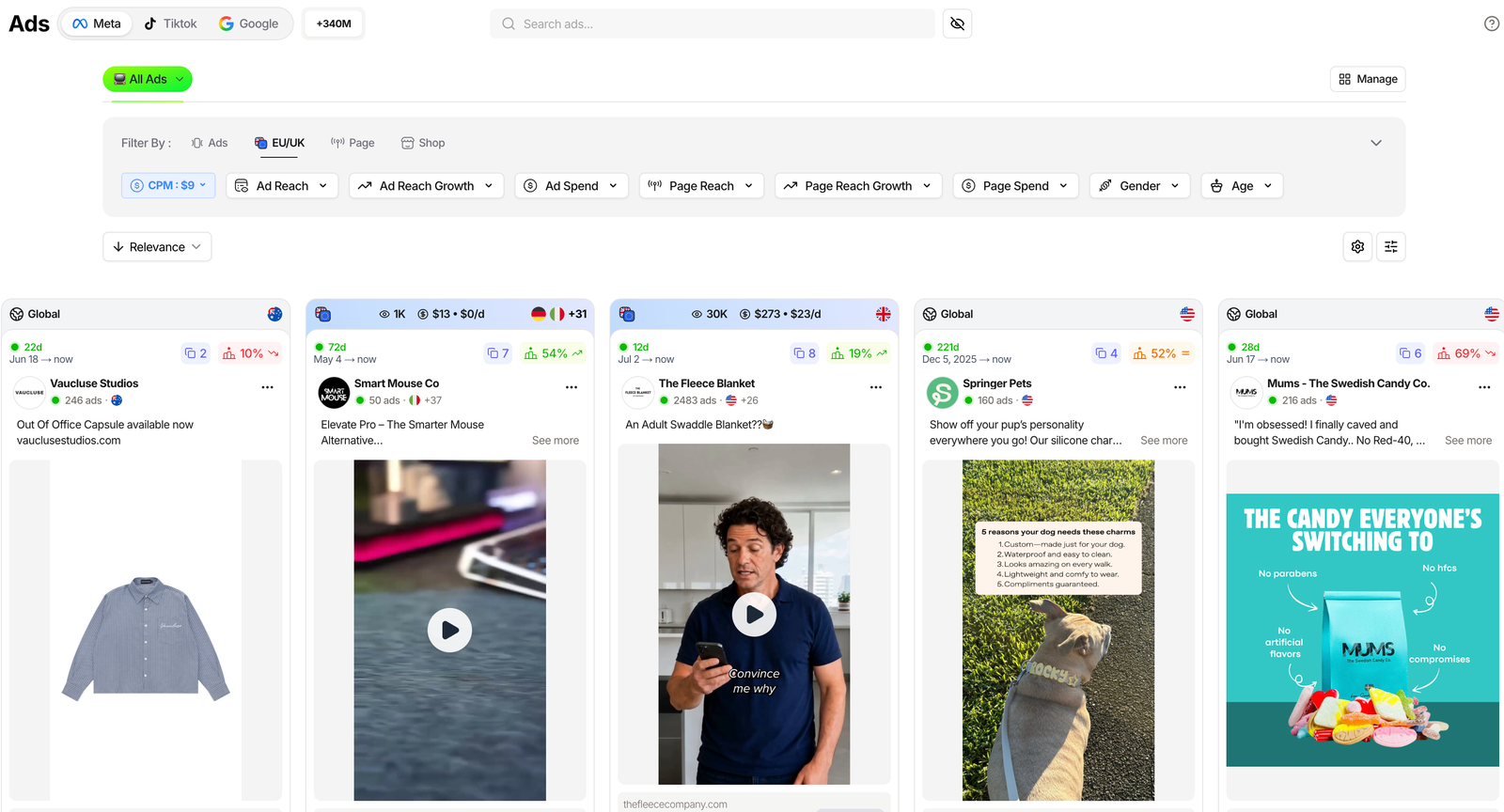
Here is what each field in the EU/UK filter group actually measures, and how to read it.
| Field | What it measures | Read it as |
|---|---|---|
| Ad Reach | EU/UK accounts an ad reached, disclosed by Meta | Real audience size, the base of every other number |
| Ad Spend | Reach divided by 1,000, times your CPM | Estimated dollars behind that single ad |
| Page Reach & Spend | The same math rolled up to the whole page | A brand’s total EU/UK footprint |
| Reach & Spend Growth | How fast reach or spend is climbing | Who is accelerating, not just who is big |
| Gender & Age | Demographics of the EU impressions | Who the ad is actually landing on |
| CPM chip | The rate used to convert reach to spend, $9 by default | Your one assumption, keep it constant |
That is the whole toolbox. The rest is knowing which read you need for the job in front of you.
Related guide
Ads Library Tutorial: Spy 337M Meta, TikTok and Google Ads
The full walkthrough of the module these filters live in.
Read a budget in three real situations
The same data answers three different questions, depending on who is asking. The gestures never change: find the page, read the EU/UK reach, set your CPM.
The beginner: is this product actually being pushed?
You found a product and a store selling it. Before you copy the angle, you want to know whether the ad behind it is alive or already dead.
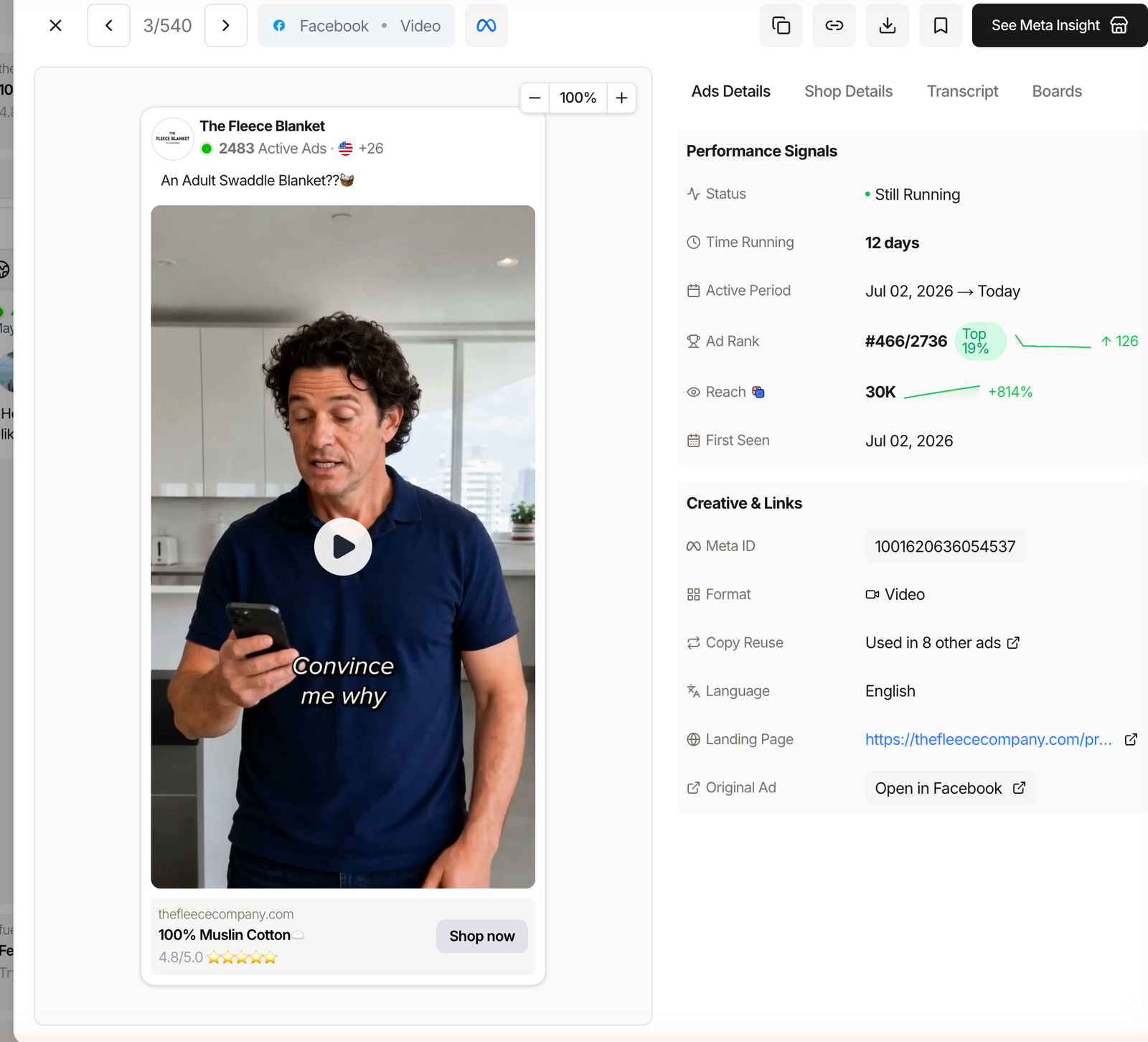
Open the Ads module on the Meta tab, search the store’s domain, and read the badge on each card: reach, estimated spend, and spend per day. Then open See Details for the reach trend and how long the ad has been running.
An ad with rising reach and weeks of runtime is being pushed with intent. One with flat, tiny reach is a test that never scaled, so copying it copies a loss.
The scaler: rank a whole niche by spend
You are past single ads. You want to know who is putting the most money behind Meta in your niche right now.
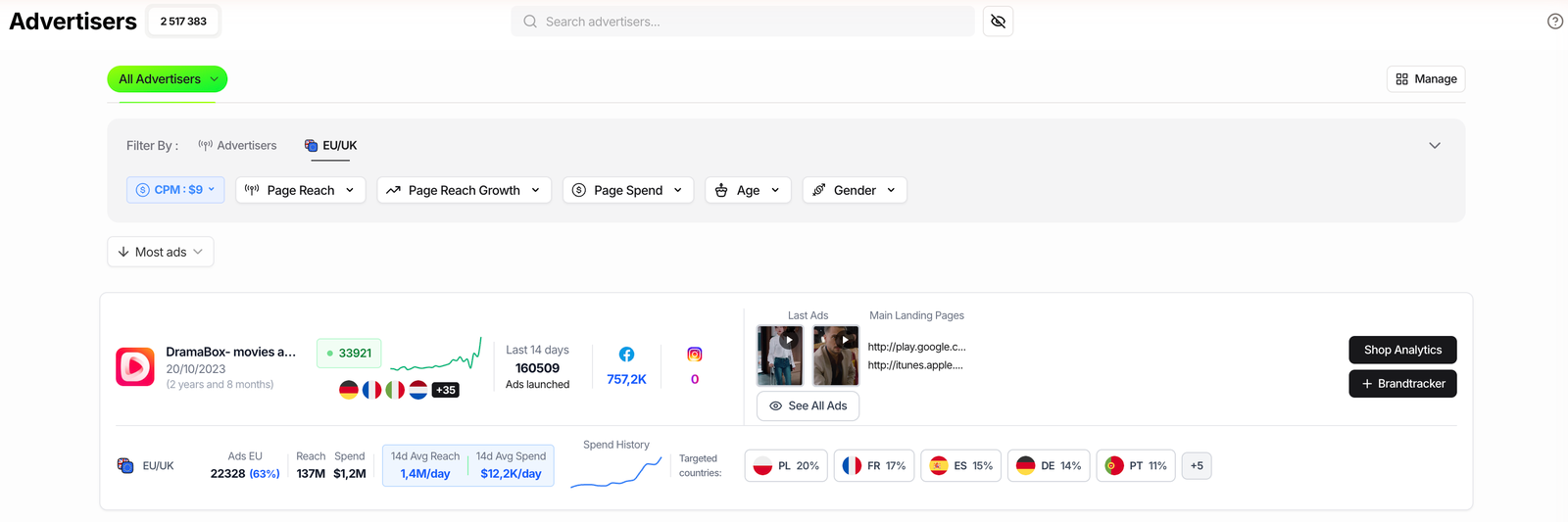
Filter by niche, sort by Highest Reach/Spend, and set your CPM once. The pages at the top are the ones spending real budget in the EU and UK, which is a decent proxy for who is scaling hardest.
For a cleaner page-level view, the Advertisers module shows each page’s 14-day average spend per day and a spend-history sparkline, so you read acceleration instead of a single frozen snapshot.
The brand or agency: track one rival end to end
For a competitor you watch every week, one-off reads are not enough. You want the shape of their budget over time.
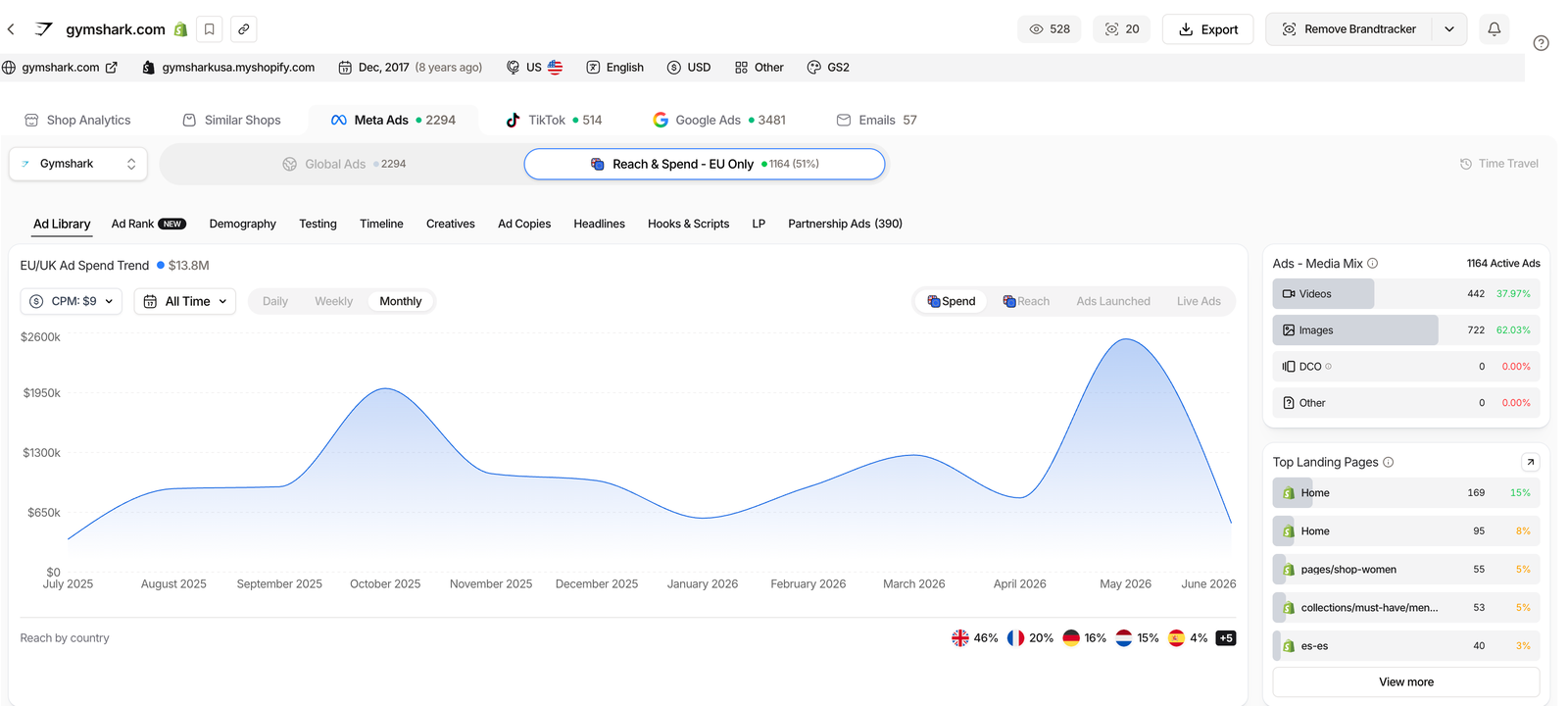
Add the brand as a Brandtracker, open Meta Ads, and flip the toggle to Reach & Spend, EU Only. You get a historic spend and reach curve with 7-, 14- and 30-day windows, so a budget ramp shows up before their new campaign ever hits your feed.
Turn on notifications and the tracker emails you the moment they launch new ads, which is usually the first sign spend is about to climb.
Related guide
Brandtracker Tutorial: Track a Store’s Ads, Tests, Emails and LPs
Follow one rival’s whole funnel, not just their spend.
Set your CPM so the estimate isn’t fiction
The spend figure is only as honest as the CPM behind it. TrendTrack defaults to $9, a reasonable middle for ecommerce, but your niche, country and format can run well above or below that.
Change it with the CPM chip (or the ?cpm= parameter in the URL) and the whole table recalculates. Here is the discipline that keeps the number useful.
Keep the CPM constant when you compare rivals. The absolute dollars shift with the rate you pick, but the ranking between competitors stays honest. A relative read like ‘Brand A spends roughly triple Brand B’ survives a wrong CPM; an exact one does not.
Where the number stops being reliable
This read is powerful, and it has hard edges. Know them before you quote a figure in a strategy deck or a client call.
Trust it when
- The advertiser targets EU or UK audiences heavily
- The ad has run long enough to accumulate reach
- You are comparing rivals against each other, not chasing an exact dollar
Don’t trust it when
- The brand spends mostly in the US or outside the EU/UK
- The ad was never served in the EU, so it has no disclosed reach
- You need audited spend, not a directional estimate
The biggest trap is treating EU/UK spend as global spend. A brand that pours budget into the US looks cheap here, because only the EU and UK force Meta to disclose reach. Read it as a strong directional signal, cross-checked against our hands-on TrendTrack review, not a full audit.
FAQ
How do you find out how much a competitor spends on Facebook ads?
Meta discloses the EU/UK reach of every ad in its Ad Library. TrendTrack reads that reach and multiplies it by a CPM you set (default $9) to estimate spend per ad, per page and per day.
Open the Ads module, filter or sort by the EU/UK metrics, or track the brand in a Brandtracker to watch spend over time. The reach is real; the dollar figure is an estimate.
Is competitor ad spend data accurate?
The reach is accurate because Meta publishes it under EU/UK transparency rules. The spend is an estimate: it is reach multiplied by an assumed CPM, and it only covers EU/UK impressions, not worldwide spend. Keep the CPM constant when you compare rivals so the ranking stays reliable even if the absolute numbers shift.
Can I see US ad spend, not just EU/UK?
No. Only the EU and UK require Meta to disclose reach, so the spend estimate is built on EU/UK impressions.
An advertiser focused on the US will show a low EU reach and a low estimated spend, which understates their real budget. Treat the figure as an EU/UK signal, not a global total.
Do I need a paid plan to check competitor ad spend?
To browse and sort the whole Ads library by EU spend you need the Pro plan ($89/mo, or $62/mo billed annually), since Ads and Advertisers are not on Starter. But every plan, including Starter, includes 2 Brandtrackers, and the Reach & Spend, EU Only view works there, so you can track one rival’s spend on the entry plan.
Stop guessing what your competitors spend.
The reach is Meta’s, the spend is your estimate, and together they show who is actually buying attention in your market. Ad spy starts on Pro ($89/mo, or $62/mo billed annually), and the free Chrome extension plus month-to-month billing let you test before you commit.