Last verified July 2026. Every filter, rank signal and Brandtracker tab below was checked hands-on on a paid TrendTrack account.
Most people hunt for winning ad creatives the wrong way. They scroll, find the flashiest, most-viewed video, screenshot it, and rebuild it for their store.
The problem: view count tells you almost nothing. A creative can rack up a million views and get cut in three days because it never sold.
A real winner is quieter. It is the ad that keeps running for weeks, gets duplicated, and quietly eats more budget. You do not spot that with your eyes. You read it in the data.
To find winning ad creatives, stop ranking by views and start ranking by survival. A creative is winning when it stays live for weeks, gets duplicated, sits high in Ad Rank, and shows rising estimated spend. Free ad libraries reveal longevity. Paid tools add the rank and the spend.
Disclosure: some links on this page are affiliate links. If you subscribe through them we may earn a commission at no extra cost to you. We tested every TrendTrack feature mentioned here on a paid account.
What actually makes a creative “winning”
Forget the vanity metric for a second. Views measure attention, not profit. Plenty of ads go viral and lose money on every click.
A creative earns the label “winning” when four signals line up. It runs a long time, it gets duplicated across ad sets, it ranks well against the advertiser’s own library, and its estimated European spend trends up rather than down.
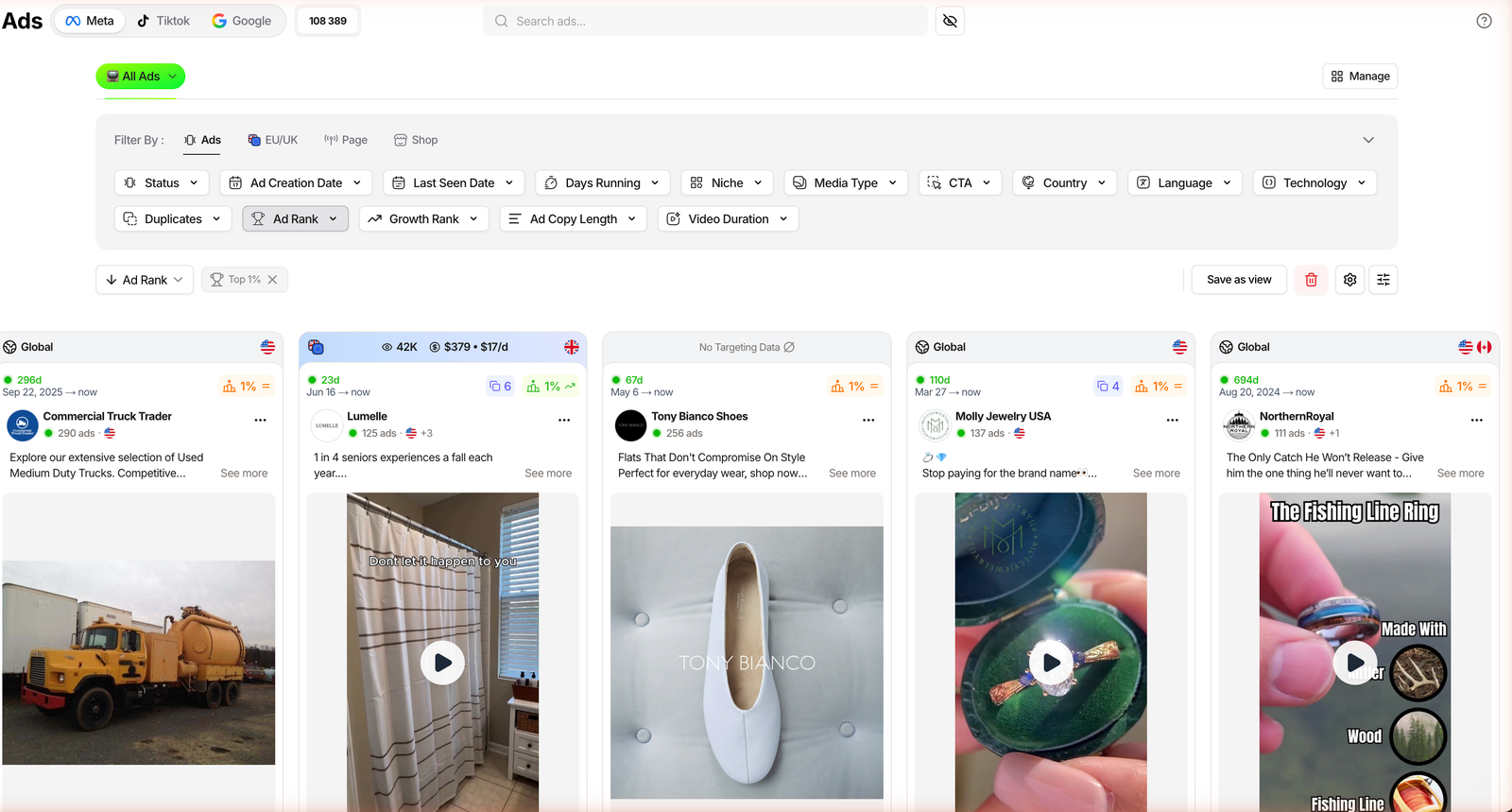
Signals read inside TrendTrack’s Ads module, checked July 2026.
Here is the mindset shift in one picture. On the left is what a durable winner actually shows. On the right is what most beginners chase.
What a winner shows
- Weeks of continuous run time
- Many duplicates across ad sets
- High Ad Rank versus its own page
- Rising estimated EU spend
What beginners chase
- A high view count
- One recent post that looks viral
- Nice production quality
- A trend that is already cooling
Start free: what the ad libraries can (and can’t) tell you
You do not need a subscription to begin. Every major platform runs a public transparency library, and they are the right first stop.
The Facebook Ad Library and the TikTok Creative Center both show live ads and, roughly, how long they have been running. If you want the full free workflow first, our guide on how to spy on competitors’ ads walks the whole ladder.
What the free libraries give you is real. What they hold back is where the guessing starts.
| Signal | Free libraries | TrendTrack |
|---|---|---|
| Live or paused status | Yes | Yes |
| Exact days running | Limited | Yes |
| Ad Rank scoring | No | Yes |
| Estimated EU spend | No (reach only, in EU) | Yes |
| Duplicate count | No | Yes |
| Hook transcript | No | Yes |
So the free stop is enough to see which ads are live and, roughly, which have been up a while. It cannot rank them, cannot sort by longevity, and cannot show you spend. For that, you need a layer on top.
The signals that separate winners from noise
This is where a database earns its keep. TrendTrack indexes 337M+ ads across Meta, TikTok and Google, and the sorting is what turns that pile into a shortlist.
Three controls do most of the work. Days Running and the Longest Active sort surface ads that have survived; Duplicates shows how hard the advertiser is leaning on a creative; and Ad Rank, shipped January 29, 2026, scores winners even when EU impression data is missing.
Ad Rank ships with presets: Top 20%, 10%, 5% and 1%. Set it to Top 1%, add a Growth Rank of Rising, and the grid collapses to the creatives actually pulling weight. That is the shortlist most people never reach by scrolling.
Related guide
TrendTrack Ads Library: Filters & Ad Rank
Sort 337M+ ads by rank, days running and duplicates.
Read the creative itself: hooks, angles, scripts
Once you have a shortlist, the question changes. It is no longer “which ad is winning” but “why”. That answer lives in the creative: the first three seconds, the angle, the script.
Inside a Brandtracker, the Creatives tab is a gallery of every asset a store is running, from studio spots to UGC video ads, with a bulk Export 30D creatives button. The Hooks & Scripts tab goes deeper: it lists recurring hooks with their ad counts and max run time, and it transcribes the video ads so you can read the script without watching fifty clips.
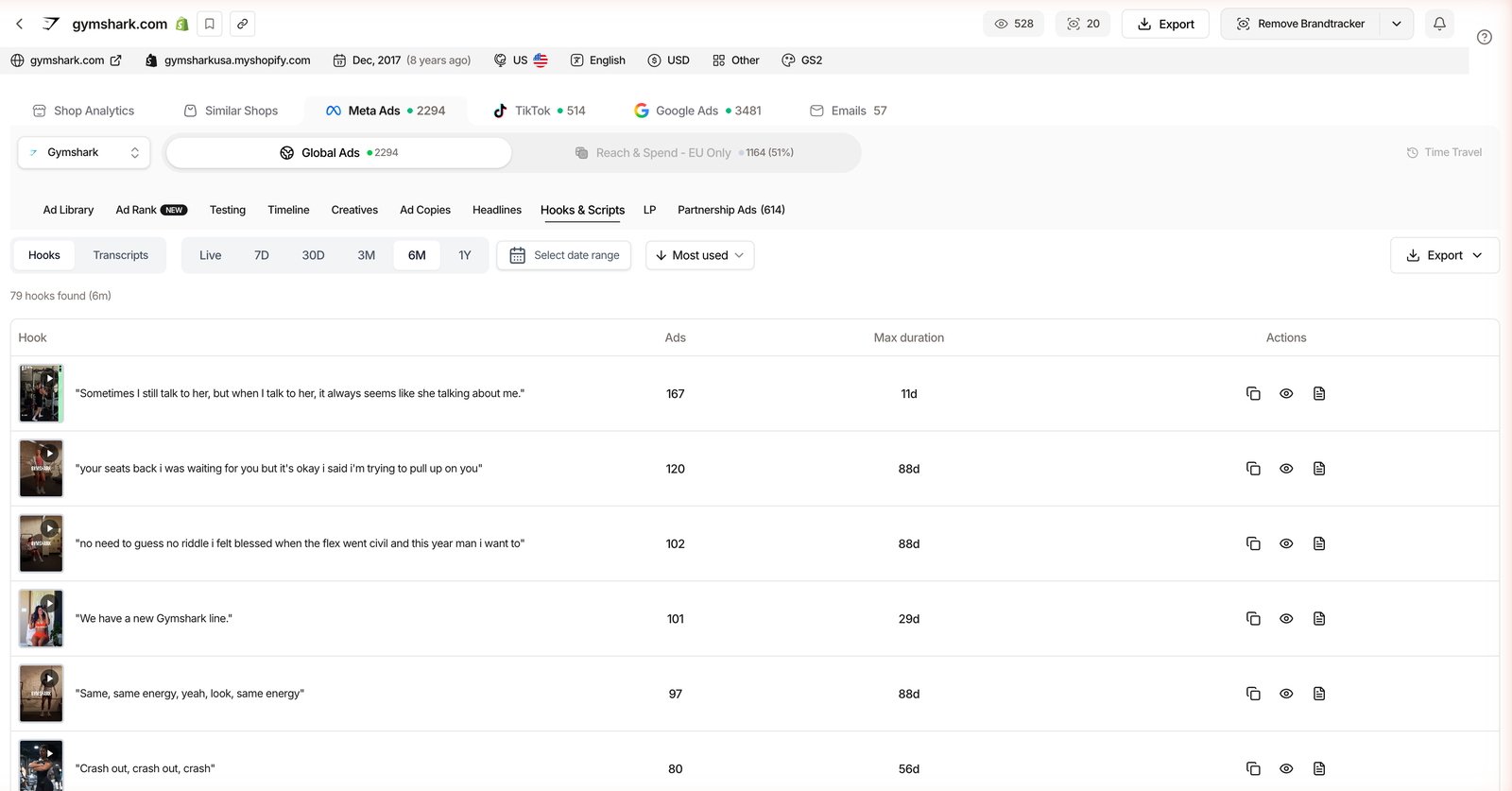
Pair that with Ad Copies and Headlines, which rank the exact text by usage and longest run time, and you can see the angle a competitor keeps coming back to. That repetition is the tell: they do not reuse copy that fails.
Related guide
Brandtracker: Track a Store’s Whole Funnel
Creatives, hooks, transcripts and test waves for one competitor.
Advanced: track a competitor’s whole creative pipeline
The best operators do not judge a creative in isolation. They watch how it was born. A winner almost always started as one test in a wave of many.
The Brandtracker Testing tab replays that, day by day: how many ads a store launched, the reach range, and how long each survived. The Timeline tab draws a Gantt chart of every ad’s lifespan (over 3,300 ads for a store like Gymshark), and Time Travel lets you rewind to an earlier state. If you are still comparing platforms, our roundup of the best ad spy tools shows where each one draws the line.
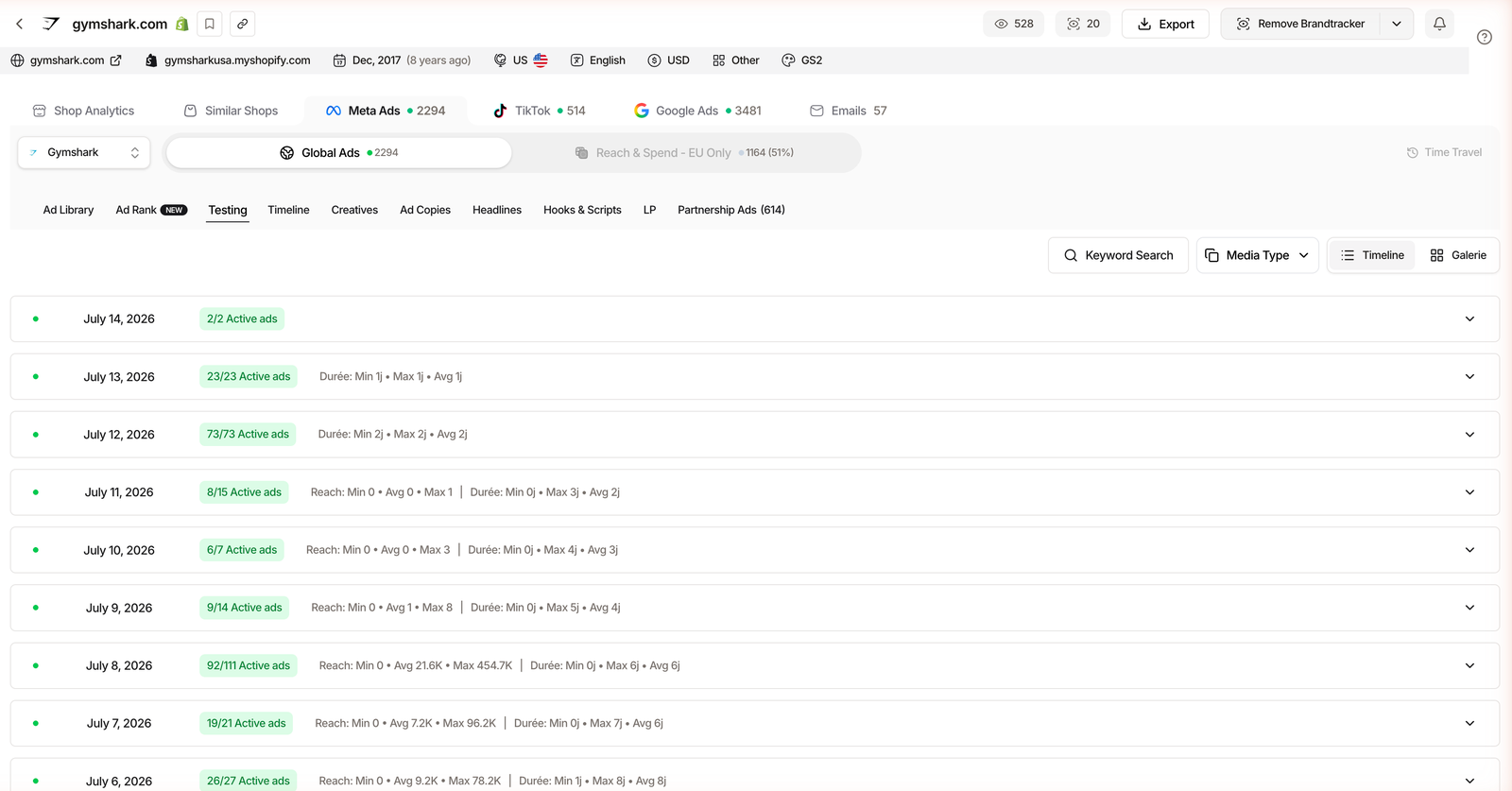
Read a pipeline this way and the copy-the-viral-video instinct dies fast. You stop seeing single ads and start seeing which angles a store commits real budget to over time.
Plan check: the Ads and Advertisers modules start on Pro ($89/mo, or $62/mo billed annually). Starter ($59) covers Shops, 2 Brandtrackers and the free extension, but not ad spy.
Boiled down, reading a creative is four moves. Here they are in order.
Your winning-creative checklist
Put it all together and the workflow is a short checklist. Run it top to bottom on any competitor and you will separate the durable winners from the noise every time.
| Phase | What to check | Green light |
|---|---|---|
| Discover | Ad is live in a public library | Active, not paused |
| Rank | Ad Rank position | Top 1% to 5% |
| Longevity | Days running | Weeks, not days |
| Duplication | Duplicate count | High and repeated |
| Creative | Hook, transcript, landing page | Clear angle you can adapt |
| Validation | Survived the test waves | Outlived its cohort |
FAQ
What makes an ad creative a “winner”?
Longevity, rank and duplication, not views. A winner keeps running after weeks, sits high in Ad Rank, and gets duplicated because the advertiser keeps funding it. Its estimated EU spend trends up rather than falling. A creative can pull a million views and still get cut in three days, so treat view count as attention, never as proof it sold.
How can I find winning ad creatives for free?
Use the public transparency libraries: Facebook Ad Library, TikTok Creative Center and Google’s Ads Transparency Center, plus TrendTrack’s free Chrome extension. They show which ads are live and, roughly, how long they have been running. You get longevity, not rank or spend, but that is enough to build a first shortlist before you pay for anything.
What is Ad Rank in TrendTrack?
Ad Rank is a scoring of winning ads derived from Facebook data, shipped January 29, 2026. It works even when EU impression data is missing, and it comes with presets for Top 20%, 10%, 5% and 1%. Sorting by Ad Rank surfaces the creatives that perform, instead of just the newest ones in the library.
How long should a winning creative run before I model it?
There is no magic threshold, but an ad that has run for several weeks and keeps duplicating is a strong signal. Advertisers do not pour budget into a creative that loses money. Use the Longest Active sort and the Brandtracker Timeline to read the exact lifespan before you invest time rebuilding a hook or angle for your own store.
Do I need a paid tool to find winning creatives?
Not to start. The free libraries are enough to spot live ads and rough duration. You need a paid layer when you want the rank, the estimated spend, the hook transcripts and the test waves in one place. The Ads module starts on Pro ($89/mo, or $62/mo billed annually); Starter ($59) does not include it.
The takeaway
Winning ad creatives are not the flashiest videos. They are the durable ones, and durability is a data signal, not a gut feeling.
Start free to see what is live. Move to rank, spend and transcripts when you are ready to scale and the shortlist matters more than the scroll.
Want the rank behind the creative, not just the view count?
Sort 337M+ ads by Ad Rank, days running and duplicates, then read the hook transcript in one place. Ad spy starts on Pro ($89/mo, or $62/mo annually), and the Chrome extension is free to try first.