Last verified July 17, 2026. Est. Revenue column and Shops filters checked live inside a paid TrendTrack account.
The fastest way to read a competitor’s monthly sales is not to guess from its follower count. It is to open one column that most sellers never switch on.
You are looking at a Shopify store and the question is simple: how much is this thing actually pulling in? A Shopify sales tracker answers it in seconds, across a whole index of stores, without a single email to their team. For the suite around that one column, read how the platform works.
A Shopify revenue checker estimates a store’s sales from public signals like traffic and best-seller price. In TrendTrack, the Est. Revenue column shows a store’s estimated monthly and daily sales across 1,868,025 Shopify stores. It ships on every plan but sits hidden by default, so you switch it on once and read any store like a dashboard.
Disclosure: some links on this page are affiliate links. If you subscribe through them we may earn a commission at no extra cost to you. We tested every TrendTrack feature mentioned here on a paid account.
You can start for free on the Chrome extension to x-ray one store, then open the full Shops index when you want to read revenue across thousands at once.
How to check any store’s estimated revenue
The whole job is three moves: open the index, unhide the revenue column, then sort and read. Here is the shortcut before we walk each screen.
Step 1: Open the Shops module
Head into TrendTrack’s Shops module and you land on a searchable table of every store in the index. The default views are ready to use: All Shops, Weekly Gems, Top Scaling, Market Leaders and DTC Brands.
Each row is a real Shopify store with its niche, monthly visits and live ad count. Revenue is not showing yet, and that is by design.
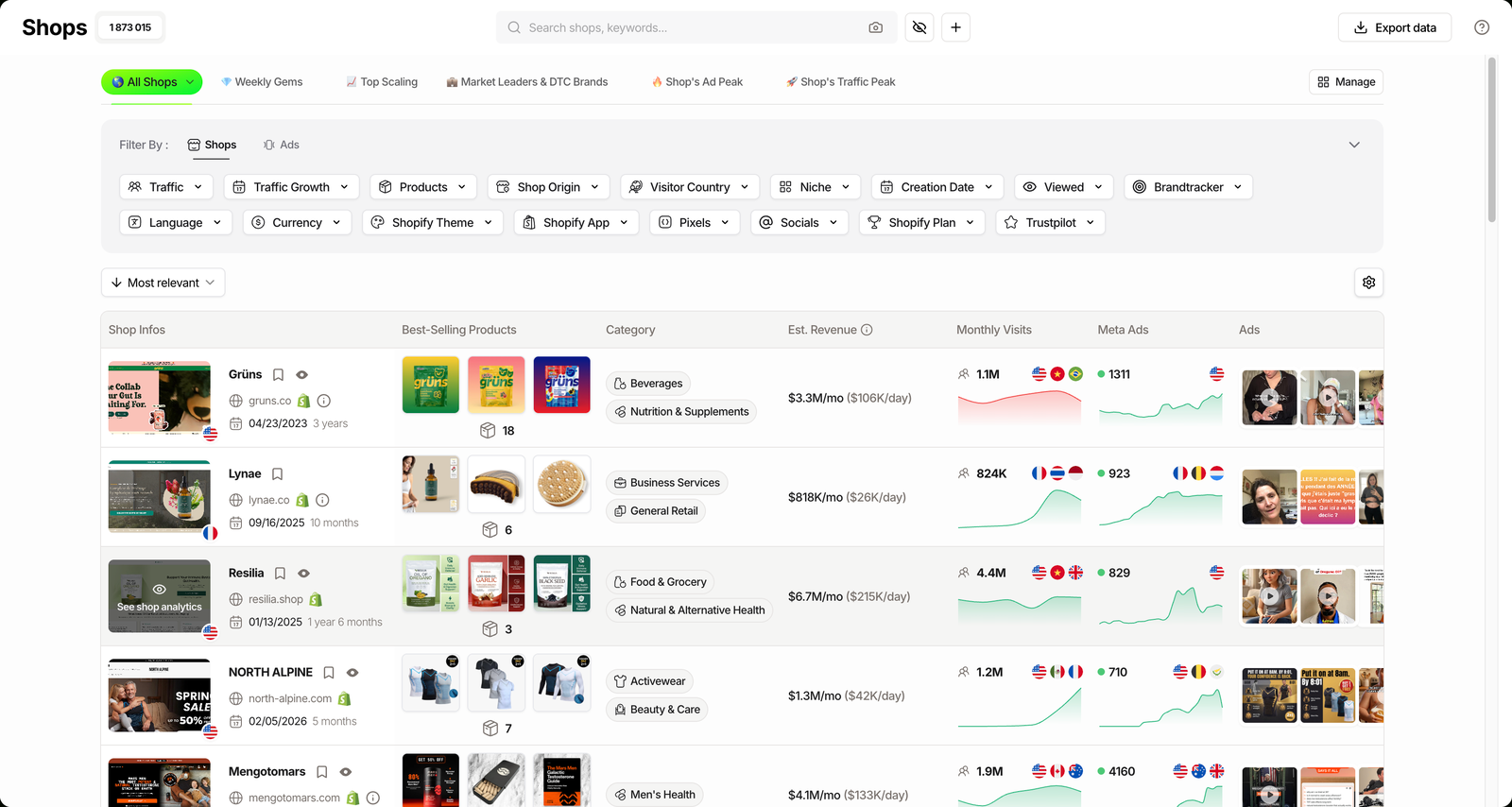
Step 2: Unhide the Est. Revenue column
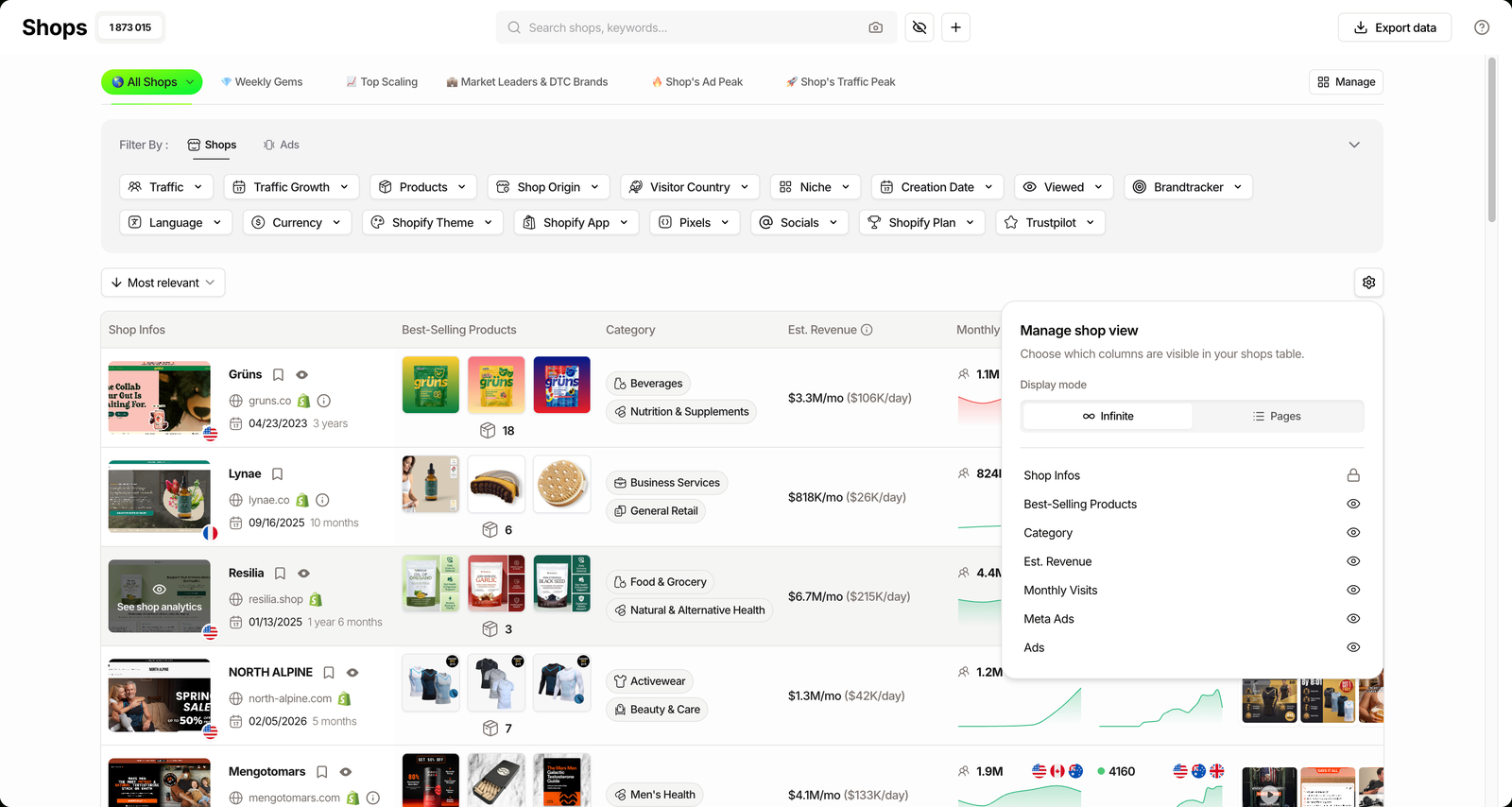
Click the gear labeled Manage shop view. This is where you pick which columns the table shows, and Est. Revenue is switched off by default.
Toggle it on. The table redraws with a revenue figure against every store, no reload and no export needed.
Step 3: Sort and read the numbers
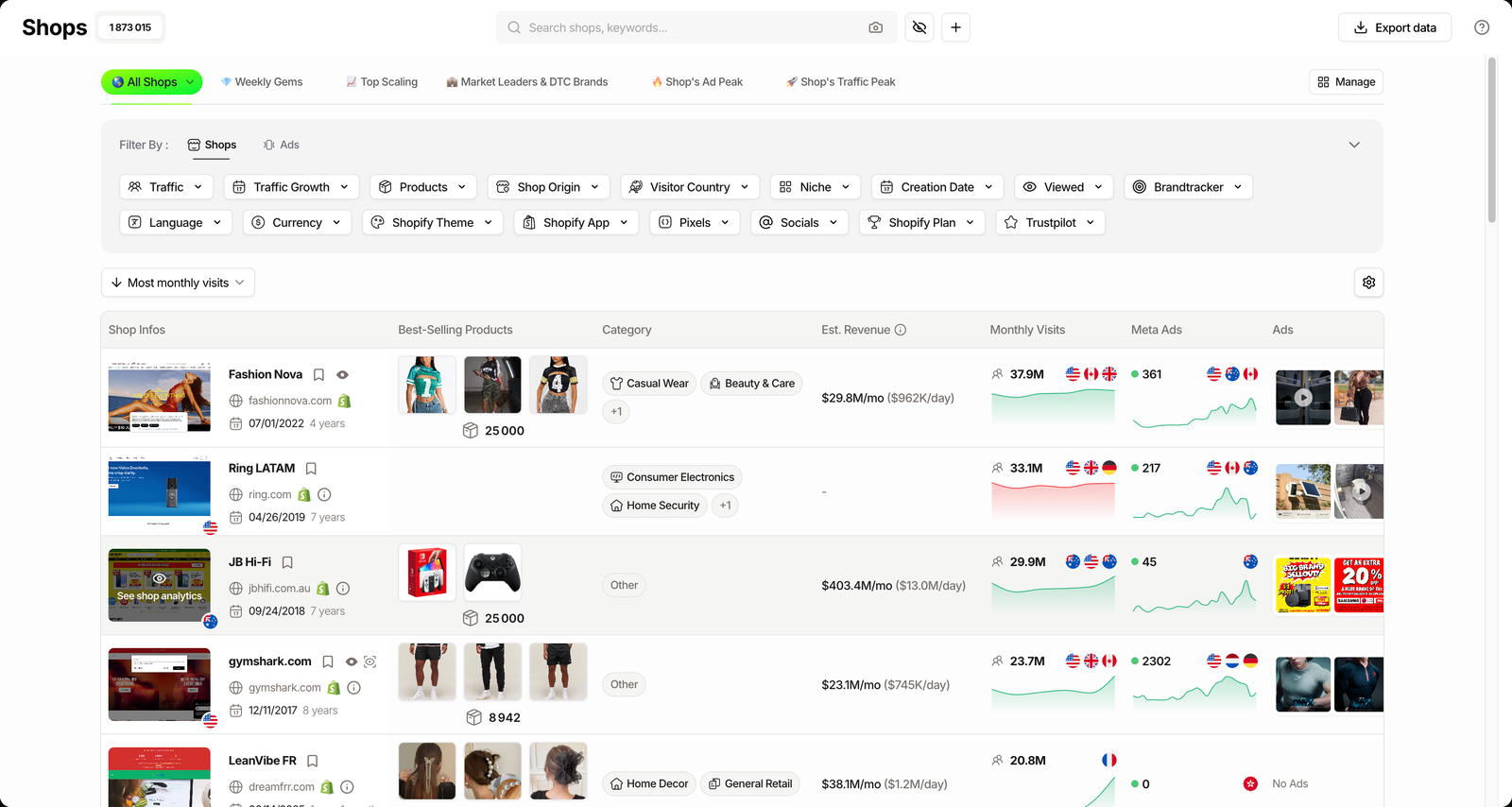
Now sort the list. Most monthly visits, Most live ads and Fastest growing all reshuffle the table, and the revenue column moves with it.
Read across a row and you get the store, its traffic, its ad activity and its estimated $/mo and $/day side by side. That single line is the read most people pay a researcher for.
Related guide
Shops Database Tutorial: 1.8M Shopify Stores, 17 Filters
Narrow the index before you read revenue: niche, traffic, best-seller price and 14 more filters.
What the Est. Revenue number actually tells you
The figure is an estimate, built from public signals rather than a Shopify login. Traffic, best-seller price, live ad volume and niche feed a model that outputs both a monthly and a daily number.
Think of it as a speedometer read from outside the car, not the odometer inside. It is directional, and on large stores it climbs fast: TrendTrack has estimated top performers north of $3M/mo, or roughly $100K/day.
Plan check: the Est. Revenue column ships on every plan, Starter included ($59/mo, or $42/mo billed annually). It is just hidden by default. The Ads and Advertisers modules are the ones that start on Pro ($89/mo), not the revenue read.
Revenue is one column among several, and each answers a different question about a store. Here is what the table is really giving you.
| Column | What it answers | Hidden by default? |
|---|---|---|
| Shop Infos | Domain, niche, age, country. | No |
| Best-Selling Products | What is driving the store and at what price. | No |
| Est. Revenue | Estimated sales, in $/mo and $/day. | Yes |
| Monthly Visits | Estimated traffic, the base the revenue model reads. | No |
| Meta Ads / Ads | Whether the store is actively spending to grow. | No |
Read those columns together and the revenue number stops being a lonely guess. Traffic explains it, best-seller price scales it, and live ads tell you whether it is climbing.
Source: TrendTrack Shops module, checked July 17, 2026.
See the Est. Revenue column live
Three ways sellers use it
The number is the same for everyone. What you do with it depends on where you sit.
Beginner: sanity-check a niche before you enter
Before you commit weeks to a niche, filter the index to it and skim the revenue column. If the top stores are estimated in the low hundreds a month, demand is thin. If several sit in six figures, the money is there.
- Filter by niche, sort by Most monthly visits.
- Read the revenue spread across the top rows.
- Note the best-seller prices that support it.
Scaler: build a revenue watchlist of competitors
Pick the stores you actually compete with and track their estimated revenue over time. A steady climb tells you a rival is scaling before their ad footprint makes it obvious.
Related guide
Find Stores by Shopify App and Theme
Screen the index by the apps and theme a store runs before you read its revenue.
Agency or brand: qualify a store before outreach
If you sell services or wholesale, the revenue read is a qualifier. A store estimated at $500K/mo can afford your retainer; one at $4K/mo probably cannot.
You walk into the call already knowing the rough size of the account, which changes how you pitch.
Where the estimate stops (and how to cross-check it)
Keep in mind this is a model, not audited revenue. It does not see refunds, margins, wholesale orders or a store’s real conversion rate, so treat it as an order of magnitude rather than a figure to the dollar.
Good for
- Comparing stores at a glance
- Spotting order-of-magnitude size
- Screening a niche fast
- Building a watchlist over time
Not for
- Exact revenue to the dollar
- Profit or margin figures
- Wholesale or offline sales
- Legal or valuation proof
The fix is to triangulate. Read the estimate next to Monthly Visits, live ad count and their estimated ad spend, and a consistent story emerges: a store spending heavily on Meta with rising traffic and a high revenue estimate is almost certainly scaling.
We pressure-tested this across modules on a paid account, and the estimate held up as a comparison tool far better than as a precise figure. For the full picture of how the data fits together, see our full TrendTrack review.
FAQ
How accurate is TrendTrack’s Shopify revenue estimate?
It is an estimate, derived from estimated traffic and public signals like best-seller price, ad volume and niche, not an audited figure. Treat it as directional: strong for comparing stores and reading order of magnitude, weaker as a to-the-dollar number. Cross-check it against Monthly Visits, live ads and estimated ad spend before you act on it.
Is the Est. Revenue column free?
The Est. Revenue column is included on every plan, Starter included, which is $59/mo or $42/mo billed annually. It is simply hidden by default, so you switch it on in Manage shop view. The Ads and Advertisers modules are the parts that start on Pro, but the revenue column is not gated that way.
Can I see how much any Shopify store makes per day?
Yes, Est. Revenue shows both a monthly and a daily figure for each store. On large stores that daily number can run into six figures, with TrendTrack estimating top performers around $100K/day. It stays an estimate, so read it as an order of magnitude rather than a bank statement.
How does TrendTrack estimate store revenue?
It reads public signals: estimated monthly traffic, best-seller price, live ad volume and niche. There is no access to a store’s Shopify account, so nothing here is certified sales data. That is exactly why the column is labeled Est., for estimated.
Can I sort or filter stores by revenue?
You sort the list by Most monthly visits, Most live ads or Fastest growing and read the Est. Revenue column alongside it, rather than filtering on a revenue threshold directly. That runs across an index of 1.87M+ stores you can already narrow by 17 filters, including niche, traffic and best-seller price.
The fastest read on a competitor’s sales
If you only need one store, the free Chrome extension will x-ray it. If you want to compare hundreds and build a watchlist, the Shops index with Est. Revenue switched on is the tool, and it starts on the cheapest plan.
How much is that competitor really pulling in?
Unhide Est. Revenue and read estimated sales across 1.87M+ stores. From $59/mo, or $42/mo billed annually, with the revenue column on every plan.