Last verified July 15, 2026. Theme, app and pixel filters checked live inside a paid TrendTrack account, plus the free Chrome extension.
The quickest way to reverse-engineer a Shopify competitor is not to stare at its homepage. It is to read the stack underneath: the theme it runs, the apps bolted onto checkout, the pixels firing in the background.
Do that on one store and you know how it is built. Do it across the whole database and you find every store already winning on the same setup. Everything else the platform reads is summarised in the tool in plain English.
To detect a Shopify store’s theme, open it in TrendTrack or the free Chrome extension: it reads the active theme, installed apps and tracking pixels in one view. To search the other way, filter the 1.87M-store database by theme, app or pixel and surface every store on that stack.
Disclosure: some links on this page are affiliate links. If you subscribe through them we may earn a commission at no extra cost to you. We tested every TrendTrack feature mentioned here on a paid account.
What TrendTrack’s tech filters actually show
The Shops module indexes 1.87M Shopify stores. Of its 17 filters, three read the tech stack, which is what turns a browse into a detector.
The first is Shopify Theme. It lists every theme with a live count of how many stores run it, so Dawn, Sense, Shrine Pro, Impulse and Refresh each show their own store total. The same three filters live inside TrendTrack’s Shops database alongside niche, traffic and best-seller price.
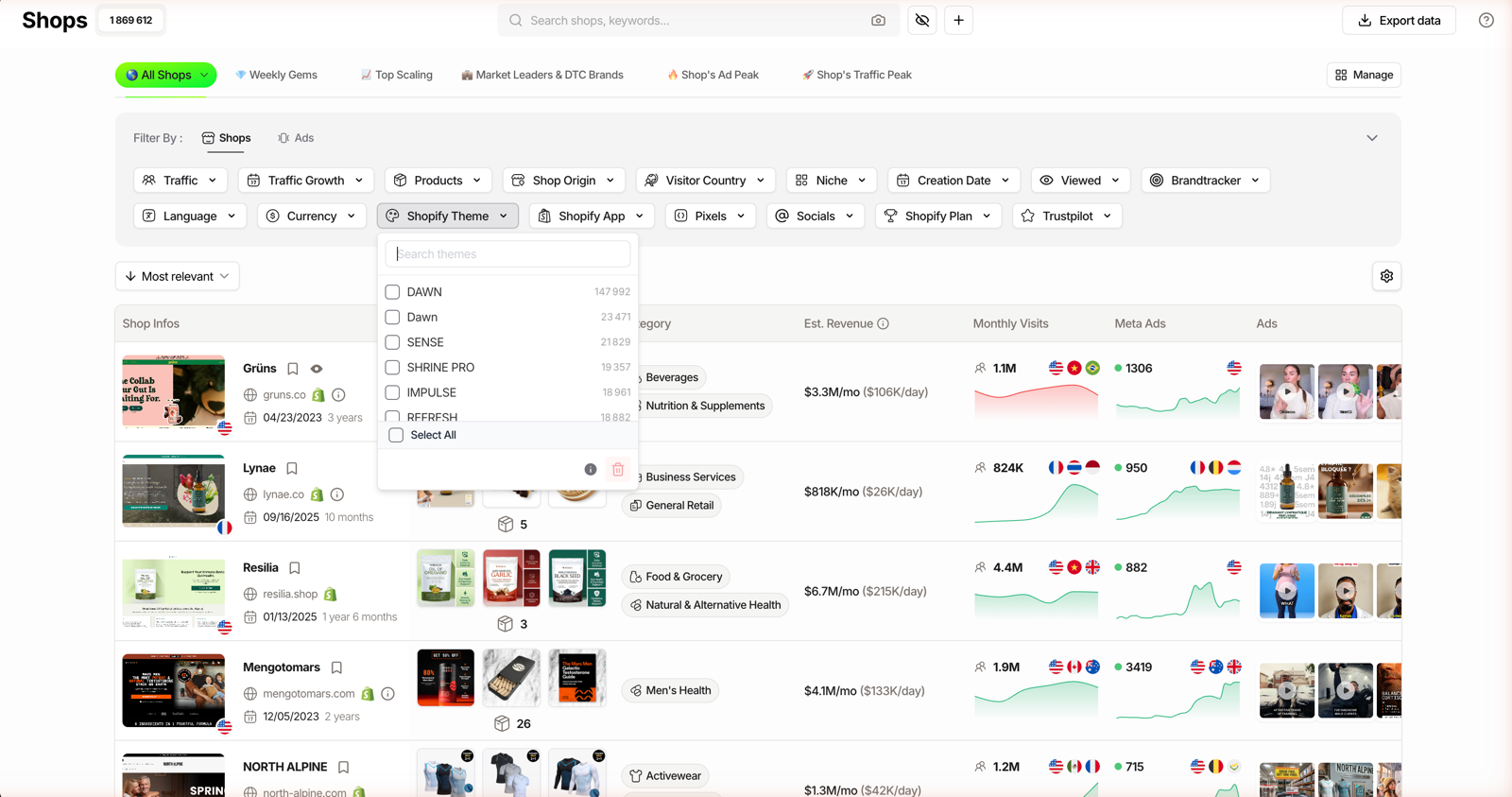
Those counts are a signal in themselves. Dawn tops the list because it is Shopify’s free default, so a store on a paid theme like Shrine Pro has already put money on the table, which tells you something before you read a single product page.
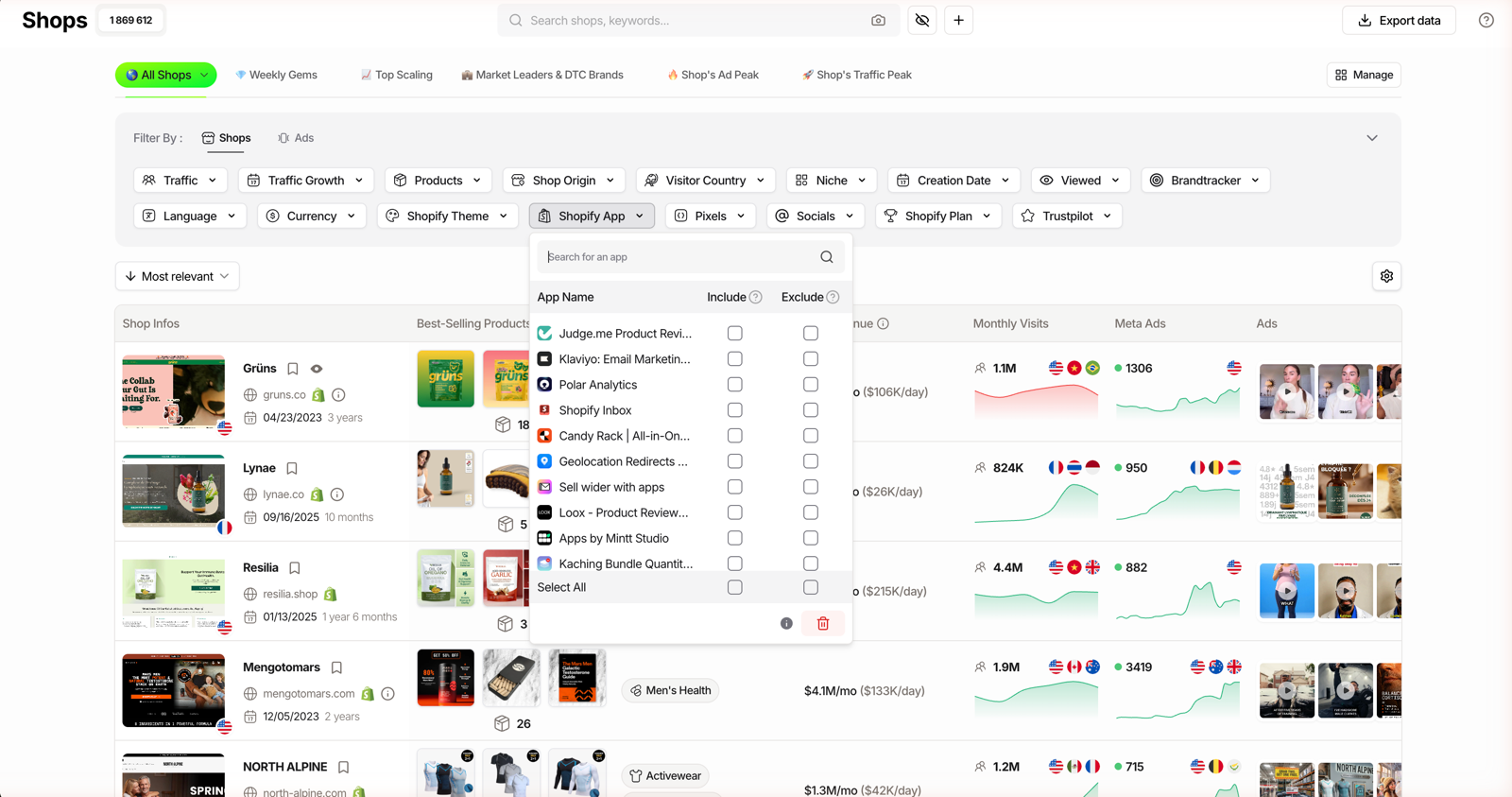
The next two work the same way. Shopify App lets you Include or Exclude by app (Judge.me, Klaviyo, Polar Analytics, Loox, Kaching Bundle), and Pixels filters by the trackers a store fires: Meta, TikTok, Google Ads, GA, GTM, Snap, Pinterest, Applovin, LinkedIn, Microsoft and Quora.
| Filter | What it detects | Example values | Min plan |
|---|---|---|---|
| Shopify Theme | Active theme, with a store count per theme | Dawn, Sense, Shrine Pro, Impulse | Starter |
| Shopify App | Installed apps, Include or Exclude | Judge.me, Klaviyo, Loox, Kaching | Starter |
| Pixels | Tracking pixels live on the store | Meta, TikTok, Google Ads, GA, Snap | Starter |
| Technology (Ads) | Platform behind an ad’s site, cross-filtered with ads | Shopify, WooCommerce, Magento, PageFly | Pro |
You do not even need the app to check one store. The TrendTrack Chrome extension, rebuilt on March 13, 2026 and free with no usage limits, x-rays the same stack on any Shopify page you land on. Grab it when you spin up a free TrendTrack account.
Plan check: the theme, app and pixel filters sit in the Shops module and the extension, both available from Starter ($59/mo, or $41/mo billed annually), with the extension free to everyone. Cross-filtering tech against live ads (the Technology filter) starts on Pro ($89/mo). See the full pricing breakdown before you pick.
How to detect any store’s theme, apps and pixels
The workflow is three moves, whether you are checking one store or listing a thousand.
Step 1: open Shops or drop in a domain
From the workspace, open the Shops module. If you already have a target in mind, paste its domain into the search bar and TrendTrack takes you to that store’s page.
Step 2: apply the tech filter
Pick Shopify Theme, Shopify App or Pixels from the filter list, then Include the value you want (or Exclude the one you do not). Stack a niche or a visitor country on top to keep the list tight.
Step 3: read the shop card
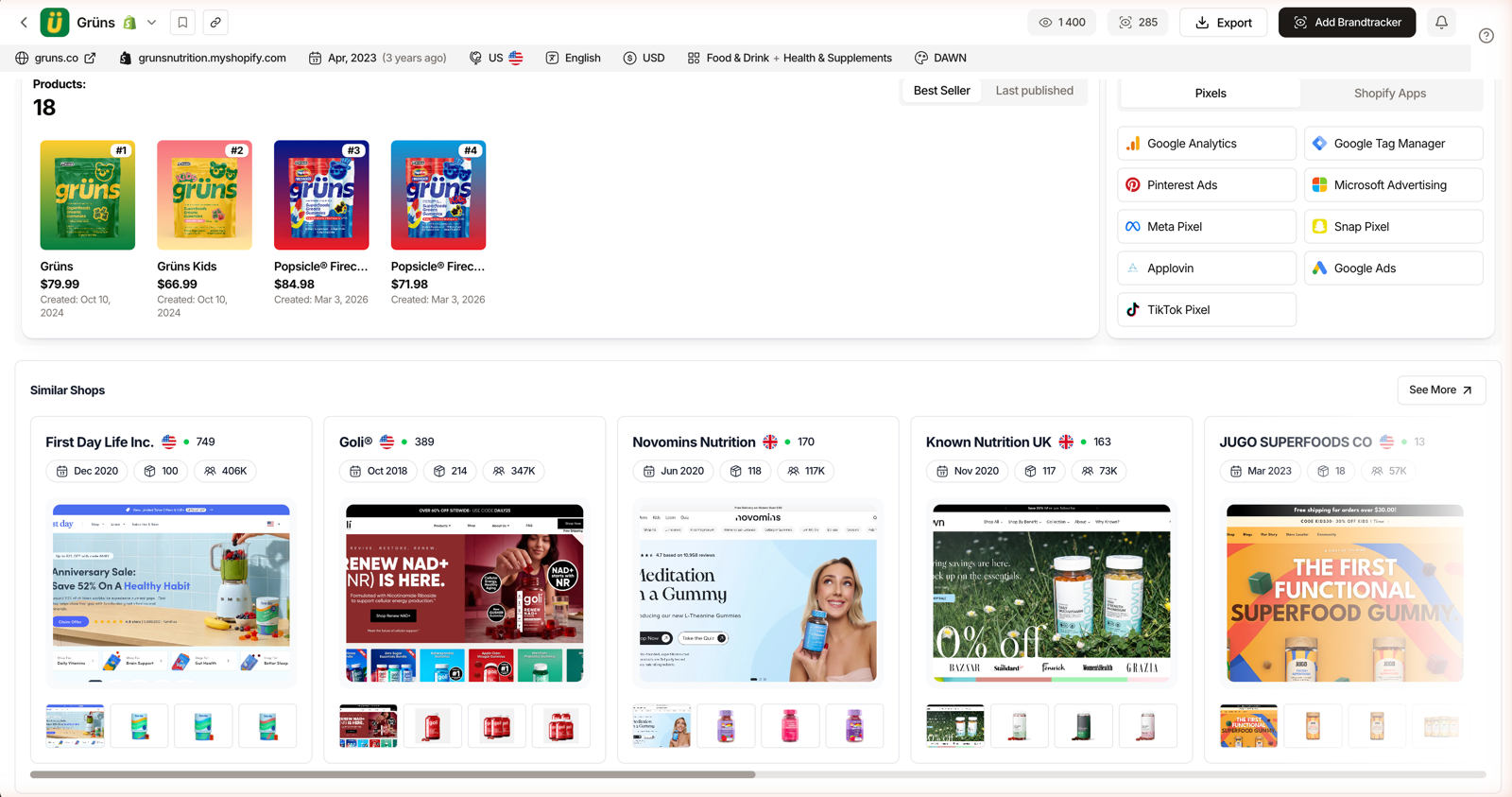
Open any result and scroll its Shop Analytics page to the detected Pixels and Shopify Apps block. That is where a single store confesses its full stack, next to its estimated traffic and product list.
Related guide
How to Use the TrendTrack Chrome Extension
X-ray a single store’s theme, apps and pixels in one click, free.
Three ways sellers use the tech filter
The detector is only as good as the question you point it at. Each of these starts from a filter and ends with a shortlist you can act on, sorted by whatever matters to you: traffic, best-seller price or ad volume.
Find every store winning on a theme you can afford
If you are on a budget, filter for stores running Dawn, Shopify’s own free default from the Shopify Theme Store, then sort by traffic. You get a list of stores proving that a free theme is no ceiling.
Copy a proven app and pixel stack
Filter for the apps a category leader runs, say Klaviyo plus Loox plus a Meta pixel, and you are looking at a working playbook rather than a guess. The pixel list also tells you which ad channels a store actually funds.
Flip a pixel filter to Exclude and the reverse question opens up: which stores in your niche are scaling without a TikTok pixel, or leaning on Google Ads while everyone else crowds Meta. That gap is often where a cheaper channel is hiding.
Related guide
Ads Library Tutorial
Cross-filter 337M ads by the shop’s theme, app or pixel.
Qualify a competitor before you copy them
A slick theme means nothing on its own. Read the theme, the apps and the estimated traffic together, and you can tell a real operation from a store that just bought a nice template last week.
Source: TrendTrack app, checked July 15, 2026.
Where the tech detector stops (and the workaround)
Detection reads public signals in a store’s code, so it is a strong lead, not a certified audit. Front-facing themes and apps show up reliably, but silent back-end apps can slip through and a custom or headless build can read as unknown.
The workaround is to never trust one signal alone. Cross-check the theme against the apps, the pixels and the estimated traffic on Shop Analytics, and use Include and Exclude to narrow a list rather than to declare a verdict.
Reality check: a theme name tells you the shell, not the customisation. Two stores on the same theme can look nothing alike, so read the whole stack, not one label.
The extension helps here too. Because it reads estimated traffic, visitor country and currency next to the stack, a one-off lookup gives you the context that a bare theme name never could, in the time it takes to load the page.
FAQ
How do I find out what theme a Shopify store uses?
Open the store in the free TrendTrack Chrome extension or on its Shop Analytics page: it reads the active theme (Dawn, Sense, Shrine Pro and others) along with the apps and pixels installed. To search the other way, TrendTrack’s Shops module has a Shopify Theme filter with live store counts per theme, so you can list every store running a given theme across 1.87M indexed shops.
Can you detect the apps a Shopify store is running?
Yes. TrendTrack detects front-facing Shopify apps (review apps like Judge.me and Loox, email tools like Klaviyo, bundle apps like Kaching) on the Shop Analytics page and lets you Include or Exclude by app across the whole database. Detection is signal-based, so visible front-end apps are the most reliable, while silent back-end apps may not always show.
Is there a free Shopify theme detector?
The TrendTrack Chrome extension is free for everyone (rebuilt March 2026, no usage limits). Install it, open any Shopify store, and it x-rays the theme, apps, pixels, estimated traffic and currency. The in-app filters that search 1.87M stores by theme or app live in the Shops module, included from the Starter plan at $59/mo (or $41/mo billed annually).
Does TrendTrack show which pixels a store has installed?
Yes. The Pixels filter covers Meta, TikTok, Google Ads, GA, GTM, Snap, Pinterest, Applovin, LinkedIn, Microsoft and Quora, with Include and Exclude logic. On a single store’s Shop Analytics page you see the detected pixels directly, which tells you which ad channels that store actually runs.
How accurate is Shopify theme and app detection?
It is based on public signals in the store’s code, so themes and front-end apps are detected reliably, while custom or headless builds can read as unknown and silent back-end apps may be missed. Treat it as a strong lead, not a certified audit: cross-check theme, apps, pixels and estimated traffic together before you model a store.
The one-line verdict
Use the free extension for a quick check on one store, and the Shops filters when you want every store on a stack. Together they turn a competitor’s setup from a mystery into a list.
Want to see what your competitors are built on?
Filter 1.87M stores by theme, app or pixel, or x-ray a single one with the free extension. From $59/mo, or $41/mo billed annually.