Last verified July 2026. Prices, counters and release dates checked live inside a paid TrendTrack account.
Most people think they know how to spy on ads. They open Facebook’s own Ad Library, sort by newest, screenshot a few creatives, and call it research.
That is not ad spy. That is scrolling. It tells you an ad exists, not whether it is winning, how long it has run, or what the advertiser actually spends. Landing here first? The tool in plain English covers the other modules.
The Ads module in TrendTrack answers those questions instead. Here is how to use it as an ad spy tool rather than a screenshot folder.
TrendTrack’s Ads library indexes 337M+ ads across Meta, TikTok and Google. You filter by Ad Rank to surface proven creatives, read estimated EU/UK spend from transparency data, and open any ad to see how long it has run and where it sends traffic.
Plan check: the Ads module starts on Pro ($89/mo, or $62/mo billed annually). Starter ($59) covers Shops, 2 Brandtrackers and the free Chrome extension, but not ad spy. If ad spy is why you are here, budget for Pro. Full breakdown in the Pro plan pricing breakdown.
Disclosure: some links on this page are affiliate links. If you subscribe through them we may earn a commission at no extra cost to you. We tested every TrendTrack feature mentioned here on a paid account.
Step by step: spy on live ads in four moves
The mistake is treating the library as a feed. Treat it as a funnel: pick a surface, filter to the winners, read the signals, then save what matters. Four moves.
Step 1: Pick your platform
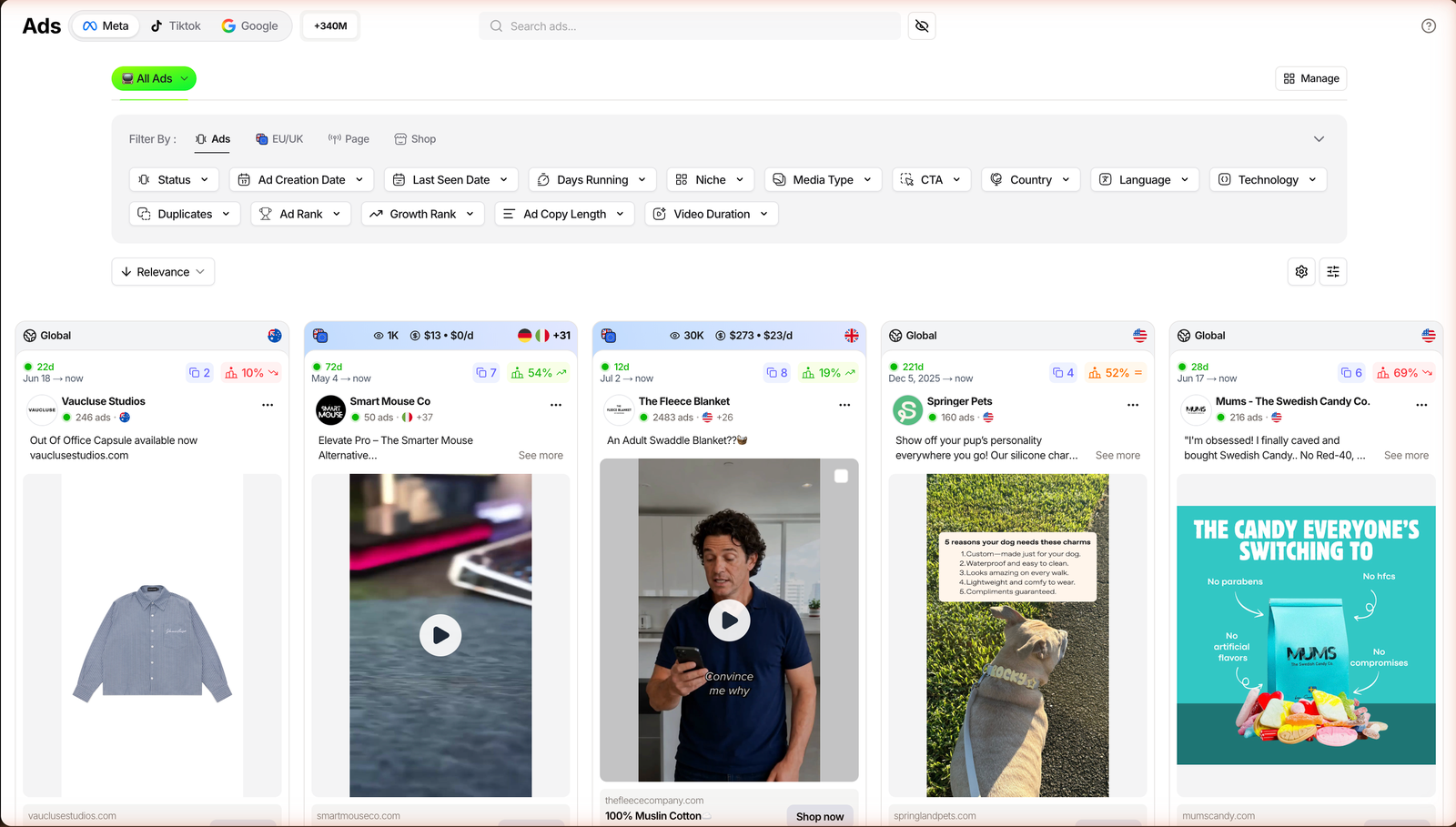
The module opens on three platform tabs: Meta, TikTok and Google. Each tab is its own library with its own filters and counters, so decide where your buyer actually scrolls before you touch anything else.
Meta is the deepest surface for dropshipping and DTC. TikTok adds organic content next to paid, and Google covers search and shopping creatives. Start on Meta if you are unsure.
Step 2: Filter to the winners
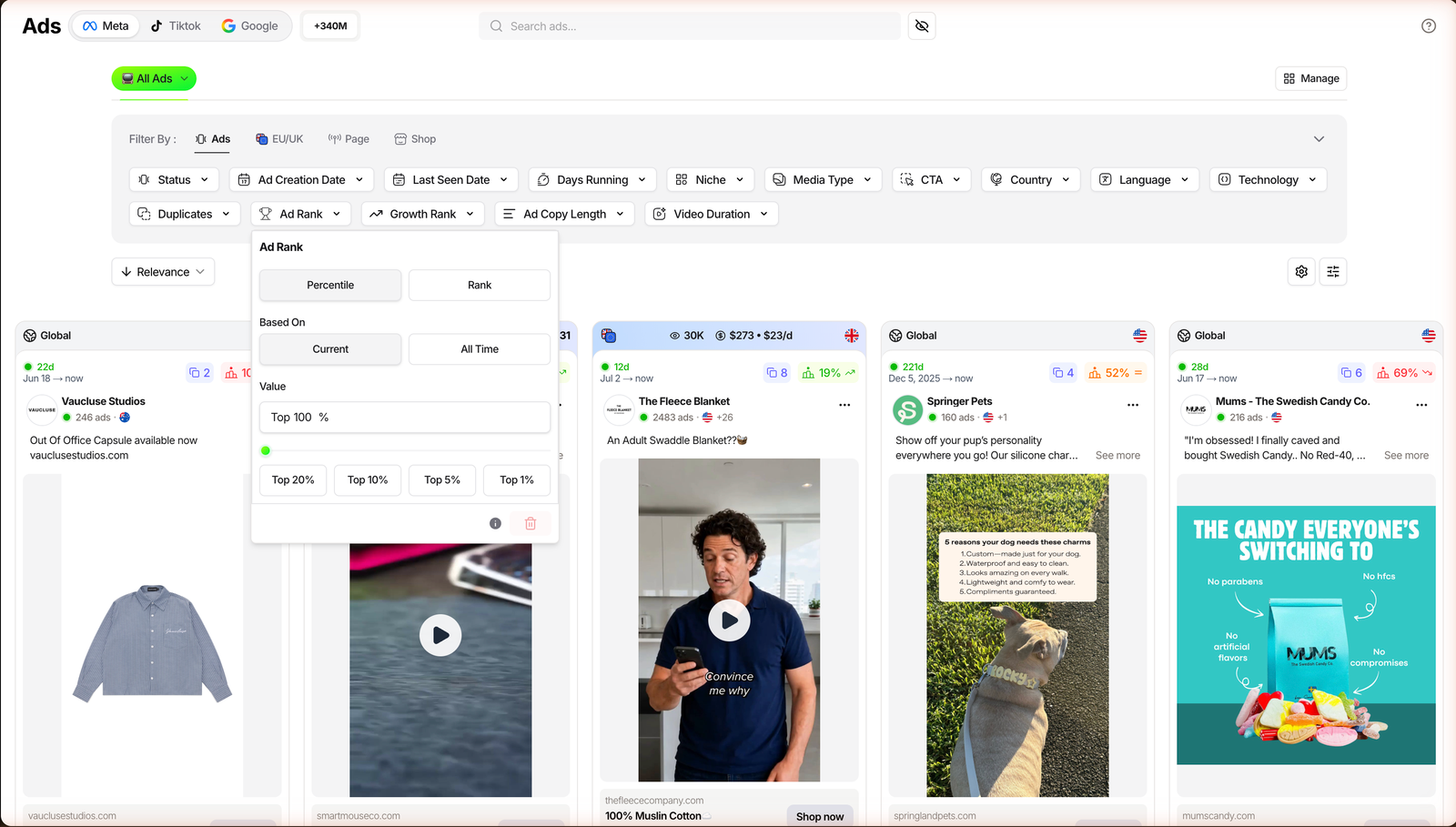
This is where ad spy stops being scrolling. The single most useful filter is Ad Rank: TrendTrack’s ranking of the best performing ads, derived from Facebook data and available even when there is no EU reach to read. It shipped on January 29, 2026.
Set the preset to Top 1% and the feed collapses from millions of ads to the handful that are genuinely scaling in your niche. Add Growth Rank (Rising / Stable / Falling) to catch creatives on the way up, not the way out.
Step 3: Open the ad and read the signals
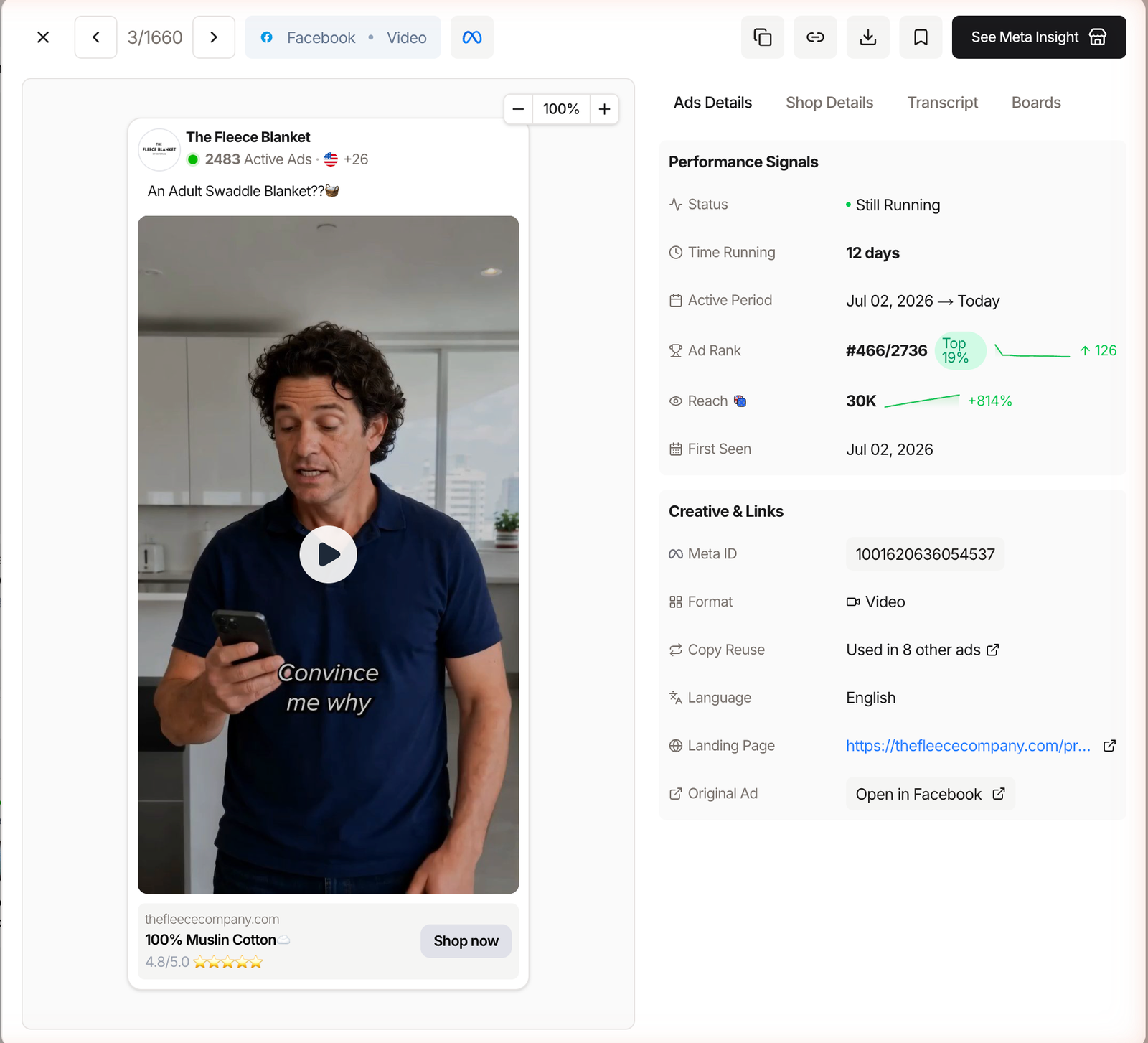
Click any card and the detail modal is where the real intelligence sits. The Ads Details tab shows the ad’s rank history with a sparkline (for example #82/159, Top 52%), how long it has been running, and its active period.
Next to it, Copy Reuse tells you when the same script powers other ads (“Used in 4 other ads”), which is the clearest sign an advertiser is doubling down. You also get the landing page URL and a link back to the original ad on Facebook. To rank the pages rather than the single ads, see which advertisers are scaling.
Step 4: Save finds to a Board
Do not lose the good ones in a browser tab graveyard. The Boards tab lets you save an ad with tags and a rating, so your swipe file is searchable next week instead of a folder of screenshots.
What the Ads library actually reveals
Once you know the workflow, the scale is the point. This is not a sample, it is a working index of what is running right now.
Counters and release dates from the app’s What’s new log, checked July 2026.
Ad Rank and Growth Rank are the two signals that separate this from a raw feed. Rank tells you a creative’s standing among its peers; growth tells you the direction it is heading. Together they answer the only question that matters: is this ad worth copying?
Then there is spend. For ads shown in the EU and UK, transparency rules expose real reach and budget, and TrendTrack converts that reach into estimated spend using a configurable CPM ($9 by default). You can also filter by Gender and Age to see who the impressions hit.
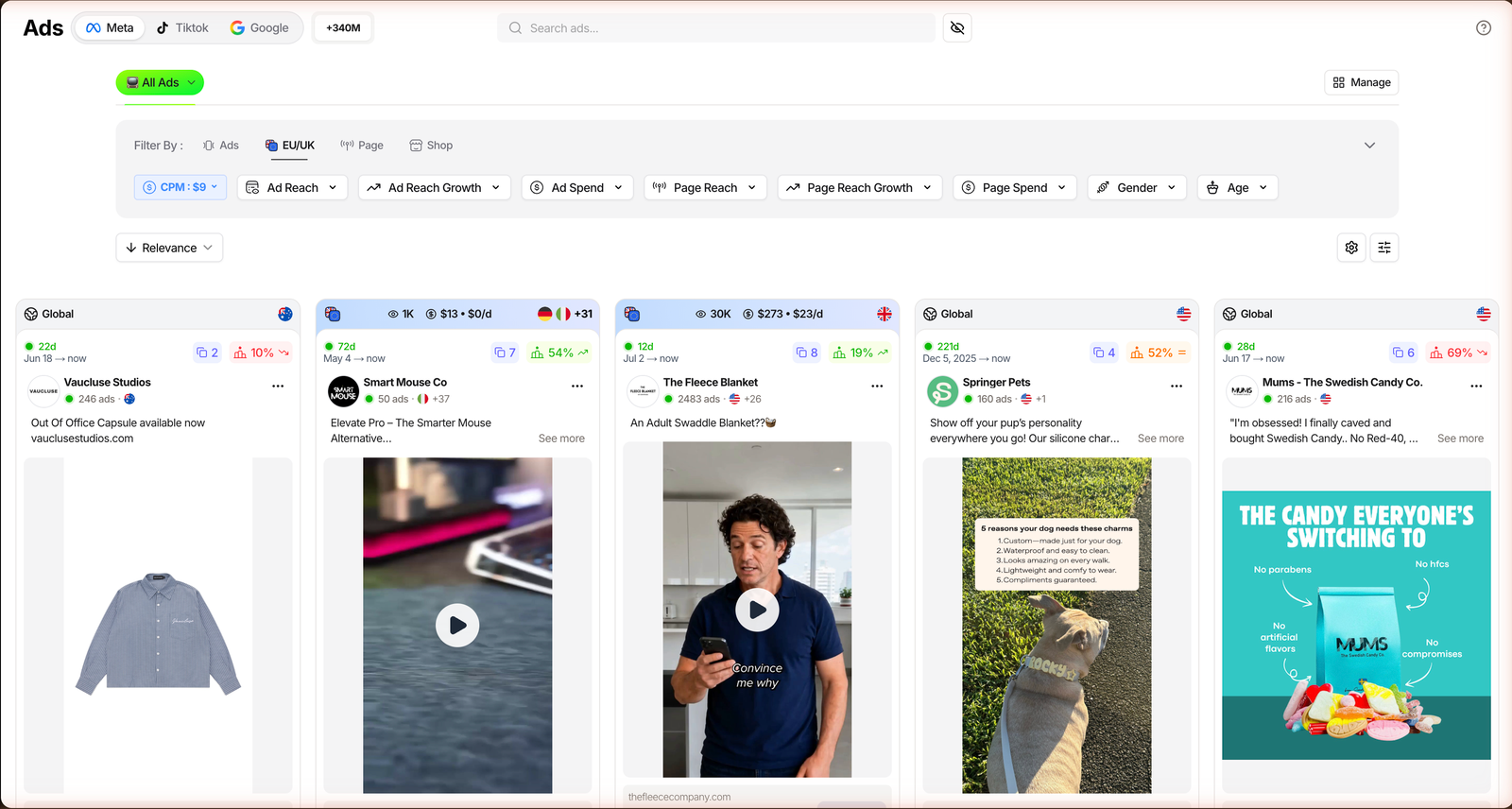
Keep in mind that this spend is an estimate, not an audited number, and it only exists for ads served in the EU or UK. Outside that region you still see global reach, just not a spend figure.
Related guide
Google Ads Transparency Center: The Complete Guide
Where Google’s own free data ends and where TrendTrack picks it up.
The filters split into four groups, each answering a different question about an ad. Here is what each one is for.
| Group | What it filters | Killer filter |
|---|---|---|
| Ads | The creative itself: status, days running, media type, CTA, language, technology. | Ad Rank Top 1% + Growth Rank |
| EU / UK | Real reach and spend from transparency data, plus gender and age. | Configurable CPM ($9 default) |
| Page | The advertiser: page age, live ads, followers, whitelisted creators. | Partnership Ads |
| Shop | The store behind the ad: traffic, products, pixels, theme, origin. | Cross-filter by Brandtracker |
Three ways operators actually use it
Same library, three jobs. Which one you run depends on where you are.
The beginner hunting a product
Filter Meta by Ad Rank Top 1%, media type Video, and a long Days Running window. An ad that has scaled for weeks is a product with demand, not a guess. Add the Technology filter to Shopify if you only want stores you can realistically model.
The scaler watching a rival
Use the Shop filter group to pin one competitor and watch only their ads. When you want their whole funnel, ads plus tests plus emails plus landing pages, that is where the Brandtracker takes over from a single-ad view.
Related guide
Brandtracker Tutorial: Track a Store’s Ads, Tests, Emails & LPs
Go from one ad to a competitor’s entire funnel.
The brand copying angles
Look at Copy Reuse to see which scripts an advertiser trusts enough to clone, and use Partnership Ads to find the creators running whitelisted ads for a brand. Download the creative, tag it to a Board, and you have a reference library of proven angles.
The honest limits
No tool reads minds, and this one is upfront about it. The estimated revenue and EU spend figures are estimates, useful for direction, not for your spreadsheet’s revenue line. We say the same in our full TrendTrack review.
Strong
- Ad Rank works even without EU reach data.
- Three platforms plus TikTok organic in one place.
- Copy Reuse and Boards make a real swipe file.
Watch out
- Spend is estimated and EU/UK only.
- Gated: no Ads module on Starter.
- Free spying stops at Facebook Ad Library.
The workaround for the spend gap is Ad Rank itself. When a competitor’s ads run outside the EU and you cannot see a budget, rank plus days running still tells you what is scaling. You lose the dollar figure, not the signal.
FAQ
Is TrendTrack’s Ads library free?
No. The Ads module is gated from Pro ($89/mo, or $62/mo billed annually). Starter ($59) covers Shops, 2 Brandtrackers and the free Chrome extension, but not ad spy. For a free glance at a single store, the Chrome extension and Facebook Ad Library exist, but without Ad Rank or estimated spend.
What is Ad Rank in TrendTrack?
Ad Rank is TrendTrack’s ranking of the best performing ads, derived from Facebook data and available even without EU reach (shipped January 29, 2026). You can filter by the Top 20/10/5/1% presets and read an ad’s rank history, with a sparkline, in its detail view. It is the most reliable proxy for whether a creative is winning.
Can you see real competitor ad spend?
Partly. For ads shown in the EU and UK, transparency laws expose reach and budget, which TrendTrack converts into estimated spend via a configurable CPM ($9 by default). Outside the EU and UK you see global reach but no spend figure. Treat all of it as an estimate, not an audited amount.
Which ad platforms does it cover?
Three: Meta, TikTok and Google Ads. TikTok also includes organic content (shipped June 8, 2026) and Google Ads was added on July 1, 2026. Each platform has its own tab in the module, with its own filters and counters.
Start spying on the right ads
If you run Meta or TikTok ads and you are still sorting a public library by newest, you are working with less data than your competitors. The Ads module turns that scroll into a ranked, filterable, spend-aware workflow.
It is the strongest fit for operators who scout creatives weekly. Lighter if you only need supplier tools or a single free store check.
Ready to filter 337M ads down to the ones that win?
Ad spy starts on Pro ($89/mo, or $62/mo annually). Starter and the free Chrome extension are there if you want to test the water first.