Last verified July 15, 2026. Views, sorts and gating checked live inside a paid TrendTrack account.
By the time a store shows up in a “winning products” TikTok, half your niche has already copied it. You end up modeling a competitor that peaked three weeks ago.
The stores worth studying are the ones climbing right now, before the crowd notices. That is a data problem, not a scrolling problem, and it is exactly what TrendTrack’s Shops module was built to solve. If you have never opened it, start with the full Shops database walkthrough, then come back here for the momentum view.
TrendTrack’s Top Scaling preset in the Shops module surfaces the Shopify stores whose traffic and live ads are climbing this week. Sort by Fastest growing, add a Traffic Growth rule, and switch on the Est. Revenue column to read each store’s estimated monthly sales. It works from Starter ($59/mo).
Disclosure: some links on this page are affiliate links. If you subscribe through them we may earn a commission at no extra cost to you. We tested every TrendTrack feature mentioned here on a paid account.
Plan check: the Shops module, the Top Scaling view and the Traffic Growth filter are included from Starter ($59/mo), which comes with unlimited shops. Cross-filtering by live-ad growth and reading a store’s estimated ad spend need the Ads module, which starts on Pro ($89/mo). Traffic-based scaling is Starter, ad-based scaling is Pro. TrendTrack explained in five minutes covers which module does what.
How to pull this week’s top scaling stores
The whole flow takes about a minute once you know where the three controls live. Here is the shape of it before we open each screen.
Step 1: Open Shops and select the Top Scaling view
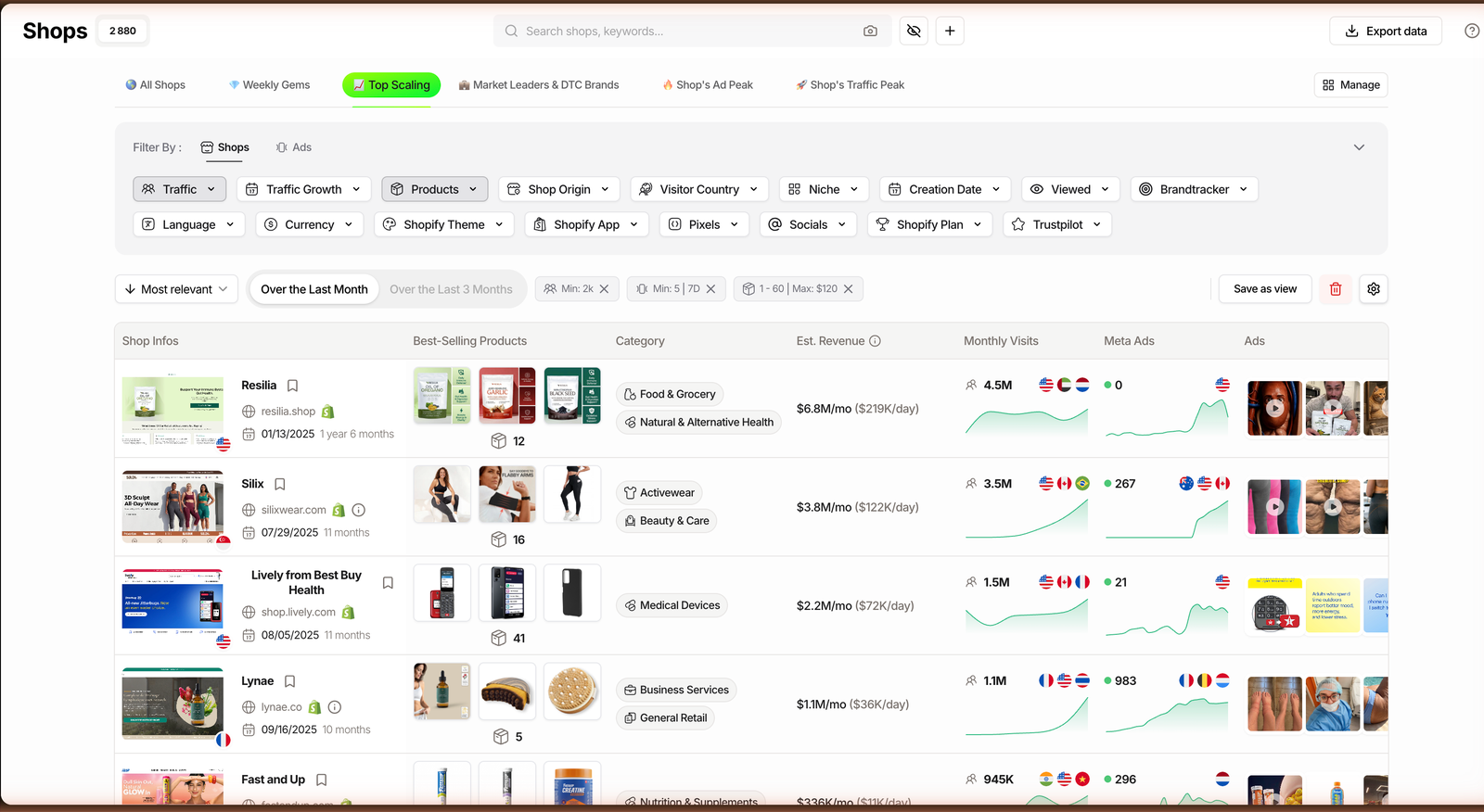
Open the Shops module on your account and look at the row of preset views above the grid: All Shops, Weekly Gems, Top Scaling, Market Leaders and DTC Brands, Shop’s Ad Peak, Shop’s Traffic Peak. Pick Top Scaling.
The grid reloads to stores that are gaining momentum instead of the full index. You are no longer looking at all 1.87M indexed Shopify stores, you are looking at the ones moving up. New to the module? Open it on a TrendTrack plan and follow along on your own screen.
Step 2: Sort by Fastest growing, or build a Traffic Growth rule
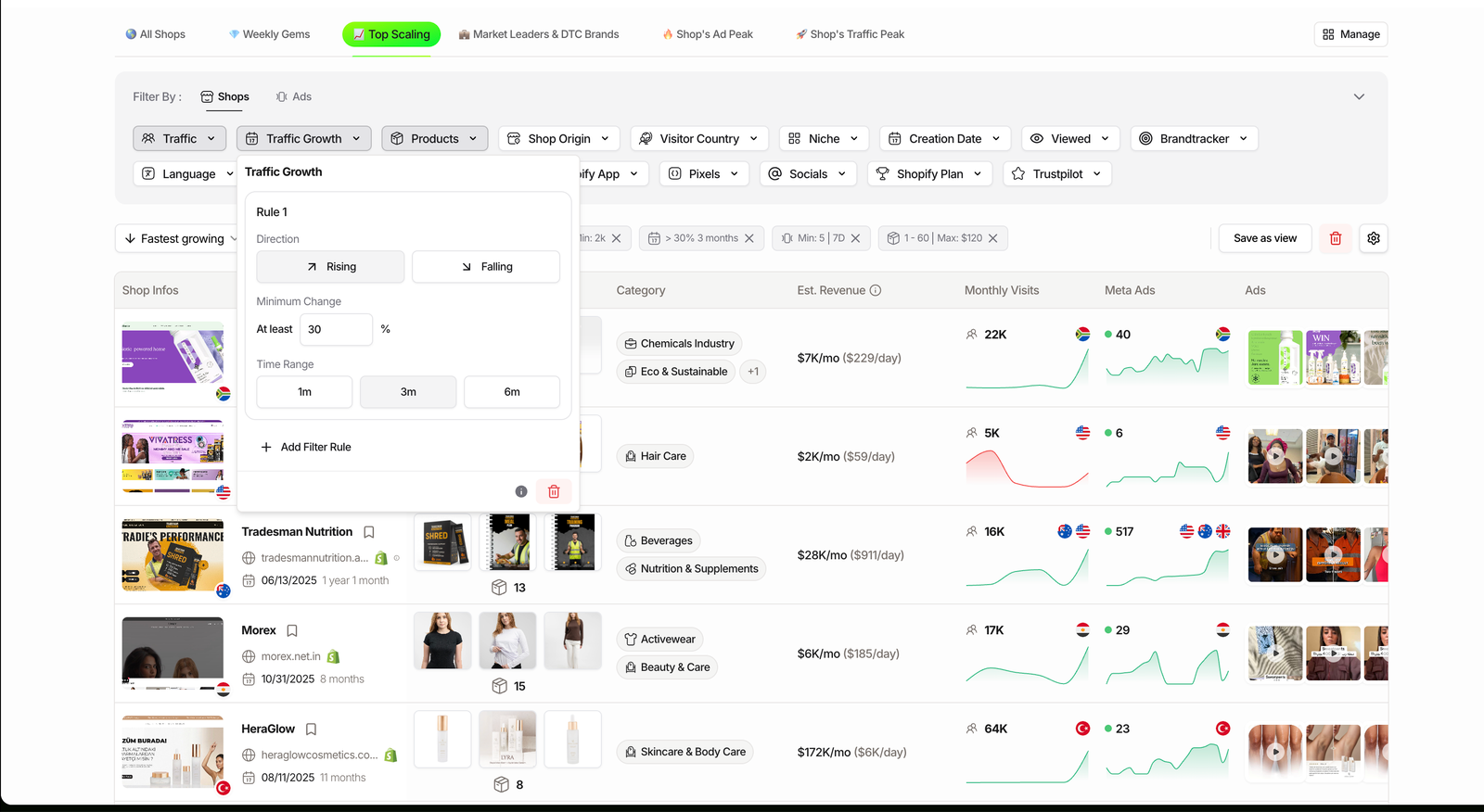
The preset gives you a starting list. The sort gives you the order. Open the sort menu and choose Fastest growing to rank the grid by momentum, strongest first.
Want tighter control? Skip the sort and open the Traffic Growth filter instead. It is a rule builder: pick a direction (Rising or Falling), a minimum percentage, and a window of 1, 3 or 6 months. Set “Rising, 30%, 3 months” and you only see stores that grew their traffic by at least 30% over the last quarter. Do you actually need six-month trend, or is a one-month spike what you are hunting? The window is the whole game.
Step 3: Switch on Est. Revenue and read a row
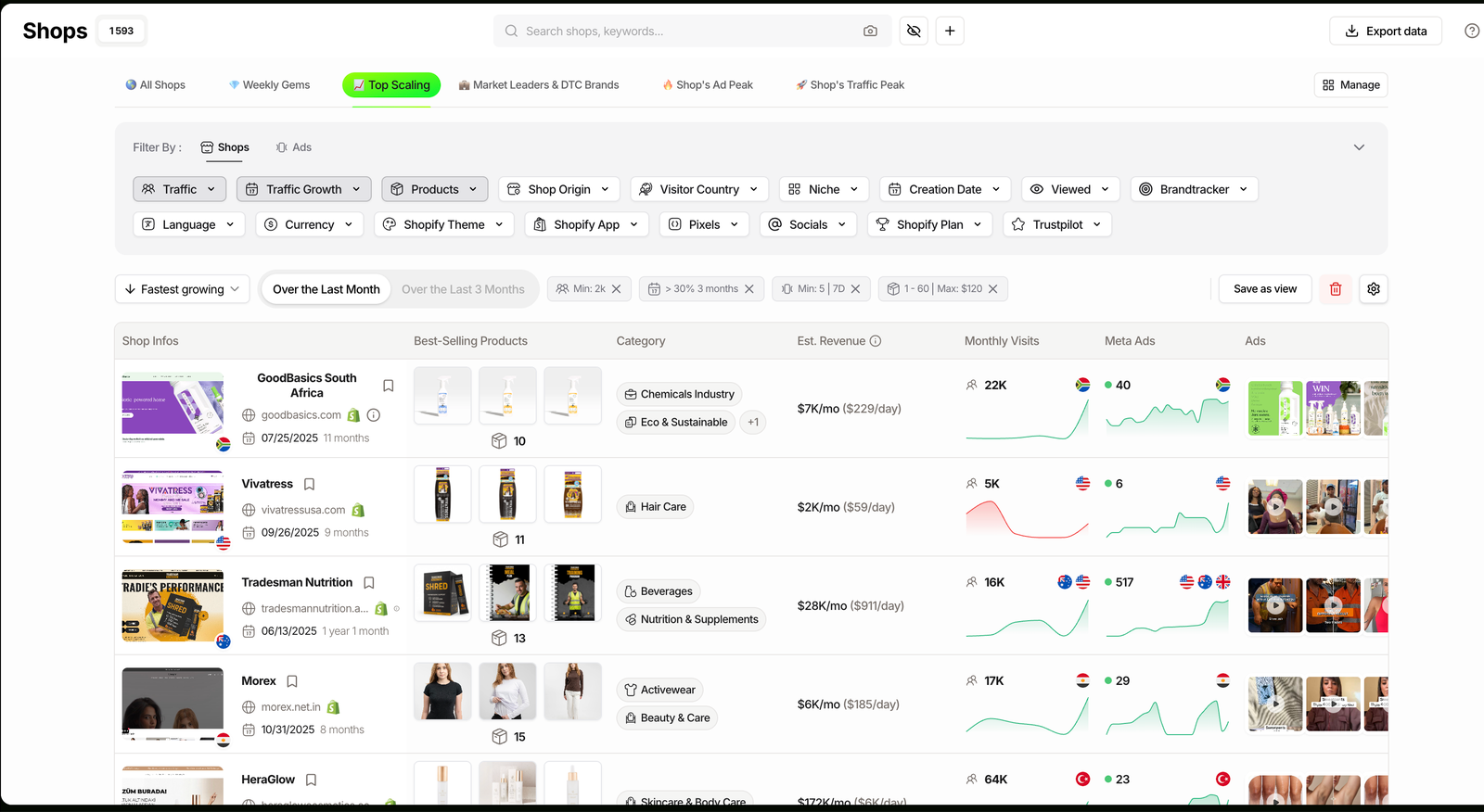
By default the money column is hidden. Click the Manage shop view gear and enable Est. Revenue, TrendTrack’s estimate of each store’s sales in $/month and $/day. Keep Monthly Visits and Meta Ads on too.
Now each row tells a story: a store climbing in traffic, running live ads, with an estimated revenue figure next to it. Keep in mind that Est. Revenue is an estimate, a read from the outside, not the store’s real books. Use it to rank and compare, not to quote.
What the Top Scaling view actually reveals
“Scaling” is not one number. The view leans on a handful of signals, and it helps to know which one you are reading and where each is unlocked.
| Signal | What it measures | Available on |
|---|---|---|
| Traffic Growth | Rising or falling visits, by threshold, over 1, 3 or 6 months. | Starter |
| Live Ads | How many ads a store is running right now, a spend proxy. | Starter |
| Est. Revenue | Estimated sales per month and per day. Hidden column, opt in. | Starter |
| Creation Date | Store age, to separate a young rocket from an old brand. | Starter |
| Ads Growth (cross-filter) | Whether a store’s ad volume itself is rising, stable or falling. | Pro |
Read two signals together and the noise drops. A store rising in traffic and adding live ads is spending into growth on purpose. A store rising in traffic with flat ads may be riding organic or a press hit. That distinction is what the grid hands you for free.
Counts checked inside a paid TrendTrack account, July 2026. Store total grows over time.
Related guide
Filter Shopify Stores by Trustpilot & Pixels
Screen the scaling list down to real brands, not fly-by-night dropshippers.
Three ways to use the scaling list
The same view answers three different jobs. Which one is yours?
Beginner: scout a product that is proving itself
If you are still hunting for something to sell, sort by Fastest growing and open the stores at the top. Enable Best-Selling Products so you can see what each climber is actually pushing. You are not copying a random creative, you are reading which products carry stores that are growing this week.
Scaler: watch a niche you already sell in
Add a Niche filter on top of Top Scaling and you get a live leaderboard of your own category. Check it weekly and you spot a competitor accelerating before their ads flood your feed. That head start is worth more than any single winning product. Set the niche and growth rule once and the view keeps itself current.
Brand modeling: study an operation, not a creative
Pick a store that has been climbing for months and open its full profile. You get its traffic curve, its live-ad history, its theme and apps, its visitor versus targeted countries. You are modeling a working operation with all its context intact, which is the opposite of chasing one saturated ad. For a curated starting point, browse the best Shopify stores to study.
Related guide
Brandtracker: Track a Store’s Ads, Tests, Emails & LPs
Found a scaler worth copying? Track its whole funnel and get alerted when it moves.
Where the Top Scaling view stops
It is a shortlisting tool, not a verdict. Three limits are worth naming up front.
Where it wins
- Surfaces momentum across the whole index in seconds.
- Works from Starter, no ad-spy plan required.
- Combines with any of the 17 Shops filters.
Where it stops
- Est. Revenue and growth are estimates, not audited.
- Ads Growth cross-filter needs Pro.
- The grid is a snapshot, not a tracked history.
The fix for the last two is built in. To read whether a store’s ad volume is climbing, not just its traffic, you need the Ads module on Pro, and it is worth checking the full plan breakdown before you decide. To turn a snapshot into a tracked history, open the store’s profile for its Traffic Over Time and Live Ads Over Time curves, or add it to your Brandtracker so every move is logged and, since July 2026, can alert you by email.
FAQ
What counts as a fast growing Shopify store in TrendTrack?
A store whose measurable signals are climbing: rising monthly traffic, more live ads week over week, and often rising estimated revenue. The Top Scaling preset and the Fastest growing sort rank stores on that momentum, and the Traffic Growth filter lets you set the exact threshold (rising by X% over 1, 3 or 6 months). It is momentum, not size: a small store growing 40% can outrank a big flat one.
Which plan do I need to see the Top Scaling view?
The Shops module, the Top Scaling preset and the Traffic Growth filter are available from Starter ($59/mo, or $41/mo billed annually), which includes unlimited shops. To cross-filter by ad growth or read a store’s estimated ad spend, you need the Ads module, which starts on Pro ($89/mo, or $62/mo annually). So traffic-based scaling is Starter, ad-based scaling is Pro.
How often does the scaling list update?
It is a live view, not a frozen weekly list. TrendTrack refreshes store signals continuously, so opening the Top Scaling view or sorting by Fastest growing reflects the most recent data on record rather than a snapshot. That is why the same view can look different from one week to the next: stores that cooled off drop, and new climbers appear.
Can I trust the Est. Revenue figures?
Treat them as estimates, not audited numbers. Est. Revenue is TrendTrack’s model of a store’s monthly and daily sales, shown as a hidden column you enable yourself. It is useful for ranking and comparison (which store is bigger, which is climbing), but it is a read from the outside, not the store’s real books. Use it directionally alongside traffic and live-ad trends.
How is this different from a winning products list?
A winning products list shows you an item; the Top Scaling view shows you a whole store that is growing. That matters because a store carries the full context a single product hides: its niche mix, its ad volume, its estimated revenue, its theme and apps. You are modeling an operation that already works, not chasing one creative that may already be saturated.
The verdict
Top Scaling is the fastest honest way to answer “who is growing in my niche right now” without scrolling a single feed. It will not audit anyone’s books, and the sharpest ad signals sit on Pro, but as a weekly shortlist of Shopify stores worth studying, it earns the tab.
See who is scaling in your niche this week.
Open the Top Scaling view, add a Traffic Growth rule and switch on Est. Revenue. From $59/mo on Starter, or $41/mo billed annually. Add the free Chrome extension and cancel any month.