
Last verified July 17, 2026. Tested on a paid TrendTrack account; counters read live in the Shops module.
You saw the product. A scroll-stopping gadget in a TikTok, a hero image in a Meta ad, a bottle on a competitor’s homepage. You still have no idea who is actually selling it.
A product name gets you nowhere here. Half these things do not have a searchable name, and the ones that do are sold under twenty different brands. So you screenshot it, drop it into Google Lens, and get back a wall of Amazon listings and Pinterest pins that tell you nothing about which Shopify store is scaling it. The wider platform is mapped in what TrendTrack actually is.
That is the exact gap TrendTrack’s AI Image Search closes. You feed it the picture, it hands you the stores.
TrendTrack’s AI Image Search lets you paste, drag or upload a product photo and returns the Shopify stores selling that product, pulled from an index of 1.87M+ stores. It shipped on March 7, 2026 and lives inside the Shops module, so it works from the Starter plan up.
Disclosure: some links on this page are affiliate links. If you subscribe through them we may earn a commission at no extra cost to you. We tested every TrendTrack feature mentioned here on a paid account.
Plan check: image search is not a premium feature. It ships with the Shops module, so it runs from Starter ($59/mo, or $42/mo annually). What moves up to Pro ($89/mo, or $62/mo annually) is crossing the stores you find with their full ad activity (the Ads and Advertisers modules) and tracking one at store level with a Brandtracker.
What image search does that a keyword can’t
A keyword search asks TrendTrack for names. You type “shower head” or a brand, and it matches text. Useful when you already know what the thing is called.
Image search asks a different question. It looks at the product itself and finds the stores selling that product or a close visual match, without you naming anything. For dropshipping research that is the whole game, because the winning products rarely have a name you would think to type.
Source: TrendTrack Shops module, checked July 17, 2026.
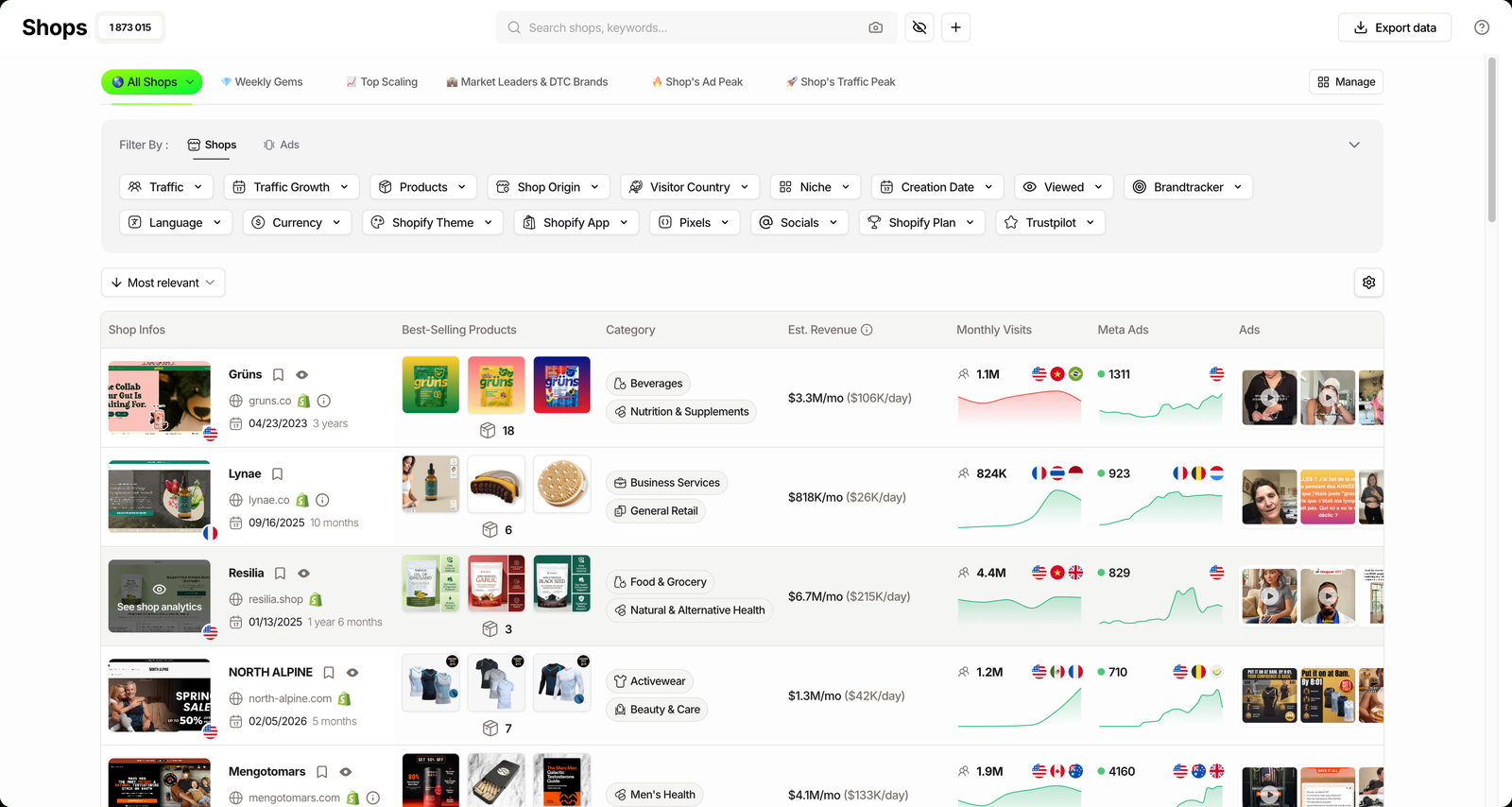
It lives where you would want it: the search bar at the top of the Shops module. The camera icon is the entry point, sitting right next to the text field.
Three ways sellers actually use it
The tool is one input box. What you do with the result depends on why you came. Here are the three jobs it does best.
1. Source the product you just saw
You caught a product in an ad and want to sell it. Drop the creative’s screenshot in, and image search returns the stores already running it.
Now you have a supplier trail and a pricing benchmark in one screen. You can see the best-seller price each store charges and where they sit, instead of guessing your margin from a blank page.
2. Gauge how saturated it is before spending
A product with three stores behind it is a different bet than one with three hundred. Image search gives you that count at a glance.
If the match list is crowded with big, heavily-advertised stores, you are late. If it is thin but a couple of stores are clearly scaling, that is the more interesting signal. You are reading the field before you commit a dollar of ad budget.
3. Catch stores copying your own product
If you sell private label, image search doubles as a knock-off radar. Feed it your own hero shot and see which stores are running a lookalike.
That tells you who to watch, and often who to out-market. It is the same mechanic in reverse: the picture finds the stores, you decide what to do about them.
Related guide
How to Find Winning Products (The Data Way)
Image search is one signal. See the full winning-product method.
Step by step, from screenshot to shortlist
The flow is short. Four moves take you from a picture to a qualified list of stores.
Step 1: Open the camera in the search bar
Head into TrendTrack’s Shops module and look at the search bar. The camera icon sits to the right of the “Search shops, keywords” field. Click it to open image search.
Step 2: Drop your image in
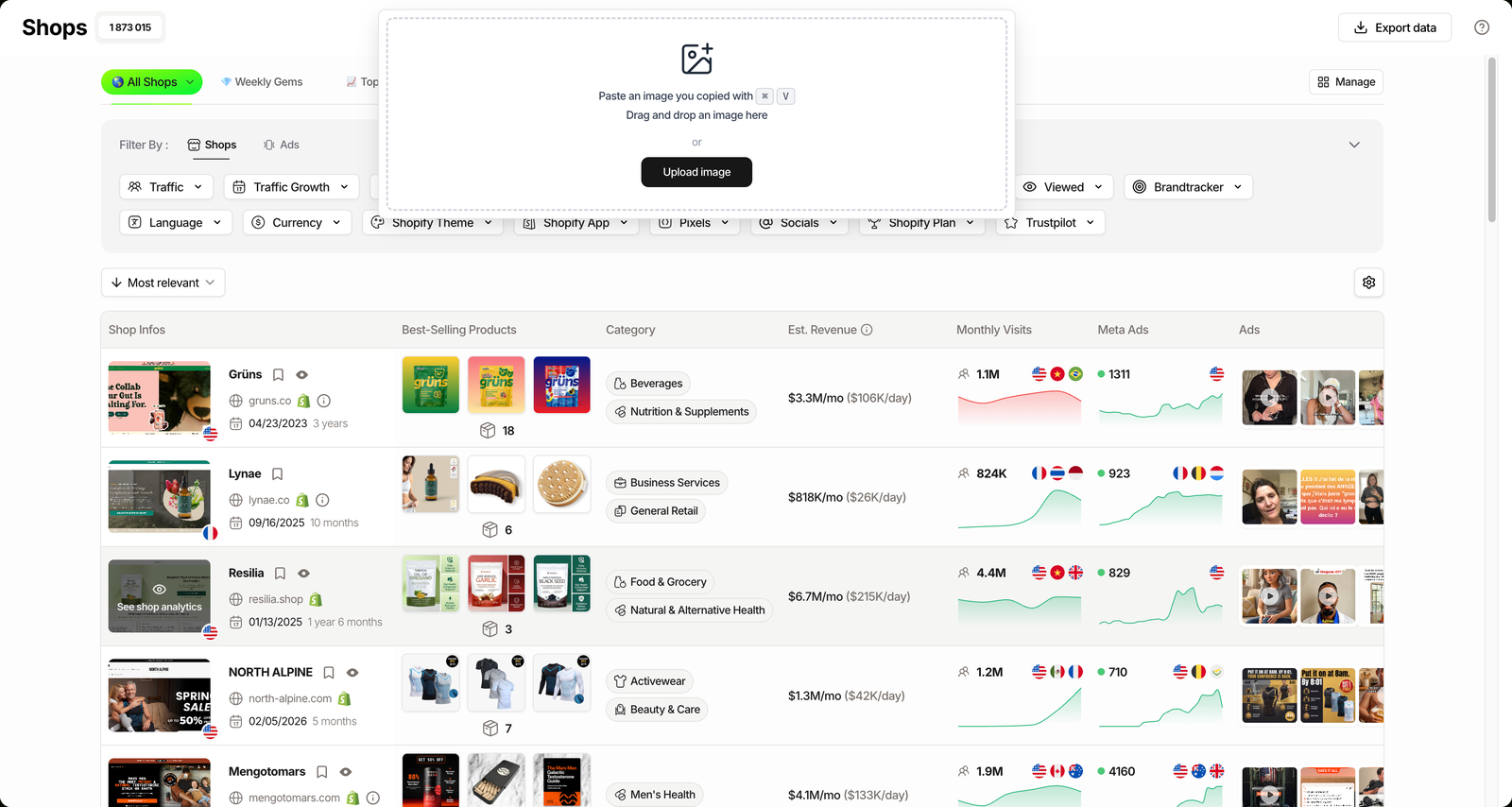
You have three ways in: paste from the clipboard, drag a file over, or upload one. A screenshot works fine, so you do not need the original product photo, just a clean shot of the item.
Crop out the noise first. A tight frame on the product beats a busy lifestyle photo, because the match reads the object, not the background.
Step 3: Read the stores it returns
TrendTrack matches the image against its index and lists the stores selling that product or a near-identical one. This is the payoff: a set of real Shopify stores, not marketplace clutter.
If you have never touched the module, run an image search on a free account before you commit to a plan, just to see the result shape for your niche.
Step 4: Qualify and save your shortlist
Raw matches are a starting point, not an answer. Apply the Shops filters to cut the list to stores that matter, then save the ones worth watching. The next section covers exactly which filters pull their weight.
Reading the results: revenue, ads and growth
A list of stores selling your product is only useful once you can tell the scalers from the graveyard. TrendTrack lets you layer its store data straight onto the image matches.
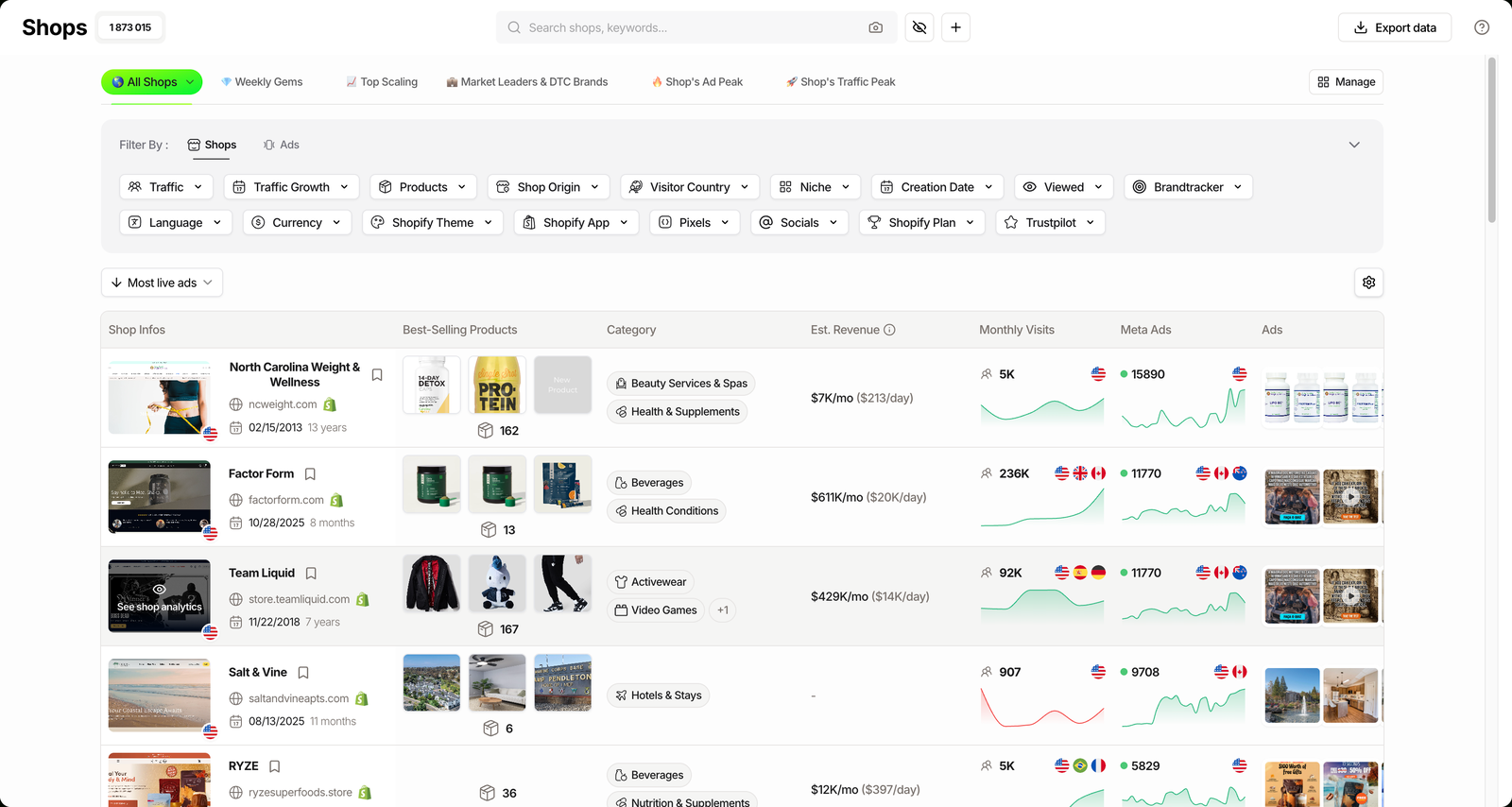
The single most telling move is switching on the Est. Revenue column, hidden by default under the “Manage shop view” gear. Keep in mind it is an estimate, not audited revenue, so read it as direction, not gospel. Then sort or filter to surface the stores that are actually moving.
| Filter / sort | What it surfaces | Why it matters |
|---|---|---|
| Est. Revenue column | Estimated $/mo and $/day per store | Ranks matches by rough scale, estimated |
| Sort: Most live ads | Stores pushing the product hardest right now | Active spend is a live demand signal |
| Sort: Fastest growing | Stores gaining traffic, not coasting | Catches a product on the way up |
| Products + best-seller price | The price each store charges | Sets your own pricing benchmark |
| Visitor Country | Where each store’s buyers sit | Confirms the product travels to your market |
| Niche | Category tag on each matched store | Strips out unrelated visual matches |
Run two or three of these together and the crowded match list collapses into a short, defensible shortlist. That is the difference between a screenshot and a research session.
Related guide
TrendTrack Shops Database: 1.87M Stores, 17 Filters
Image search is one door in. Here is the full filter set behind it.
Where image search stops
It is a matching tool, and matching has edges. It surfaces visual lookalikes, so you get the same product plus close cousins, not a guaranteed exact-SKU hit. The results also depend on index coverage: a product no indexed store sells yet will come back thin.
The bigger limit is scope. The image finds the store, not the winning ad. To see a store’s live creatives, real EU spend and how long each ad has run, you cross into the Ads module or track that store’s entire ad operation with a Brandtracker, both on Pro. For how these pieces fit the wider toolset, see our full TrendTrack review.
Strong at
- Naming the unnameable product from a picture
- Counting how many stores already sell it
- Feeding straight into revenue and ad filters
Blind spots
- Visual matches, not exact-SKU guarantees
- Thin results for barely-indexed products
- Finds the store, not the winning creative
FAQ
Can you find products by image on TrendTrack?
Yes. The Shops search bar has a camera icon called AI Image Search. Paste, drag or upload a product photo and it returns Shopify stores from its index that sell that product or a close match. The feature shipped on March 7, 2026 per the What’s new changelog.
Which TrendTrack plan includes AI Image Search?
AI Image Search sits inside the Shops module, so it is available from the Starter plan at $59/mo (or $42/mo billed annually). Crossing the stores it finds with their full ad activity (the Ads and Advertisers modules) and the Brandtracker starts on Pro at $89/mo ($62/mo annually).
How is this different from Google reverse image search?
Google Lens points you to pages and marketplaces selling a product. TrendTrack’s image search stays inside its 1.87M+ Shopify store index and returns the actual stores, which you can then rank by estimated revenue, live ads and traffic growth. It answers “who is selling this on Shopify”, not “where can I buy it”.
Does image search find the exact product or similar ones?
It surfaces visual matches, so you get the same product and close lookalikes. That is useful for gauging how saturated a product is. Refine the returned stores with the Shops filters (niche, best-seller price, live ads) to narrow to the ones that matter.
Can you see which stores are actively running ads on the product?
Not from the image result alone. The image search returns stores; to see their live ads, spend and creatives you cross into the Ads module or add the store to a Brandtracker, both on Pro.
The verdict
AI Image Search is not the flashiest thing TrendTrack ships, but it removes a real daily friction: turning a product you can see into a list of stores you can study. For product research that starts on TikTok or in an ad feed, that is the missing first step.
Treat it as the front door. The image gets you the stores; the filters, revenue estimates and ad data turn those stores into a decision.
Got a product photo? Find out who’s selling it.
Drop an image and search 1.87M+ Shopify stores in seconds. Image search ships with the Shops module from $59/mo (or $42/mo annually), and the free Chrome extension gets you started at no cost.