Last verified July 2026. Free libraries and every TrendTrack module below were checked hands-on on a paid account.
Which of your competitors is actually scaling right now? Which single creative is doing most of the work? And how much are they really spending to run it?
You can answer all three without guessing, and mostly for free. This guide walks the whole ladder, from the free ad libraries a beginner should bookmark to the full-funnel tracking a scaler needs.
To spy on competitors’ ads, start with the free ad libraries: Facebook Ad Library, TikTok Creative Center and Google’s Ads Transparency Center show live creatives on each platform. Then use a dedicated tool to sort ads by what is winning, read estimated EU ad spend, and track a store’s whole funnel over time.
Disclosure: some links on this page are affiliate links. If you subscribe through them we may earn a commission at no extra cost to you. We tested every TrendTrack feature mentioned here on a paid account.
What “spying on competitor ads” actually means
Ad spying sounds shady. It is not. Every ad you can find this way is public by design, and EU and UK transparency laws now force platforms to show who runs an ad and roughly how far it reaches.
So this is competitor research, not hacking. You are reading public creatives and public reach data, the same way you would walk a rival’s shop floor and count the shelves.
Sources: DataForSEO (US) and TrendTrack in-app counters, checked July 2026.
Done well, ad spying answers five things: which creatives a competitor runs, how long each one has survived, what they spend, the angle they lead with, and where the click goes. Free tools cover the first. A dedicated tool covers all five.
Here is why a free-only workflow plateaus. You can see that a rival runs 40 ads, but not which two pay the bills, how long they have run, or what they cost. Seeing is cheap. Ranking is the part that protects your budget.
Start free: the three ad libraries to bookmark
The Facebook Ad Library is the best free place to start. Type any brand and you see every active Meta ad on its pages, plus an EU reach range for ads shown in Europe. You can search by advertiser or by keyword, which helps when you know the product but not the seller. Every filter and every field of an ad card is covered in the Facebook Ad Library guide. It is the tool most people mean when they say Facebook ad spy.
For TikTok, the TikTok Creative Center surfaces top formats and trends, though it is curated rather than exhaustive. For Google and YouTube, Google’s Ads Transparency Center shows a brand’s ads with a rough EU range. If Google is your main channel, our full Google Ads Transparency Center walkthrough covers it end to end.
| Library | Platform | What it shows | Where it stops |
|---|---|---|---|
| Facebook Ad Library | Meta | Every active Meta ad + EU reach range | No sorting, no run-time history, no spend detail |
| TikTok Creative Center | TikTok | Top formats and trends | Curated, not exhaustive; no competitor tracking |
| Google Ads Transparency Center | Google & YouTube | A brand’s Google ads + rough EU range | No cross-store view, no winner scoring |
These three are enough for a first look, and they cost nothing. The catch is structural: each one is a single platform, none of them sort ads by what is actually winning, and none keep a history of how long an ad has run.
Bookmark all three anyway, because sellers rarely stay on one channel. A brand crushing it on TikTok often runs the same offer quietly on Meta and Google, and you only see the full picture when you check each library. That cross-platform blind spot is exactly what a single index closes later.
Read the ads like an operator, not a browser
Seeing a competitor’s ads is easy. Reading them is the skill. The question is never how many ads they run, it is which one is carrying the account.
The strongest public signal is time. An ad still live after several weeks is almost always a winner, because sellers cut losers fast. The 3-second hook and the copy structure tell you the angle; the run time tells you it works.
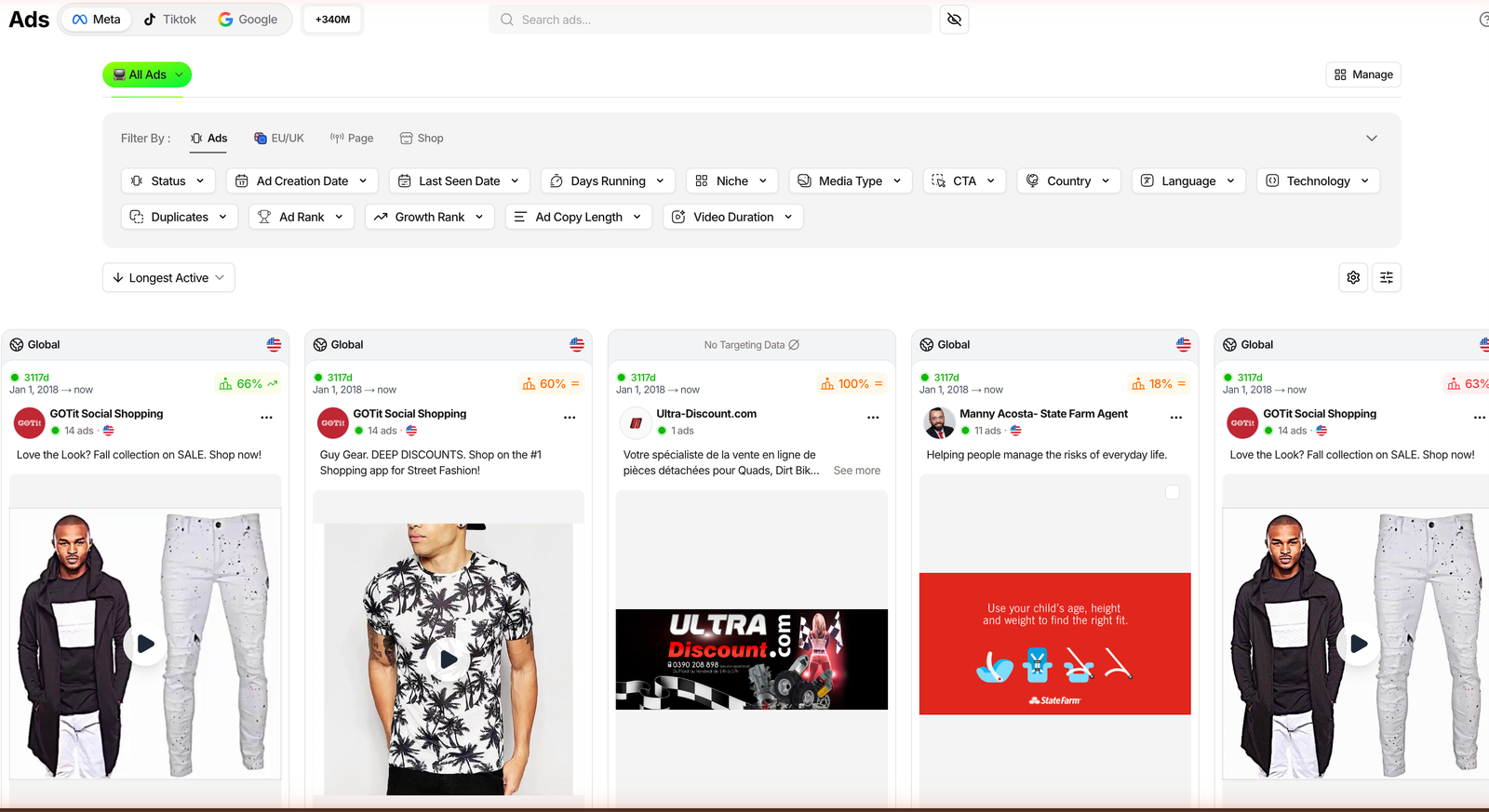
Free libraries do not sort by any of this, and they forget an ad the moment it stops. A dedicated index changes the read. TrendTrack holds over 337M ads across Meta, TikTok and Google, and lets you sort by Ad Rank (top 1 to 20 percent), Longest Active and Most Duplicates.
Duplication plus long run time is the clearest sign an ad is scaling. When the same creative shows up in four other ads and has run for a month, you are looking at a proven angle, not a test.
Free libraries show
- Live, official creatives
- Any brand, no login gate
- EU reach ranges
- A solid first look
They hide
- Which ad is winning
- Days-running history
- Real spend or ROAS
- Landing pages and email flows
Two TrendTrack tabs make the copy readable at scale. Ad Copies ranks a competitor’s lines by usage and longest running, and Hooks & Scripts even transcribes their video hooks. You stop guessing the angle and start reading it word for word.
Related guide
TrendTrack Ads library tutorial
Sort 337M ads by Ad Rank, run time and duplicates, step by step.
Go advanced: track the whole funnel, not just the creative
The advanced layer is money and time. EU and UK transparency rules publish the reach of ads shown in Europe, and tools convert that reach into an estimated spend using a configurable CPM. It is an estimate for European impressions, not audited global spend, so treat it as directional.
On top of raw reach, Ad Rank (shipped January 29, 2026) scores winning ads even when EU impression data is missing, derived from Facebook signals. That is how you rank creatives that have no public reach number at all.
Plan check: the Ads and Advertisers modules start on Pro ($89/mo). Starter ($59) covers Shops, 2 Brandtrackers and the free Chrome extension, but not ad spy.
Discovery scales here too. The Advertisers module flags pages that launched a burst of new ads in the last 14 days, and the Testing tab on a tracked store lays out its test waves day by day. TrendTrack also follows TikTok organic, not just paid, so you catch the content pushing sales rather than only the ads.
The real jump is tracking a store instead of a single creative. TrendTrack’s Brandtracker went store-level on May 27, 2026: one slot follows a competitor’s whole funnel, Meta plus TikTok plus Google plus Emails, with landing pages, video hook transcripts, Time Travel and notifications added July 7, 2026.
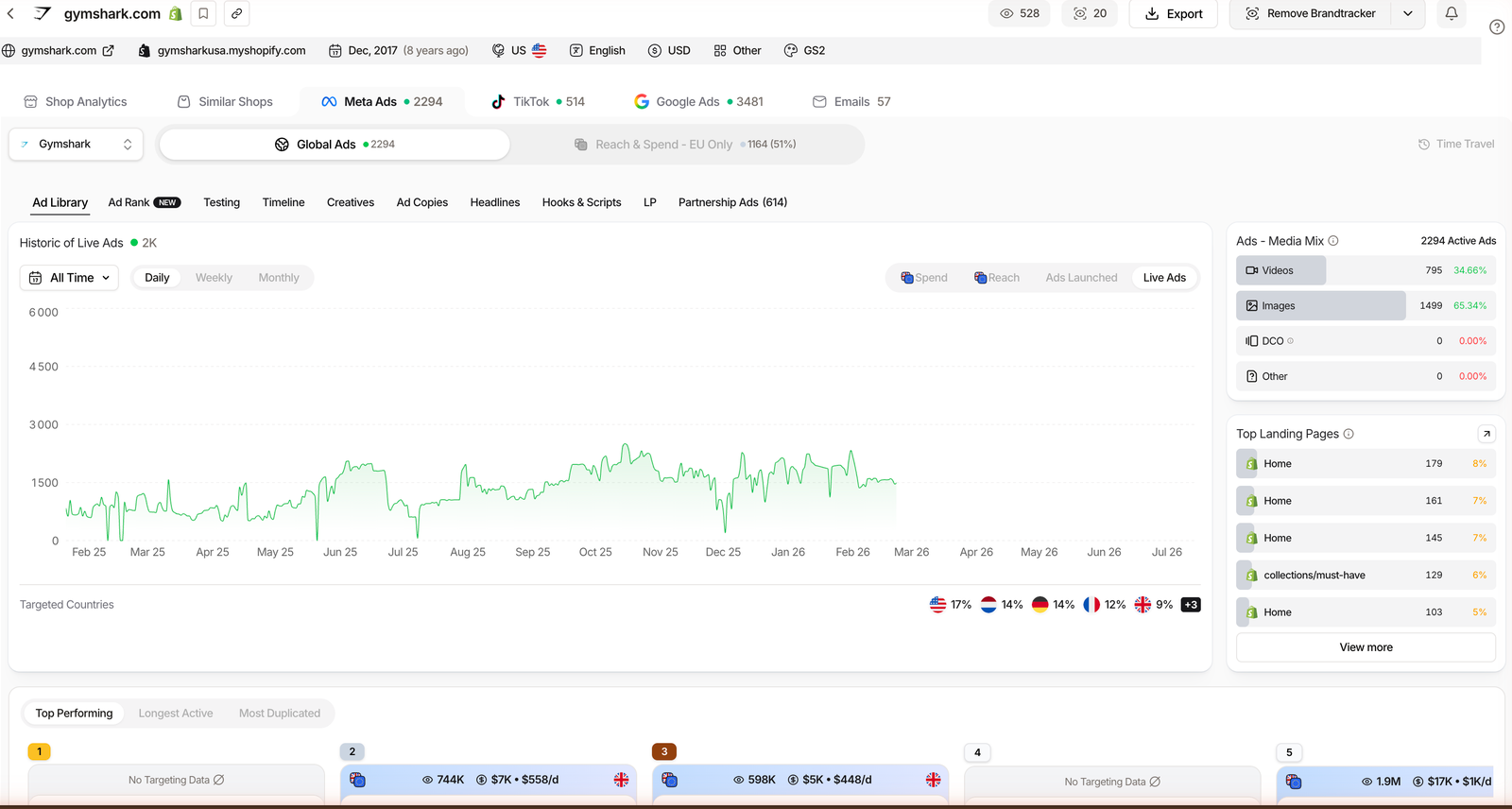
Landing pages and emails are where a funnel gives itself away. The LP tab ranks a store’s pages by how many ads point to them, and the Emails index holds over 6M campaigns, so you can read a rival’s welcome and abandoned-cart flows, not just their front-end ads.
One honest caveat: Est. Revenue and competitor spend are estimates, not audited numbers. They are excellent for ranking and comparison, weaker as exact figures, so use them to decide who to watch, not to quote a rival’s P&L.
Related guide
How to estimate a competitor’s ad spend
Turn EU/UK reach into a directional spend figure the right way.
Your weekly competitor-ad routine (3 phases)
A one-off audit ages badly. Competitors launch, kill and relaunch ads every week, so the value is in a short repeatable loop, not a deep dive you do once and forget.
Thirty minutes a week beats a three-hour audit once a quarter. The point is not to admire a rival’s funnel, it is to catch the moment a new angle starts scaling, while you still have time to test your own version.
Phase 1: Discover
- Scan the free libraries for the brands already running ads in your niche.
- In the Advertisers module, sort by ads launched in the last 14 days to catch fast movers.
- Screen stores by niche and traffic growth to shortlist who is worth watching.
Phase 2: Read
- Sort each competitor’s ads by Ad Rank or Longest Active.
- Note the days running and the duplicate count on the top creatives.
- Open the landing page and read the hook to capture the full angle.
Phase 3: Track
- Add your 3 to 5 shortlisted stores to the Brandtracker.
- Turn on the daily digest so new ads, emails and products come to you.
- Compare estimated EU spend week to week to see who is really scaling.
Free libraries or a dedicated tool: which fits you
So do you need to pay? It depends on where you are. A beginner validating a niche can run entirely on the free libraries and the free Chrome extension.
A seller scaling spend needs the winner-sorting and the estimated EU spend to stop guessing. An agency tracking many brands needs the whole-funnel view and the alerts.
| Capability | Free libraries | Dedicated tool |
|---|---|---|
| Platform coverage | Limited one at a time | Yes Meta, TikTok, Google |
| Sort by winner | No | Yes |
| Days running / history | No | Yes |
| Real EU ad spend | Limited reach only | Yes estimated |
| Landing pages | Limited | Yes |
| Email flows | No | Yes |
| Alerts over time | No | Yes |
| Price | Free | From $59/mo, ad spy on Pro $89 |
In TrendTrack, the ad-spy layer sits on Pro ($89/mo), so the free tier and extension are your zero-risk starting point.
One rule of thumb keeps the decision honest: match the tool to your spend, not your ego. If your monthly ad budget is smaller than a Pro plan, stay free and reinvest. Once you are spending enough that a wasted test week actually hurts, the paid view is easy to justify.
FAQ
Is it legal to spy on competitors’ ads?
Yes. Active ads are public by design, and EU and UK transparency rules require platforms to expose who runs an ad and its rough reach. Free libraries like Facebook Ad Library and Google’s Transparency Center exist for exactly this. You are looking at public creatives and public reach data, not private account numbers. What you cannot see is a competitor’s exact internal revenue or true ROAS, so treat any spend or revenue figure as an estimate.
What is the best free way to spy on competitor ads?
The Facebook Ad Library is the most useful free starting point, since it shows every active Meta ad for any page plus an EU reach range. Pair it with the TikTok Creative Center for TikTok trends and Google’s Ads Transparency Center for Google and YouTube. The catch is that each one is one platform only, none of them sort ads by what is actually winning, and none keep a history of how long an ad has been running.
How can you tell which competitor ad is actually working?
Look at how long the ad has been running. A creative live for weeks is usually a winner, because sellers kill losers fast. Free libraries do not sort by this, so a dedicated tool helps: TrendTrack indexes over 337M ads and lets you sort by Ad Rank (top 1 to 20 percent), Longest Active and Most Duplicates. Duplication and long run time together are the clearest public signal that an ad is scaling.
Can you see how much a competitor spends on ads?
Not exactly, but you can estimate it. EU and UK transparency rules publish the reach of ads shown in Europe, and tools convert that reach into an estimated spend using a configurable CPM. TrendTrack shows this EU/UK reach and spend on ad and store level. Keep in mind it is an estimate for European impressions, not audited global spend, so use it as a directional signal rather than an exact number.
Do you need a paid tool to spy on ads?
No, not to start. The free libraries and TrendTrack’s free Chrome extension are enough to see live creatives and x-ray a store. You move to a paid tool when you want to sort by winners, read real EU spend, see landing pages and email flows, and track a store over time. In TrendTrack, that ad-spy layer starts on the Pro plan at $89/mo, since the Ads module is not included in the $59 Starter plan.
The bottom line
Spying on competitor ads is a ladder. Start free to see the creatives, add structure to read which ones win, and track the full funnel when the money on the line justifies it. Each rung answers a sharper question than the one below it. Before recommending the top one, we ran TrendTrack for 30 days on a paid account.
Most sellers stop at the first rung and wonder why their research feels shallow. If you want to climb the rest, you can start a TrendTrack account free and add the Ads module when ad spy becomes the point. From $59/mo (or $41/mo billed annually), with the ad-spy modules on Pro.