Last verified July 2026. Walked through on a paid TrendTrack account (Agency trial), tracking gymshark.com.
The Partnership Ads tab on our Gymshark tracker lists 813 whitelisted creators, and US searches for “partnership ads” are up +23% year over year.
A partnership ad runs from a creator’s own handle, but a brand pays for it. Find them and you see exactly which creators, and which UGC angles, a competitor trusts enough to put budget behind.
A partnership ad (whitelisting) runs from a creator’s account while a brand pays the bill. TrendTrack surfaces them two ways: the Partnership Ads tab inside any Brandtracker, per store, and a Partnership Ads filter in the Ads module, across 337M+ ads. Tracking one store starts on Starter ($59/mo).
Disclosure: some links on this page are affiliate links. If you subscribe through them we may earn a commission at no extra cost to you. We tested every TrendTrack feature mentioned here on a paid account.
What a partnership ad is (and where TrendTrack shows it)
On Meta, a partnership ad (the feature formerly called a branded content ad) keeps the creator as the visible sender while the brand funds the reach. The trade name for the setup is whitelisting: the creator grants a brand permission to run ads through their handle.
That matters because the ad borrows the creator’s followers and credibility, so it reads like organic UGC in the feed. If you sell on Shopify and run Meta, seeing a rival’s whitelisted ads is closer to reading their creator roster than to browsing an ad library. It pairs well with what TrendTrack actually does across the rest of a competitor’s funnel.
Here is why it is a buy signal: a brand only whitelists a creator once the collaboration is worth paid spend. So the tab is a shortlist of creators and angles a competitor has already validated with money.
| Where | What it finds | Plan | Best for |
|---|---|---|---|
| Brandtracker Partnership Ads tab | Every whitelisted creator running ads for one store | Starter | Mapping a specific competitor |
| Ads module Page filter | Partnership ads across the 337M+ ad base | Pro | Finding creators across a niche |
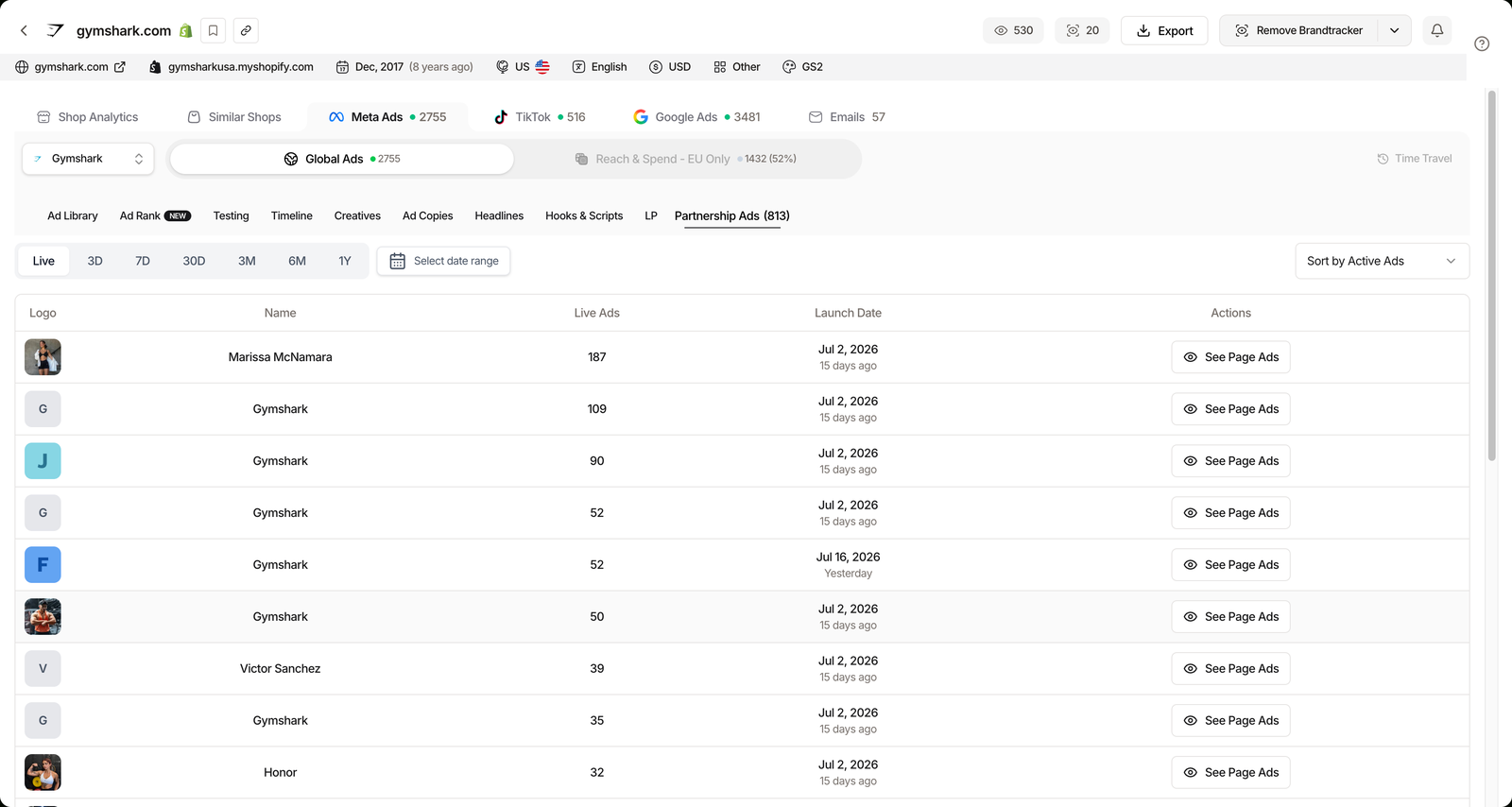
Inside a Brandtracker, the Partnership Ads tab is one of the ten Meta sub-tabs. Each row is a whitelisted creator or page, with columns for Live Ads, Launch Date and a See Page Ads action that opens that creator’s ads for the brand.
Plan check: the Partnership Ads tab sits inside the Brandtracker, so tracking one competitor’s whitelisted creators works from Starter ($59/mo, or $41/mo billed annually), which includes 2 Brandtrackers. Filtering the whole ad base by Partnership Ads needs the Ads module, which starts on Pro ($89/mo, $62/mo annual). Here is how the plans compare, or start on a free trial.
Three ways to use whitelisted-ad data
The tab is the same for everyone. What you do with it depends on why you opened it. Here are the three plays we run most, each with the exact steps folded in.
Scout creators already making winning ads
Instead of cold-emailing influencers, start from the ones a competitor already pays. Open the tracker, go to the Partnership Ads tab, and sort by Live Ads to float the creators with the most active spend to the top.
Then hit See Page Ads on a name to watch the actual creatives. You get a vetted creator list plus proof of what already works, before you spend a dollar on outreach.
Catch a whitelisting wave before you copy it
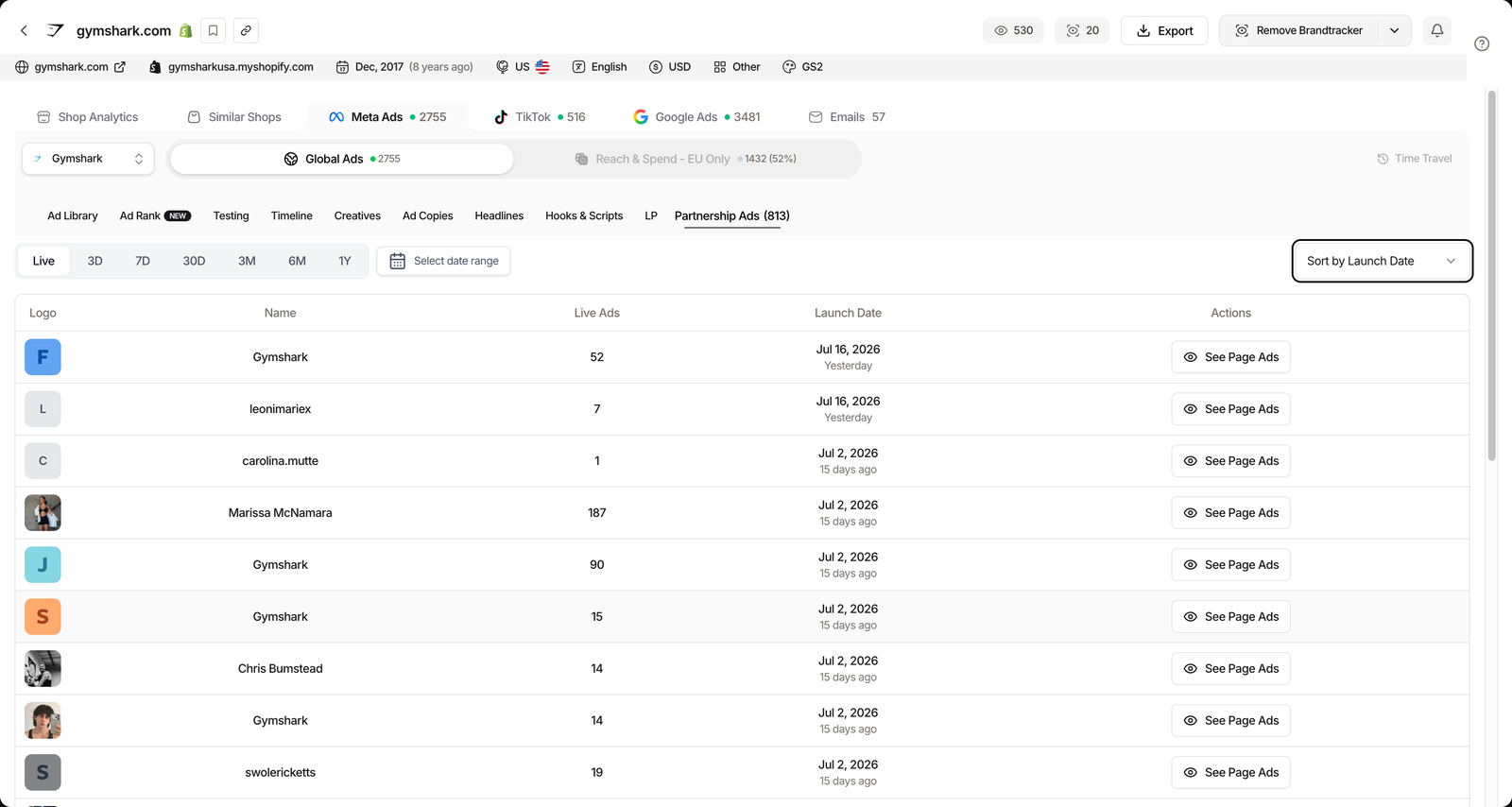
Sort the same tab by Launch Date instead. A cluster of new whitelisted creators inside a short window usually means the brand just found an angle and is doubling down on it.
That is your early warning. Reading the wave while it builds beats copying a creative six weeks after it has already peaked.
Filter the entire ad base for partnership ads
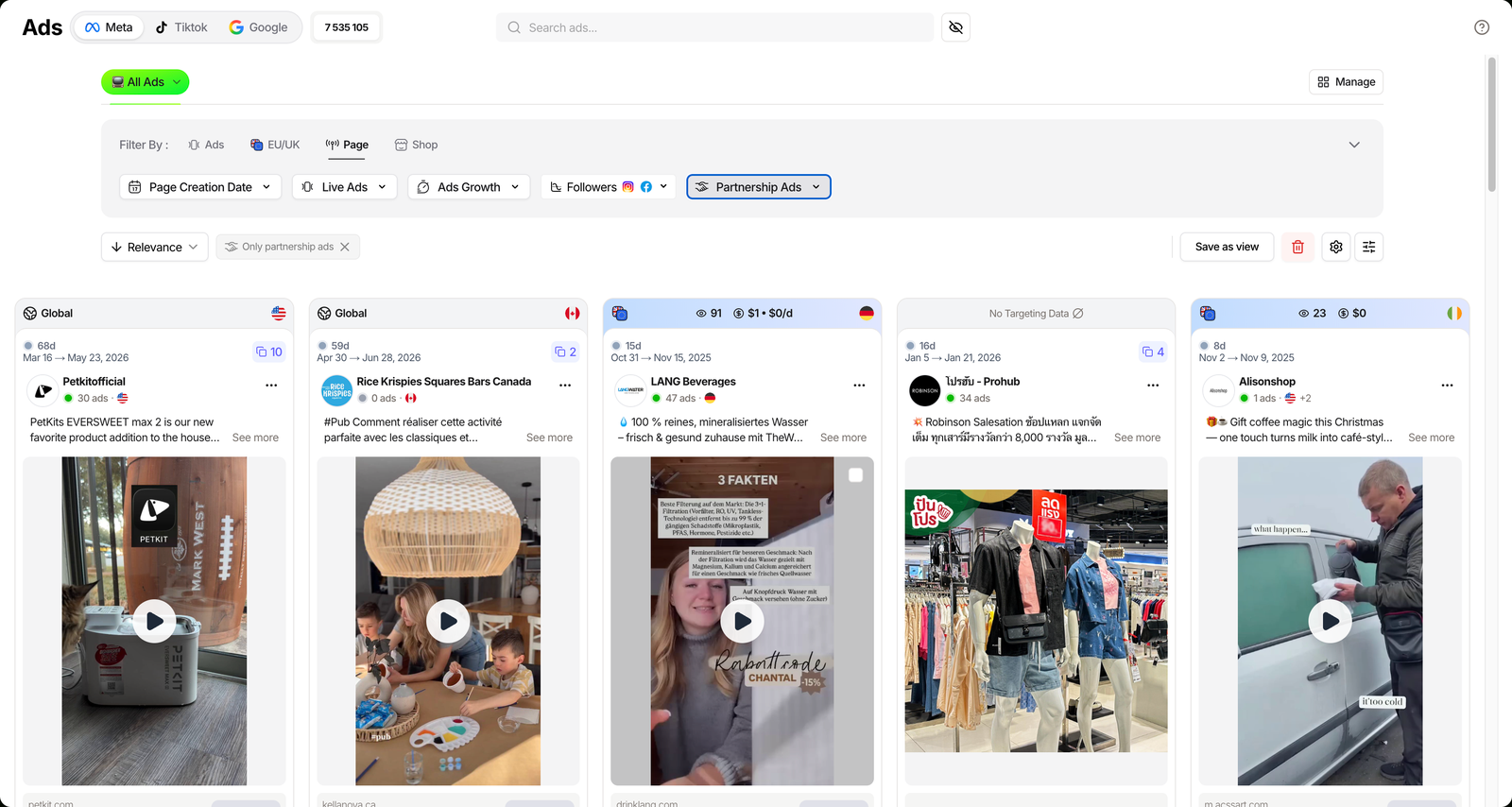
When you want creators across a niche rather than one store, switch to the Ads module. Open the Page filter group and turn on Partnership Ads to keep only whitelisted ads, then stack niche, country or technology filters on top.
This is the Pro-level move: instead of one competitor’s roster, you get every brand in your category running creator ads right now.
Open the Partnership Ads filter
Related guide
The TrendTrack Ads library
Filter 337M+ ads across Meta, TikTok and Google.
Gymshark tracker, checked July 2026. Counts move as the store ships.
Where partnership-ad tracking stops (and the workaround)
The tab only reflects whitelisting a brand actually runs. A competitor that never grants creator permissions shows a thin tab, and that absence is itself useful intel, not a bug.
The Est. Revenue and EU/UK spend numbers shown next to a store are estimates derived from traffic and Europe’s ad transparency rules, so read them as directional, not audited. TikTok whitelisting (Spark ads) is not surfaced at the same depth as Meta yet.
The workaround is to widen out: the Pro filter pulls partnership ads across the whole base, not one store, and the free Chrome extension lets you x-ray any store from your browser without spending a tracker slot. Start there if you just want to poke around before committing to a plan.
FAQ
What are partnership ads?
A partnership ad (formerly a branded content ad on Meta) is a paid ad that runs from a creator’s own account while a brand foots the bill, a setup called whitelisting. The creator stays the visible sender, which is why these ads often feel like organic UGC.
Where does TrendTrack show partnership ads?
Two places: the Partnership Ads tab inside any Brandtracker lists every whitelisted creator for one store (Live Ads, Launch Date, See Page Ads), and the Partnership Ads filter in the Ads module surfaces them across the 337M+ ad base.
Do I need a paid plan to see whitelisted ads?
Tracking one store’s partnership ads works from Starter ($59/mo), which includes 2 Brandtrackers. Filtering the whole ad base by Partnership Ads needs the Ads module, which starts on Pro ($89/mo). Starter has no Ads module.
How is a partnership ad different from a normal ad?
A normal ad runs from the brand’s own page. A partnership ad runs from a creator’s handle with the brand paying, so it inherits the creator’s followers and credibility. TrendTrack flags which ads are whitelisted.
Can I see how long a creator has run ads for a brand?
Yes. The Partnership Ads tab shows each creator’s Launch Date and current Live Ads, and See Page Ads opens that creator’s ads for the brand, so you can gauge how committed the partnership is.
Which creators is your competitor actually paying?
Track one store’s whitelisted creators from Starter ($59/mo, or $41/mo annually), or filter partnership ads across the whole base on Pro ($89/mo).