Last verified July 2026. Counters, tabs and release dates checked live inside a paid TrendTrack account, tracker set to gymshark.com.
You do not need to watch three hundred competitor videos to learn which opening line stops the scroll. You need the first three seconds that already work, ranked by how many ads reuse them.
That is the whole job of the Hooks & Scripts tab in TrendTrack. It pulls every hook a tracked brand uses, sorts them by usage, and hands you the full spoken script underneath. A quick primer on the tool places the Brandtracker in the wider suite.
To be clear about the word “steal”: you copy the angle that a competitor has already proven, then rewrite it in your own voice. You do not lift a brand’s exact video. This guide is about reading the pattern, not plagiarising the asset.
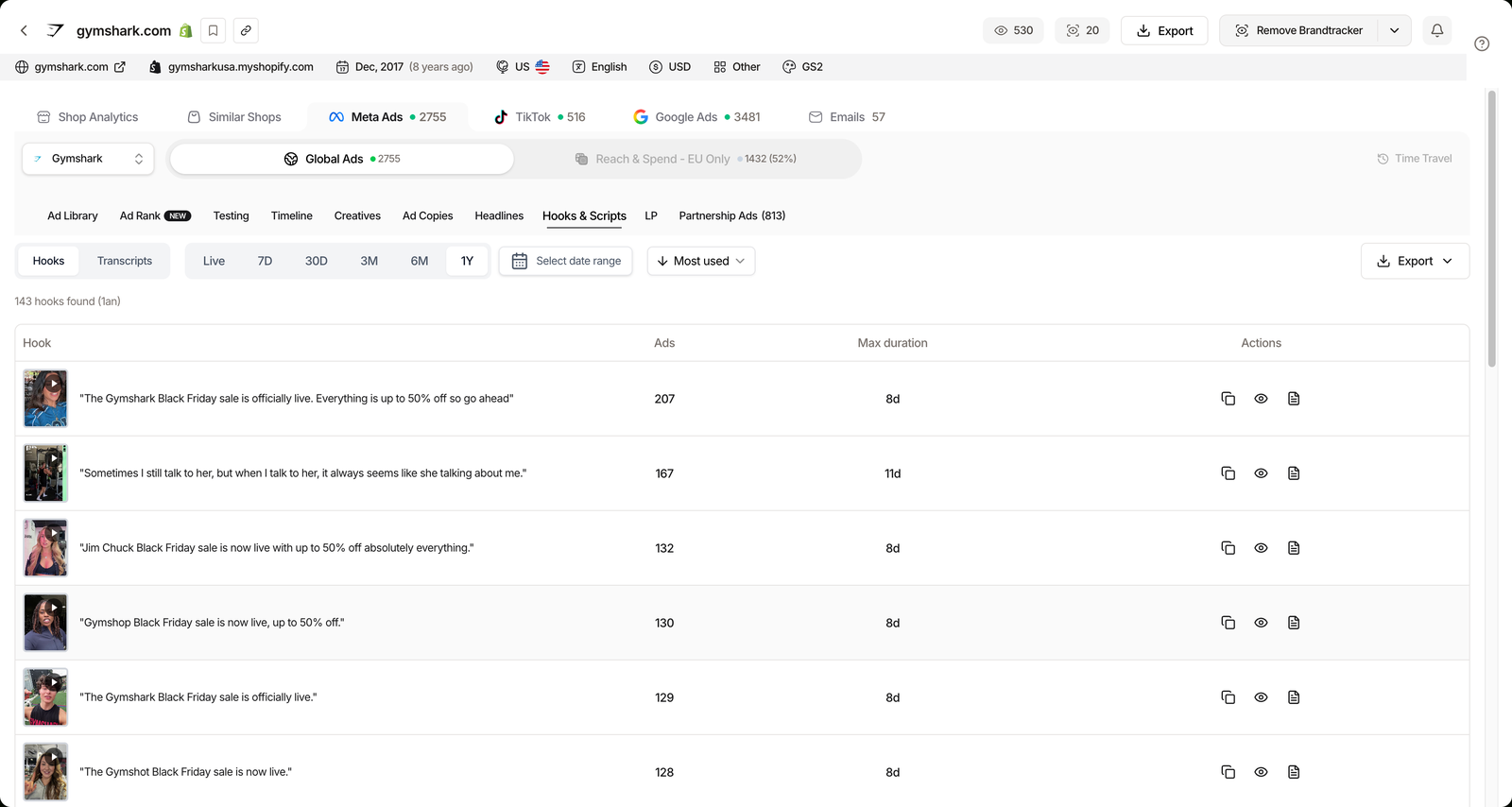
The Hooks & Scripts tab lives inside a brand’s Meta Ads view in the Brandtracker. It lists every ad hook a competitor runs, ranked by usage (how many ads reuse it) with each hook’s max duration, and its Transcripts view writes out the full spoken script of the video.
Plan check: Hooks & Scripts is not a paid add-on. It sits inside the Brandtracker, included from Starter ($59/mo, or $41/mo billed annually) with 2 trackers. Pro ($89/mo) unlocks 30 trackers and Business is unlimited, so your plan sets how many competitors you can watch, not access to the tab itself.
Disclosure: some links on this page are affiliate links. If you subscribe through them we may earn a commission at no extra cost to you. We tested every TrendTrack feature mentioned here on a paid account.
Three ways operators actually use it
Same tab, three different jobs. The workflow underneath is always the same three moves, so learn it once and reuse it whichever seat you are in.
The beginner: find an angle that already works
If you are still guessing which angle to test, sort the Hooks view by usage and read the top rows. A hook reused across many of a brand’s ads is not a fluke, it is an angle the advertiser keeps paying to run.
Start with one brand you admire in your niche, sort, and note the three angles that dominate. That is your test list, drawn from real spend instead of a swipe-file screenshot. The same instinct powers our guide to finding winning ad creatives.
Each row carries a video thumbnail, so you can preview the creative behind a hook before you commit the angle to a test plan.
The media buyer: iterate hooks that keep running
You already have winners live. Now you want the next variation before fatigue hits. Read two columns together: the Ads count tells you how hard a hook is being reused, and Max duration tells you how long the longest ad on that hook has stayed up.
A hook with a high ad count and a long max duration is a proven spine. Keep the promise, swap the visual and the first frame, and you have a fresh variant that starts from evidence, not a blank page.
The Live, 7D, 30D and up to 1Y windows above the table separate what a brand is running right now from what it has leaned on all year, so you can tell a seasonal spike from an evergreen angle.
Related guide
Ad Copy Analysis: What Competitors Are Actually Writing
The text-ad sibling of the Hooks tab: copies and headlines ranked by usage.
The creative or UGC writer: read the full script
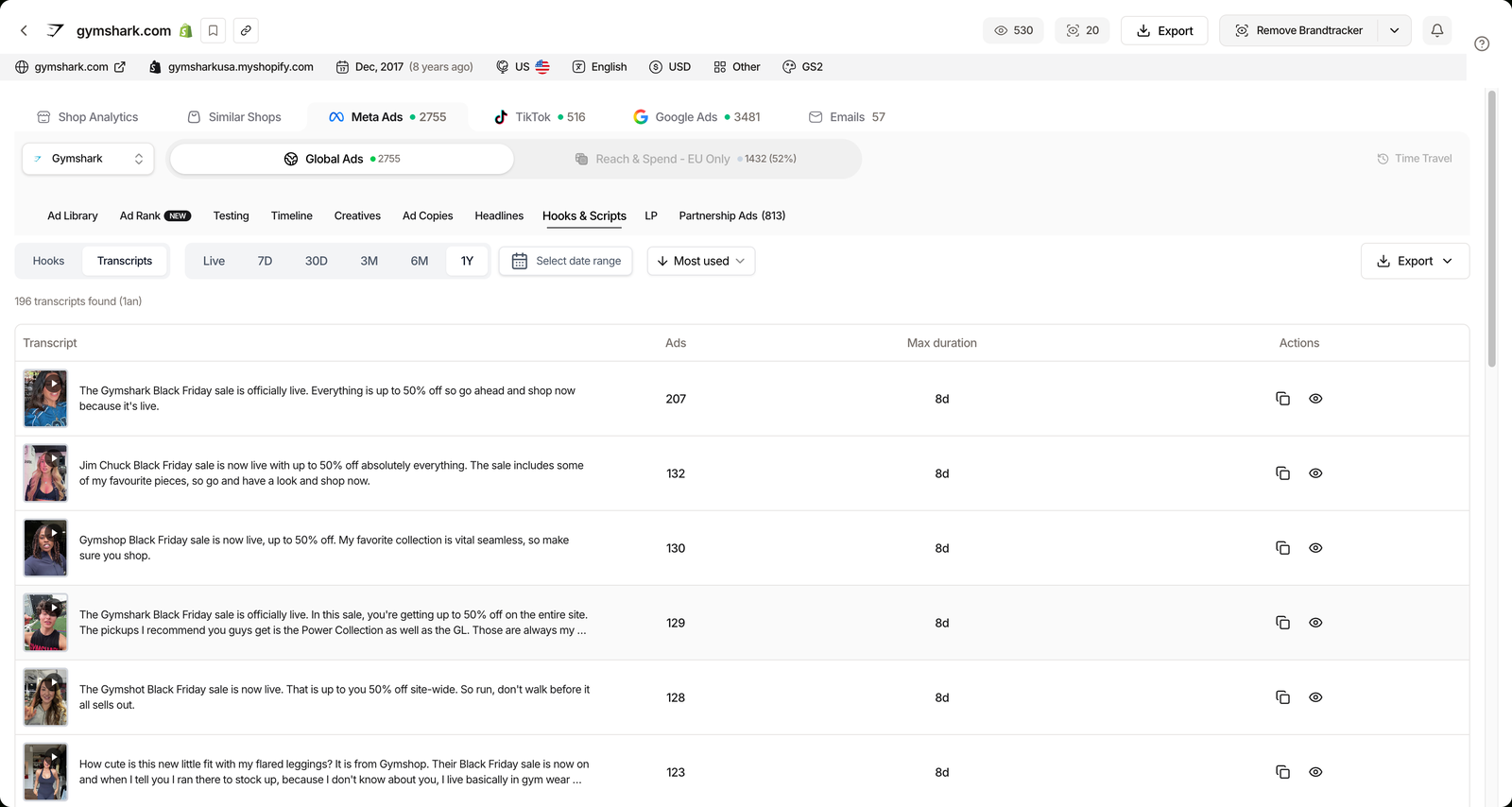
A hook gets the click, but the script keeps the viewer. Switch to the Transcripts view and TrendTrack writes out the full spoken word of a competitor’s video ad, not just the caption you can already read.
Read three transcripts back to back and the structure jumps out: hook, problem, demo, proof, offer. Rewrite that skeleton for your product and your UGC brief starts from a format that has already earned watch time.
What the Hooks & Scripts tab actually shows
Under the hood the tab is two views over the same brand. Hooks ranks the opening lines; Transcripts spells out the whole video. An Export button pulls the list out when you want it in a brief or a sheet.
That export is how a weekly creative brief starts without a manual tally: pull the top hooks, drop them next to your own angles, and hand a writer a shortlist that already carries the evidence of what runs.
| View or column | What it shows | Why it matters |
|---|---|---|
| Hooks | Every opening line, ranked by usage. | Surfaces the angles a brand keeps paying to run. |
| Transcripts | The full spoken script of a video ad. | Gives you the whole format, not just the caption. |
| Ads | How many ads reuse a given hook. | Reuse is the clearest proof an angle is working. |
| Max duration | The longest run of any ad on that hook. | Longevity separates a test from a keeper. |
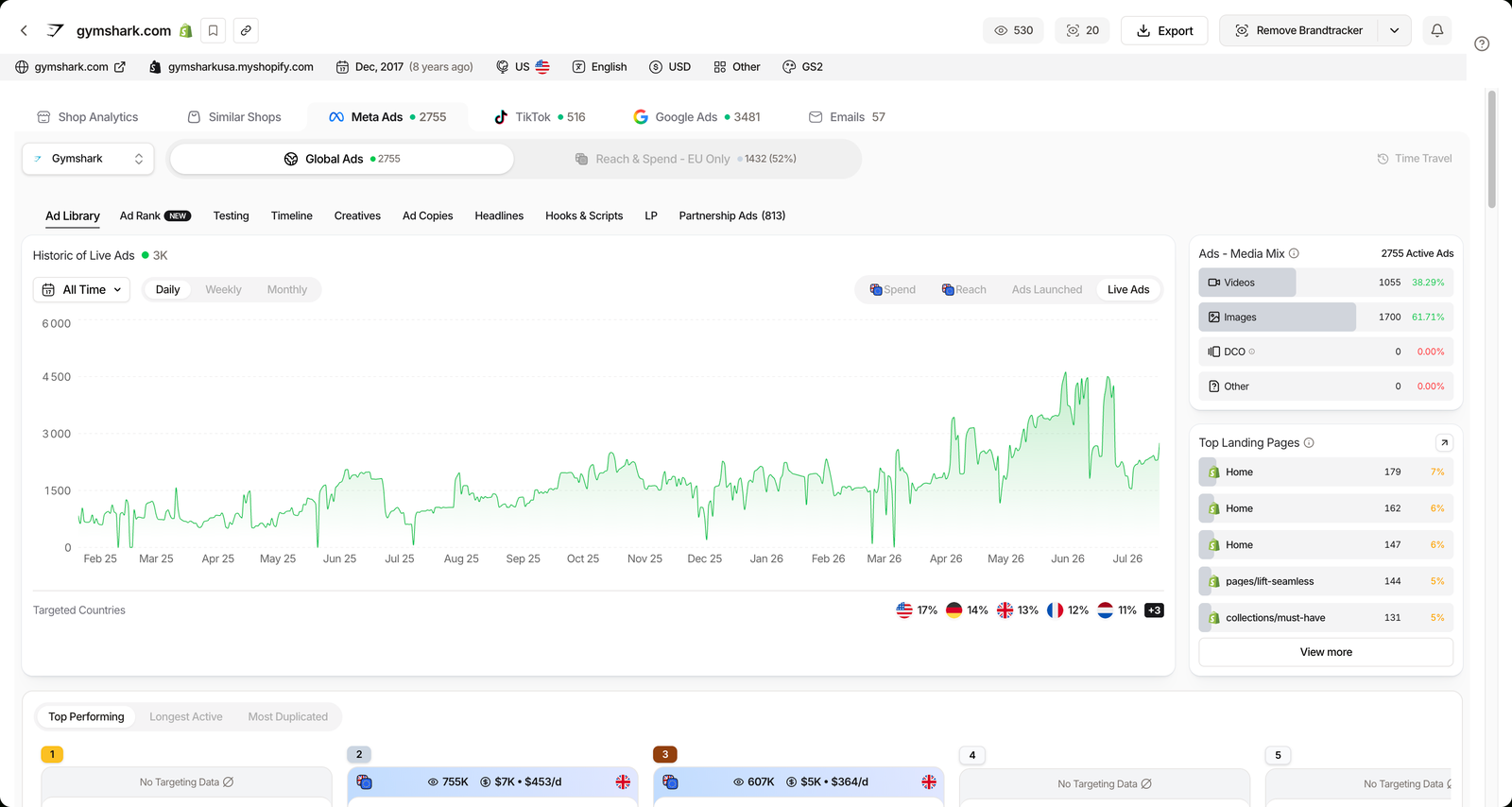
The tab is one of ten sub-views inside a tracked brand’s Meta Ads dashboard, alongside Ad Library, Ad Rank, Testing, Timeline, Creatives, Ad Copies, Headlines, LP and Partnership Ads. Store-level tracking, which bundles all of a brand’s pages into one tracker, shipped on May 27, 2026.
Tab structure and release date from the app’s What’s new log, checked July 2026.
Related guide
Brandtracker Tutorial: Track a Store’s Ads, Tests, Emails & LPs
The full module that hosts the Hooks tab, end to end.
The honest limits
The transcription is auto-generated, so a fast-talking or music-heavy ad can come back with a typo or a dropped word. Read it as a working script, not a legal transcript, and you will be fine.
Usage and max duration are strong signals, but they are still signals, not audited results. A hook can run for weeks because a brand is stubborn, not because it converts. We keep the same honest framing in our full TrendTrack review.
Strong
- Ranks hooks by real reuse, not by guess.
- Transcribes the full spoken video script.
- Included from Starter, no Pro paywall on the tab.
Watch out
- Transcripts are auto-generated, typos happen.
- Usage is a signal, not a conversion rate.
- Only covers brands you actually track.
The last limit has a simple workaround: track the right brands. Two well-chosen competitors on Starter usually teach you more than twenty random ones, because your niche recycles the same handful of winning angles. Free libraries like TikTok’s free Creative Center show you top ads, but they will not transcribe them or rank the hooks by usage.
FAQ
What are ad hooks?
A hook is the opening line of a video ad, the first few seconds that stop the scroll before the viewer swipes. In TrendTrack, the Hooks & Scripts tab lists the hooks a tracked brand uses, ranked by usage (how many ads reuse them) with each one’s max duration. A hook reused across many ads and kept running is an angle that has proven itself.
Does TrendTrack transcribe video ads?
Yes. The Transcripts view writes out the full spoken script of a tracked brand’s video ads, not just the on-screen caption. The transcription is auto-generated and can contain the odd typo, but it gives you the whole message flow so you can rebuild the format in your own angle.
Which plan do I need for Hooks & Scripts?
The tab lives inside the Brandtracker, included from Starter ($59/mo) with 2 trackers. To watch more competitors, Pro ($89/mo, or $62/mo billed annually) unlocks 30 trackers and Business is unlimited. The tab itself is not a separate paid module, your plan just sets how many brands you can follow.
Is TrendTrack better than TikTok Creative Center for hooks?
For finding and reusing hooks, yes, on one specific point: the free Creative Center shows top ads but does not transcribe the videos or rank hooks by usage. TrendTrack does both on the brands you track. The Creative Center is still useful for a free overview of a niche.
Start stealing the hooks that work
If you write ad scripts from a blank page every week, you are doing the hardest version of the job. The Hooks & Scripts tab turns a competitor’s proven openings into a ranked, readable starting point.
It is the strongest fit for media buyers and creative teams who ship new video angles often. Lighter if you only run static ads or never touch video.
Want the hooks your rivals keep paying to run?
Hooks & Scripts is included from Starter ($59/mo, or $41/mo annually) with 2 trackers. The free Chrome extension is there if you want to test the water first.