Last verified July 16, 2026. Shopify pricing and TrendTrack counters checked live in-app; market figures are directional estimates.
You have a Shopify trial open, a blank store staring back at you, and no idea which button to press first. That paralysis is normal, and it is fixable in six ordered steps.
The problem is never a lack of buttons. It is not knowing which decision comes first, so people build a pretty store around a product nobody wants.
This guide walks the build in the order that actually matters: validate a product, line up a supplier, build the store, handle payments and policies, launch with a real ad test, then read your numbers. No income promises, just the steps.
To dropship on Shopify: validate a product with proven live demand, connect a supplier through an app like DSers, build a one-product Shopify store, then test it with paid ads. Budget $300 to $500 to validate. A Shopify plan starts at $39/mo, so the store is the cheap part; the ad test is not.
Disclosure: some links on this page are affiliate links. If you subscribe through them we may earn a commission at no extra cost to you. We tested every TrendTrack feature mentioned here on a paid account.
In this guide
What dropshipping on Shopify really means
Dropshipping is a fulfillment method, not a business model. You list a product, a customer buys it, and your supplier ships it directly to them, so you never hold stock and only pay for a unit after it sells.
Shopify is where most sellers run that model because it handles the hard parts for you: hosting, a secure checkout, and an app layer that syncs orders straight to a supplier. You are not building a website from scratch, you are configuring a storefront.
Source: TrendTrack index counters, checked in-app July 2026.
Those counters exist because Shopify dropshipping is a crowded, measurable market, not a secret. That is good news for you: everything a competitor does on this platform leaves a trail you can study before you spend a cent. If you want the wider business context first, start with the full how to start dropshipping playbook, then come back here for the Shopify build.
Step 1: Validate a product before you build
Here is the mistake that sinks most first stores. People pick a “passion niche”, build a beautiful storefront, and only then ask whether anyone wants the product. You do it in reverse.
Start from a product that already proves demand, then let the store follow. A niche is a bet on your taste; a product with live ads and a growing store behind it is a bet on evidence, and evidence is cheaper to be wrong about.
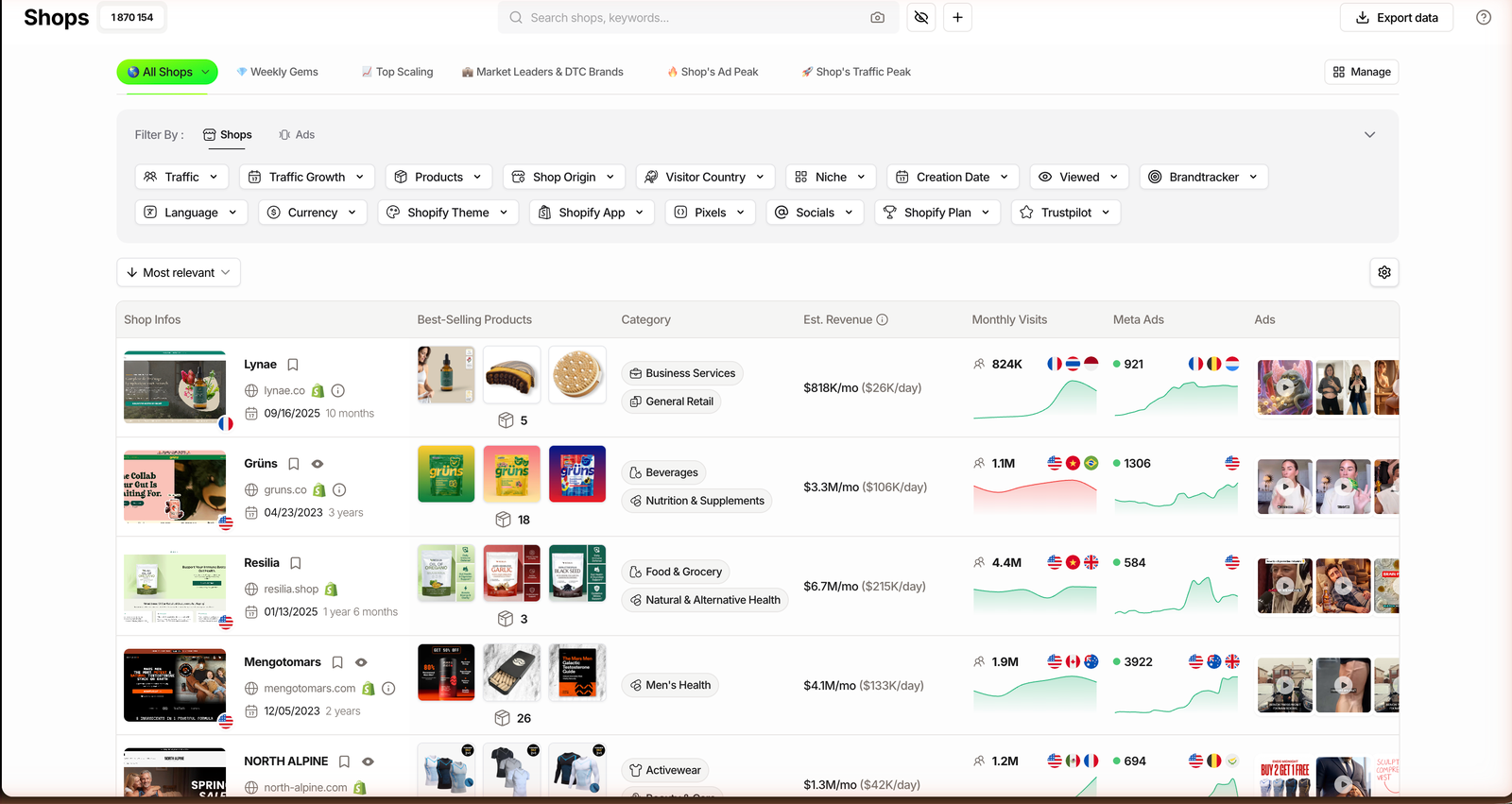
What to screen for is simple: is the product advertised right now, at what price does its best-seller sell, and is the store behind it growing? Those three signals separate a real opportunity from something that just looks good on a feed.
Live ads mean somebody already spends money to sell it, which is the market voting with a budget. A best-seller price above roughly $30 leaves room for ad cost and still a margin. Rising traffic tells you the demand is fresh, not fading. To see what survives after fees and ads, run it through a Shopify profit calculator.
Related guide
How to find winning products
The exact signals that separate a scaling product from a viral fluke.
Before you commit, pressure-test the demand. Pull the term up and check demand on Google Trends to see whether interest is rising or already cooling, then look at how many stores are actively advertising it. A product with proof behind it is worth the build; a hunch is not.
Step 2: Line up a supplier and a sync app
Your supplier decides your delivery time, your defect rate, and half your margin. Pick badly and even a winning product turns into a pile of refund tickets.
On Shopify you connect that supplier through an app so orders sync automatically. You have four broad routes, and they trade margin against speed and control.
| Supplier route | Margin | Ship time | Best for |
|---|---|---|---|
| AliExpress + DSers | Widest, thinnest | Slowest | Testing new products cheaply |
| Sourcing agent | Better at volume | Faster | A product already selling |
| Domestic supplier | Lower per unit | Days | Fast delivery, repeat buyers |
| Print-on-demand | Slim, no inventory risk | Varies | Custom designs, apparel |
DSers is the most common bridge to AliExpress, while Zendrop, CJ Dropshipping and Spocket add faster shipping options, and Printful or Printify handle print-on-demand. You install one from the Shopify App Store and connect your product.
Whichever route you pick, vet it the same way: order a sample yourself, time the real delivery, and message support before you send them a single customer. If communication is slow now, it gets worse the day something breaks.
Step 3: Build the Shopify store
You do not need a custom build. You need a hosted platform like Shopify, a clean theme, and a store that looks like a real brand instead of a template with a random product dropped in.
Keep the scope tight. One hero product, a focused product page, the trust and policy pages a buyer expects, and a checkout that works on mobile is enough to launch and test.
Spend your real effort on the product page, since that is where the sale is won or lost. Real photos, a clear offer, honest shipping times, and a handful of reviews beat any fancy homepage animation.
Then, before you spend a cent on ads, place a test order on your own store from your phone. If anything feels slow or sketchy in that flow, your customers will feel it too.
Step 4: Turn on payments, shipping and policies
This is the part nobody films for a viral clip, and skipping it is how new stores get their payouts frozen. You do not need a lawyer to start, but the basics have to be in place before money moves.
Payments come first. Turn on a real processor such as Shopify Payments or PayPal, and make sure your store name, contact page, and refund policy all match, because mismatches are the fastest way to a held payout.
Do at launch
- Enable a payment processor
- Write real shipping and refund policies
- Add a working contact email
- Start as a sole proprietor
Do once sales are steady
- Form an LLC if it fits your state
- Open a separate business bank account
- Track your sales tax obligations
- Set up simple bookkeeping
The rule is simple: finish the launch column before your first ad, and treat the second column as a reward for traction. None of this is legal advice, so confirm the rules for your own state before you formalize anything.
Step 5: Launch with a real ad test
Paid traffic is not a growth lever yet. At the start it is your validation test, the way you learn whether real strangers will pay for your product at your price.
Most beginners start on Meta because the targeting and ad library are mature, and the same playbook covers running Facebook ads for dropshipping. TikTok can be cheaper for the right product but rewards native, fast video over polished ads.
Plan check: the Shops database and 2 Brandtrackers start on Starter ($59/mo). The Ads and Advertisers modules, the ad-spy core, begin on Pro ($89/mo, or $62/mo billed annually).
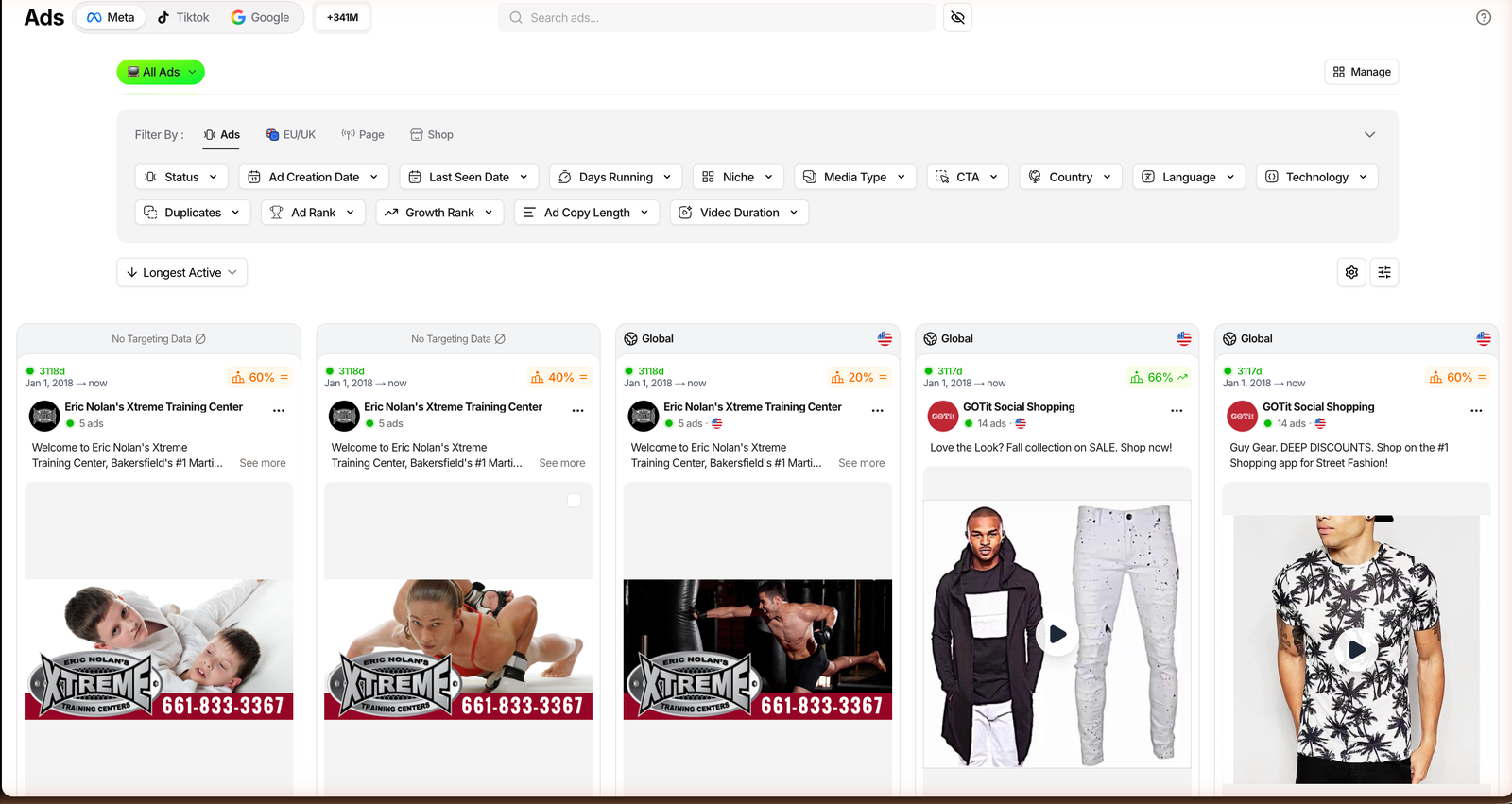
Before you burn a test budget, look at what is already winning. Inside the Ads module you filter 340M+ tracked ads by platform and by Ad Rank, TrendTrack’s ranking of which creatives are performing, then open any ad to see its landing page and how long it has been running.
Then run more than one creative of your own. A single ad is a coin flip, not a test: put a small daily budget behind three or four angles, cut the losers, and read results by cost per purchase, never by likes.
See how TrendTrack screens products
The gating matters most at the Starter to Pro jump, since that is where live competitor ad spying unlocks. Knowing which ads already convert is far cheaper than learning it by burning budget.
Your Shopify launch checklist
Six steps, in order, each with a clear finish line. Do not move to the next phase until the current one is genuinely done, because skipping ahead is what creates expensive rework later.
| Phase | Goal | Done when |
|---|---|---|
| Validate | Pick a proven product | Live ads, price above $30, rising traffic |
| Source | Choose a supplier | Sample ordered, delivery timed |
| Build | Set up the store | Product page and trust pages live |
| Configure | Payments and policies | Test order placed on mobile |
| Launch | Test with ads | Three to four creatives live |
| Read | Judge the numbers | Decision made by cost per order |
Read the “Read” row carefully, because it is where discipline pays off. A realistic net margin after product cost, fees, and paid traffic sits around 15% to 25% for most new stores, and revenue means nothing until you know your cost per order. Tools that estimate a competitor’s revenue can help you size a market, but treat those figures as estimated, never as fact.
Related guide
TrendTrack pricing, plan by plan
Which plan unlocks what, monthly and annual, with no misleading math.
FAQ
How much does it cost to start dropshipping on Shopify?
Plan for a Shopify plan around $39/mo (trial first), a domain near $15/yr, a couple of apps at $0 to $40/mo, and a real ad test budget of $300 to $500. You can technically launch for under $100, but without a test budget you cannot validate a product. The store is the cheap part; the ad test is what actually teaches you whether it works.
Is dropshipping on Shopify still profitable in 2026?
Yes for operators who treat it as a real business with a validated product, healthy margins, and disciplined ad testing. A realistic net margin sits around 15% to 25% after product cost, fees, and paid traffic. It is a poor fit for anyone expecting passive income, and there is no guaranteed payout, only a model that rewards execution.
What is the best supplier app for Shopify dropshipping?
There is no single best app. DSers is the most common bridge to AliExpress, while Zendrop, CJ Dropshipping and Spocket add faster shipping options, and Printful or Printify handle print-on-demand. Choose based on delivery time and reliability for your product, not on which catalog is the widest.
How long does it take to set up a Shopify dropshipping store?
The technical build, meaning the theme, product page, supplier app, and payments, usually takes one to three days. The slow part is upstream: validating a product and vetting a supplier. Do not rush to launch before you have a proven product and a sample in hand, because a fast build on a weak product just fails faster.
Can you dropship on Shopify for free?
Not realistically. Shopify offers a trial, so the store itself can be near free at the start, but you need budget to test ads. With zero ad spend you are relying on organic reach, which is slow and unreliable for a brand-new store with no audience.
Do you need a business license to dropship on Shopify?
Not to launch and test. In most US states you can start as a sole proprietor and formalize into an LLC once sales are consistent. You do need a payment processor such as Shopify Payments or PayPal and matching store policies. This is general information, not legal advice, so confirm the rules for your own state.
Start with the step in front of you
The path is not complicated: validate a product, vet a supplier, build a tight store, turn on payments and policies, launch a real ad test, then read your margins honestly. Do those in order and you skip the rework that sinks most first stores.
The temptation on Shopify is to spend day one perfecting a theme. Resist it. The store is a few days of work; the product decision in front of it is what actually decides whether any of this pays off.
Pick the product that already has evidence behind it, build around that one thing, and let your cost per order, not your feed, tell you what to scale.