
Last verified July 15, 2026. Checked against the live Google Trends tool and a paid TrendTrack account.
You notice a product term ticking up on Google Trends. The line is climbing, and that climb feels like permission to test it.
Here is the trap. That line tells you interest is rising, not that anyone is buying, and definitely not that the product is worth your budget. Google Trends is free, genuinely useful, and badly misread by most people who open it.
This guide covers what it actually does for product research, how to read the chart without fooling yourself, and the exact point where a rising line stops being enough. If you already run the full winning-product method, treat this as the free first filter that sits in front of it.
Google Trends (trends.google.com) is a free tool that shows the relative search interest for any term over time and place, on a 0-100 scale. For product research it is best at spotting rising demand and seasonality, not at telling you search volume, price, or who already sells it. No account needed.
Disclosure: some links on this page are affiliate links. If you subscribe through them we may earn a commission at no extra cost to you. We tested every TrendTrack feature mentioned here on a paid account.
How Google Trends indexes interest. Verified on the live tool, July 15, 2026.
What you would actually use Google Trends for
Before the mechanics, the reasons to open it at all. For product research, Google Trends is not a discovery engine so much as a demand-and-timing check on ideas you already have.
Four jobs are where it earns its place in a dropshipping product research routine. Skim them first, then we will do each one on the screen.
Spot a product climbing
Catch rising interest early, before a term is everywhere.
Time a seasonal launch
Read the yearly curve so you enter before the peak, not after.
Compare two ideas
Put up to five terms head to head on one chart.
See where demand is
Break interest down by region to aim your targeting.
Spot a product that is climbing
The clearest signal Google Trends offers is a term whose interest is rising quarter over quarter. A steady climb across twelve months means more people are searching for it, which is the earliest public sign that a category is warming up.
The Related queries panel makes this even sharper. Set it to Rising and you get the searches growing fastest around your seed term, with a Breakout tag on anything up more than 5000%, which is your shortlist of what to research next. Cross-check it against what is actually trending in 2026 before you commit a test budget.
Time a seasonal launch
Most dropshipping products are seasonal whether you plan for it or not. Google Trends holds data back to 2004, so a five-year view shows you the same product’s annual rhythm at a glance.
That rhythm decides your timing. If interest peaks in November every year, you want inventory and ads live in September, not the week the curve tops out. Entering after the peak is how sellers end up paying to advertise a product on its way down.
The five-year view also catches false seasons. A garden gadget that spiked once during a heatwave looks seasonal until you notice it never repeated, which is a very different bet from a product that climbs every spring like clockwork.
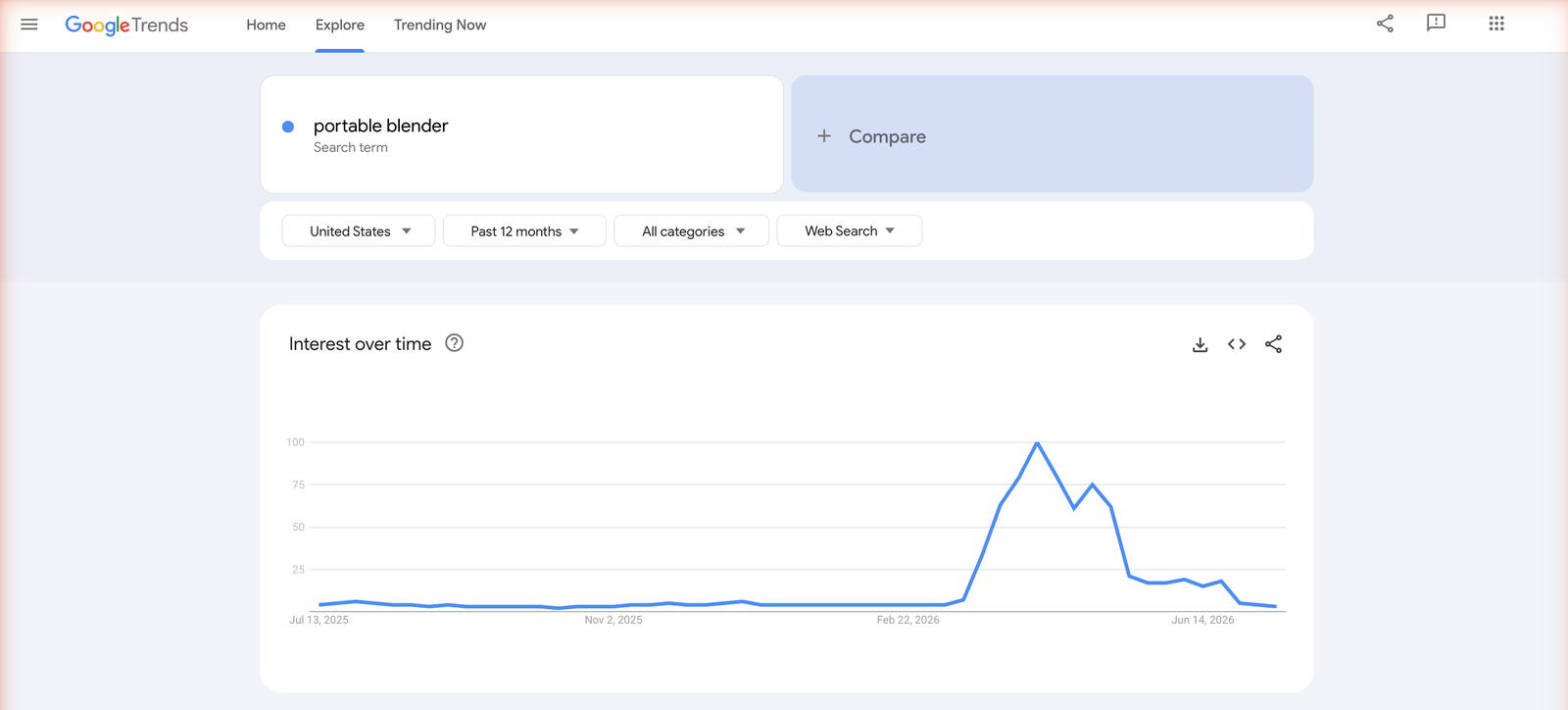
Compare two product ideas head to head
You can add up to five terms to one chart with the Compare button. This is the fastest way to settle a debate between two products you are torn on.
One caution: comparison is still relative. The chart tells you which term draws more interest, not how many searches either one gets. It is a ranking, not a volume readout.
Use it to break a tie, not to size a market. If two candidate products trace nearly identical lines, the winner will be decided by margin, sourcing and competition, none of which Google Trends can see. The comparison narrows your list, then the real work starts.
See where demand concentrates, by region
The Interest by subregion map breaks a term down by state or country. For a US seller, that shows where a product already has pull, which is a free hint for ad targeting and shipping priorities.
A product that indexes high in a handful of states is a different bet than one spread evenly. Concentrated demand can mean a niche community you can target cheaply, or a regional quirk that will not scale nationally.
How to use Google Trends for product research, step by step
The mechanics take a couple of minutes to learn. Here is the loop, then each step in detail.
Search a term in Explore
Open trends.google.com and go to Explore. Type your product or category and pick from the suggestions.
Watch the difference between a Search term and a Topic. A Search term matches that exact phrase, while a Topic groups related searches in any language. For a specific product name, the Search term keeps your read clean.
Set your country and time range
This is where the tool earns its keep, and where most people go wrong. Set the country to your actual market, so a US seller is reading US intent and not a worldwide blur.
Then choose the time range deliberately. Past 12 months shows momentum, while past 5 years exposes seasonality and whether a trend is real or a one-off. Read both before you decide anything.
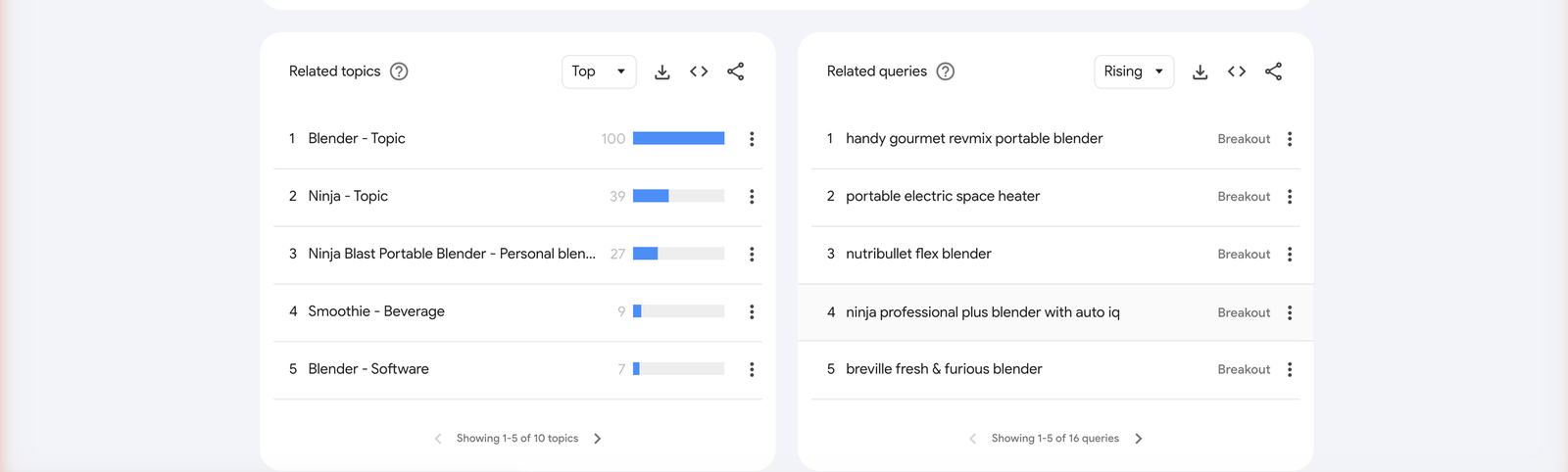
Read Related queries: Rising vs Top, and what Breakout means
The Related queries box has two modes. Top shows the most popular searches around your term, which skews toward the obvious and the already-saturated.
Rising is the one that matters for product research. It shows searches growing fastest right now, and the Breakout label marks anything up more than 5000%. That is your idea pipeline, as long as you remember it is a growth signal, not a demand guarantee.
Breakout percentages also flatter small numbers. A term going from 20 searches to 1,200 is a genuine 5000% jump, yet the absolute demand is still tiny. Treat Rising as a list of things to investigate, never as a list of products to buy inventory for.
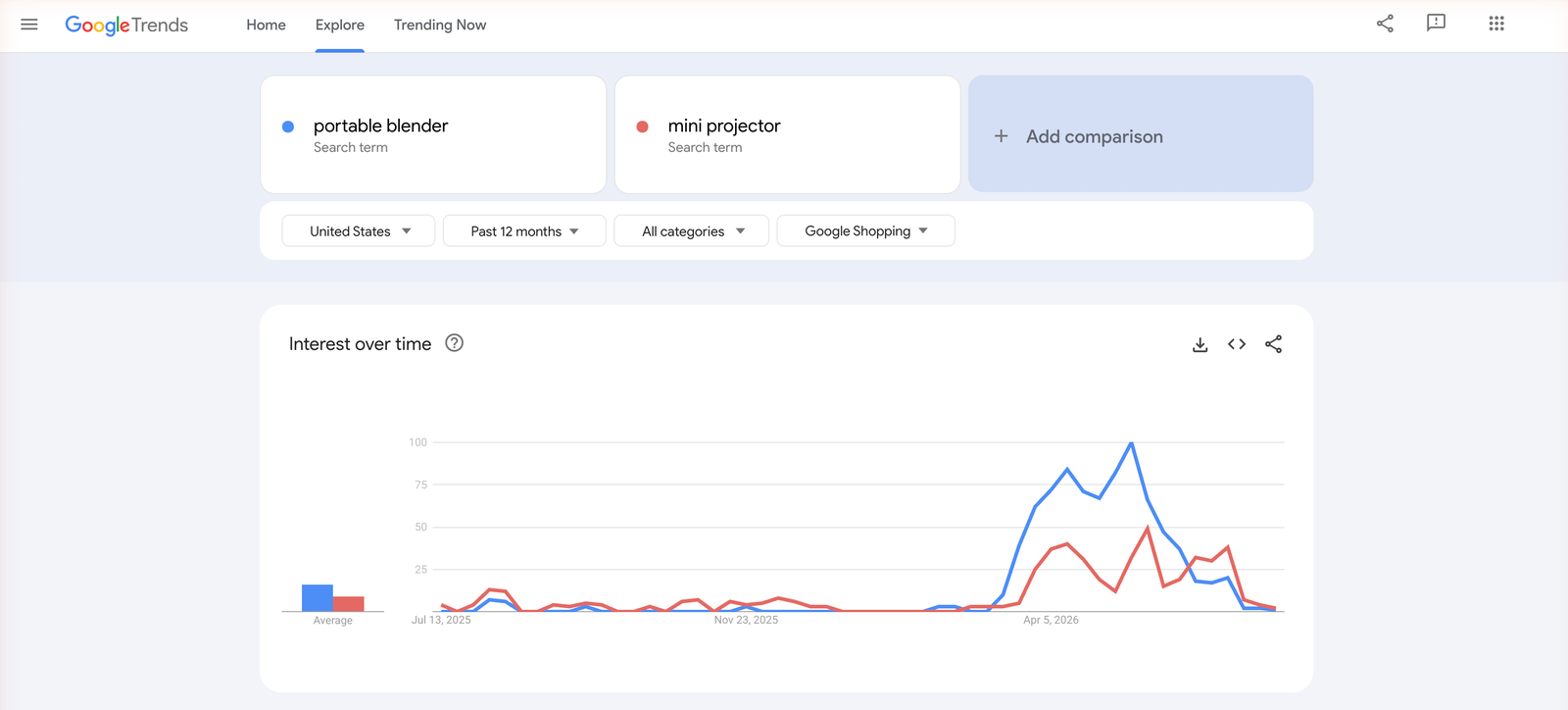
Switch the search type to Shopping or YouTube
By default Google Trends reads web search. The dropdown lets you switch it to Image, News, YouTube, or Google Shopping, and that last one is underused by product researchers.
Shopping interest is closer to commercial intent than a general web search, because people searching there are further down the buying path. YouTube interest, meanwhile, hints at whether a product lends itself to the video content that carries so much of dropshipping demand.
How to read a Google Trends chart without fooling yourself
Most bad product calls from Google Trends come from misreading the chart, not from the data being wrong. Three habits keep you honest.
First, the 0-100 scale is relative, not a volume. A value of 100 is only the peak point for the terms and window you picked. It could sit on top of a few hundred searches or a few million, and the chart never tells you which.
Read it as a question: a rising line asks “is interest growing?” and answers yes or no. It never answers “will people buy this?” Curiosity and buyer intent look identical on a Trends chart.
Second, separate a spike from a trend. A single vertical jump often means a news moment or a viral clip, not durable demand. Pull the five-year view, and if the term returns to the floor after each spike, you are looking at a fad, not a category.
Third, respect seasonality. A term that always climbs in Q4 is not “trending”, it is doing what it does every year. Read the pattern, not the slice.
Related guide
Dropshipping Product Research: The Full Method
Google Trends is one input. Here is the complete research workflow.
Where Google Trends stops for product research
The free tool is built to measure search interest, and it does that well. The moment you ask it to help you pick a product, its limits show up fast.
| For product research, can it show… | Google Trends |
|---|---|
| Rising interest in a term | Yes |
| Seasonality and timing | Yes |
| Absolute search volume | Limited (relative 0-100 only) |
| Which store already sells it | No |
| Estimated revenue or price | No |
| Whether it is already scaling on ads | No |
Read the table as one sentence: Google Trends answers “is interest rising?” and stops there. It never answers “is this a winning product?”, because that question needs stores, prices, and live ads, none of which live in a search-interest chart.
From a Google Trends spike to a validated product
So take a real case. You found a term tagged Rising, the twelve-month curve is climbing, and the five-year view says it is not just a Q4 blip, so Google Trends has done its job. Now you validate it where the market actually lives.
This is the part we ran on a paid TrendTrack account, which indexes 1.87M Shopify stores and 337M ads. The workflow has three moves.
Find who is actually selling it
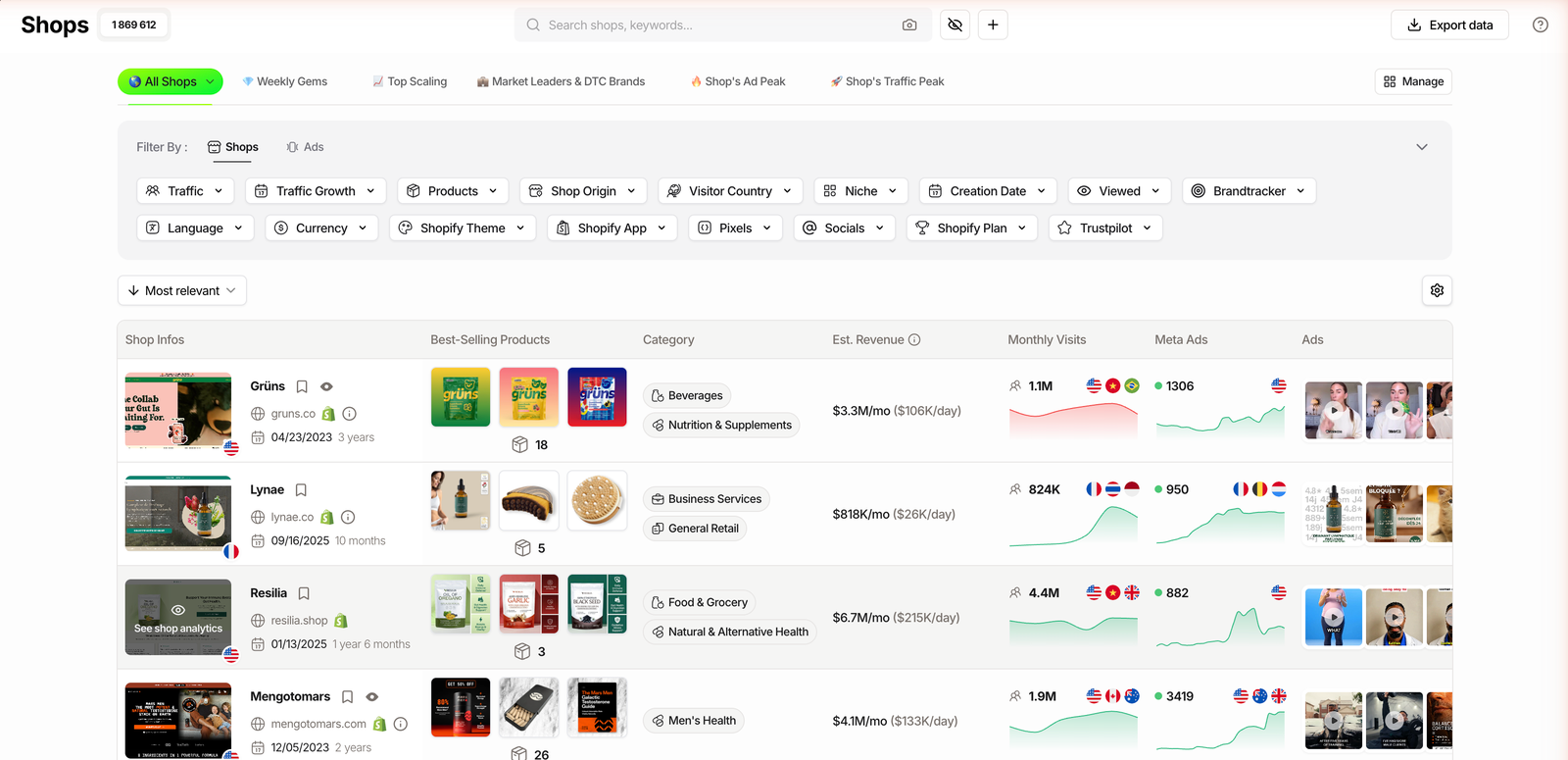
Open the Shops database and filter toward your term by niche, product, or store creation date. Instead of a search-interest line, you now get real stores carrying the product, which turns an abstract trend into a list of live competitors.
Related guide
The TrendTrack Shops Database, Explained
Screen 1.87M Shopify stores by niche, growth and estimated revenue.
Read estimated revenue and traffic growth
For each store, TrendTrack shows an estimated monthly revenue and traffic trend. Keep in mind that number is a model, not audited revenue, so read it as directional rather than exact.
Still, a cluster of young stores selling your product with rising traffic is a far stronger signal than a Trends line alone. You can screen those stores inside TrendTrack’s database and sort by the metrics that matter, instead of guessing from search interest.
Check if it is already scaling on ads
The last move is the one Google Trends can never make. Look at whether the product is running live ads, and for how long, because a creative that has stayed up for weeks is spending real money and working.
Longevity is the tell. Anyone can launch an ad, but only a profitable one survives, so a competitor quietly running the same creative for a month is the strongest demand signal you will find. That is the difference between a term people search and a product people buy.
Plan check: the Shops database, with the estimated revenue column, is available from Starter ($59/mo, or $42/mo billed annually). The Ads and Advertisers modules, for the live-ad check, start on Pro ($89/mo, or $63/mo annually).
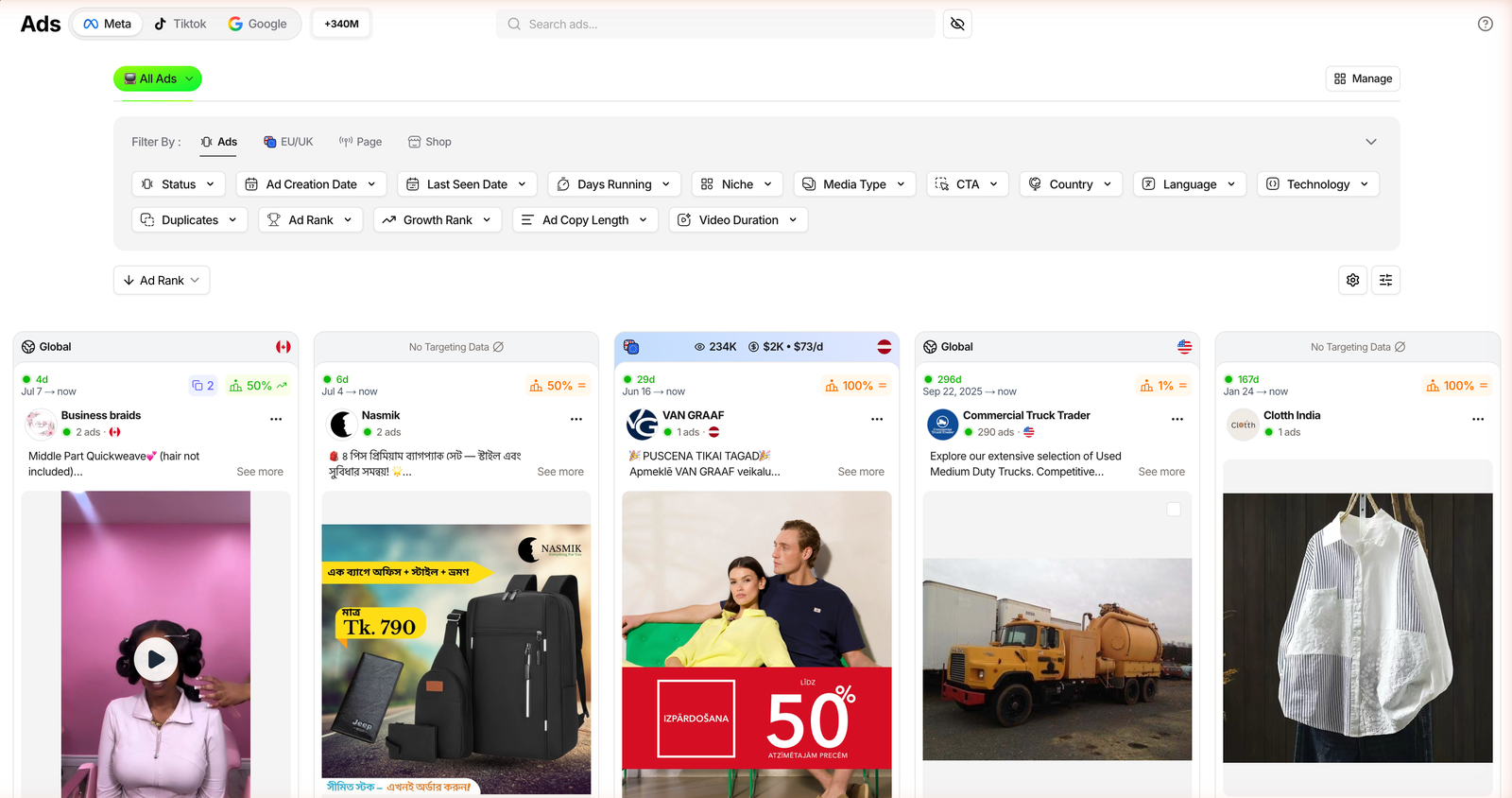
Run those three checks and the difference is stark. Google Trends said interest was rising. The store and ad data tells you who is selling, roughly how big they are, and whether the money is already moving, which is what “validated” actually means.
See the store data on a TrendTrack account
FAQ
Is Google Trends good for product research?
Yes, as one input. It is free and strong at spotting rising interest and seasonality, but it shows relative interest on a 0-100 scale, not absolute volume, and cannot tell you who sells the product, at what price, or whether it is saturated. Use it to shortlist ideas, then validate them with store and ad data.
How do I find trending products on Google Trends?
Open Explore at trends.google.com, type a product or category, set your country and a time range like the past 12 months, then read the Related queries panel. Switch it to Rising to see fast-growing searches, and watch for the Breakout tag, which flags terms up more than 5000%. Cross-check the curve over 5 years to separate a real trend from a one-off spike.
Does Google Trends show real search volume?
No. Google Trends shows relative interest on a 0-100 scale, where 100 is the peak for the terms and period you selected, so a value of 100 could represent a few hundred searches or a few million. For absolute volume you need a keyword tool, and for buyer demand you need to see who is actually selling and advertising the product.
Google Trends vs a product research tool: what is the difference?
Google Trends measures search interest, while a product research tool like TrendTrack measures the market: it indexes 1.87M Shopify stores and 337M ads, and shows estimated revenue, traffic growth and live competitor ads. Trends tells you interest is rising. A research tool tells you whether the product is proven, who sells it, and whether it is already scaling.
Can Google Trends tell me if a product is saturated?
Not directly. It shows whether search interest is up or down, but not how many stores already sell the product or how much competitors spend on ads, and judging saturation needs store-level and ad-level data. That is where a spy database, which shows live ads and estimated revenue per store, picks up where Google Trends stops.
The bottom line
Google Trends is one of the best free tools in product research, and most people use a fraction of it. Learn the search types, set the right country and window, and read Rising queries, and you already pull more from it than the crowd glancing at one climbing line.
What it will never give you is the part that decides a test: who sells the product, how big they are, and whether the ads are already running. Treat Google Trends as your free first filter, then validate the survivors where the market actually shows its hand.
A rising line, or a validated product?
TrendTrack turns a Google Trends term into real stores, estimated revenue and live ads across 1.87M stores and 337M ads. The Shops database starts on Starter ($59/mo, or $42/mo annually). Ad spy starts on Pro.