Last verified July 15, 2026. Every TrendTrack signal below was read live on a paid account; search data pulled from US Google data.
A product blows up on your feed. You feel the rush, order 300 units, build a store around it, and start running ads the same week the wave breaks. By the time your stock lands, the price has been cut in half and every second ad is selling the same thing.
That is the trap with “trending.” Chasing what already peaked is how you buy inventory at the top. The useful skill is spotting the slope on the way up, before the whole market piles in.
This guide is a method, not a list of picks. It moves from free signals anyone can check to the paid data that confirms a trend is real and still climbing.
To find trending products, track momentum, not hype, across four signal types: rising search demand, social traction, store traffic growth, and fresh live-ad activity. A product is genuinely trending when several signals point up at once, not when one clip goes viral for a day.
Disclosure: some links on this page are affiliate links. If you subscribe through them we may earn a commission at no extra cost to you. We tested every TrendTrack feature mentioned here on a paid account.
What “trending” actually means
Trending is about direction. A trending product has demand that is rising right now, whichever way you measure it: search, social, traffic, or ad spend.
That is different from a winning product. A winner has already proven it can scale and sell profitably, which is a separate question covered in our guide on how to find winning products. Trending is timing; winning is proof. The best bets show both.
Counters read in-app on a paid TrendTrack account, July 2026.
Those three signals map to the four families you will use here: search demand, social traction, store traffic, and live ads. Free tools cover the first two well. Store and ad data need a paid tool, and that is where a trend gets confirmed or killed.
Start free: read the demand signals anyone can check
Before you pay for anything, pull the free curves. Open Google Trends and type the product or category. Read the 12-month line, not today’s number.
A rising slope over three to six months beats a single spike that already dropped. Watch for the “Breakout” tag on related queries, and check that interest holds across more than one region. Our walkthrough on using Google Trends for product research goes deeper on reading those curves.
Then check social traction. The TikTok Creative Center surfaces trending videos, hashtags and songs, so you can see whether interest is building or fading. Amazon Movers and Shakers ranks the fastest-rising items by category, which is a blunt but honest momentum read.
None of this tells you who is already selling the product at a profit. It only tells you interest is moving. Treat it as the shortlist stage.
Phase 1 checklist (free signals):
- The Google Trends line is rising over months, not one week.
- Interest shows up in more than one region, not a single spike.
- Related queries are growing, ideally with a Breakout tag.
- The product appears in TikTok or marketplace momentum rankings.
Validate the trend with real store data
Plan check: live-ad data (the Ads module) starts on Pro ($89/mo). The Starter plan ($59/mo) covers the Shops database, two Brandtrackers and the free Chrome extension. Store traffic filtering below works on Starter.
Rising search is a hint. Rising stores are proof. Inside TrendTrack’s Shops module, open the Traffic Growth filter, set the direction to Rising, pick a window (1, 3 or 6 months) and a minimum percentage, then sort by fastest growing.
That flips the database from “biggest stores” to “stores gaining momentum right now.” A shop selling your candidate with monthly visits climbing is a much stronger signal than a giant that peaked last year.
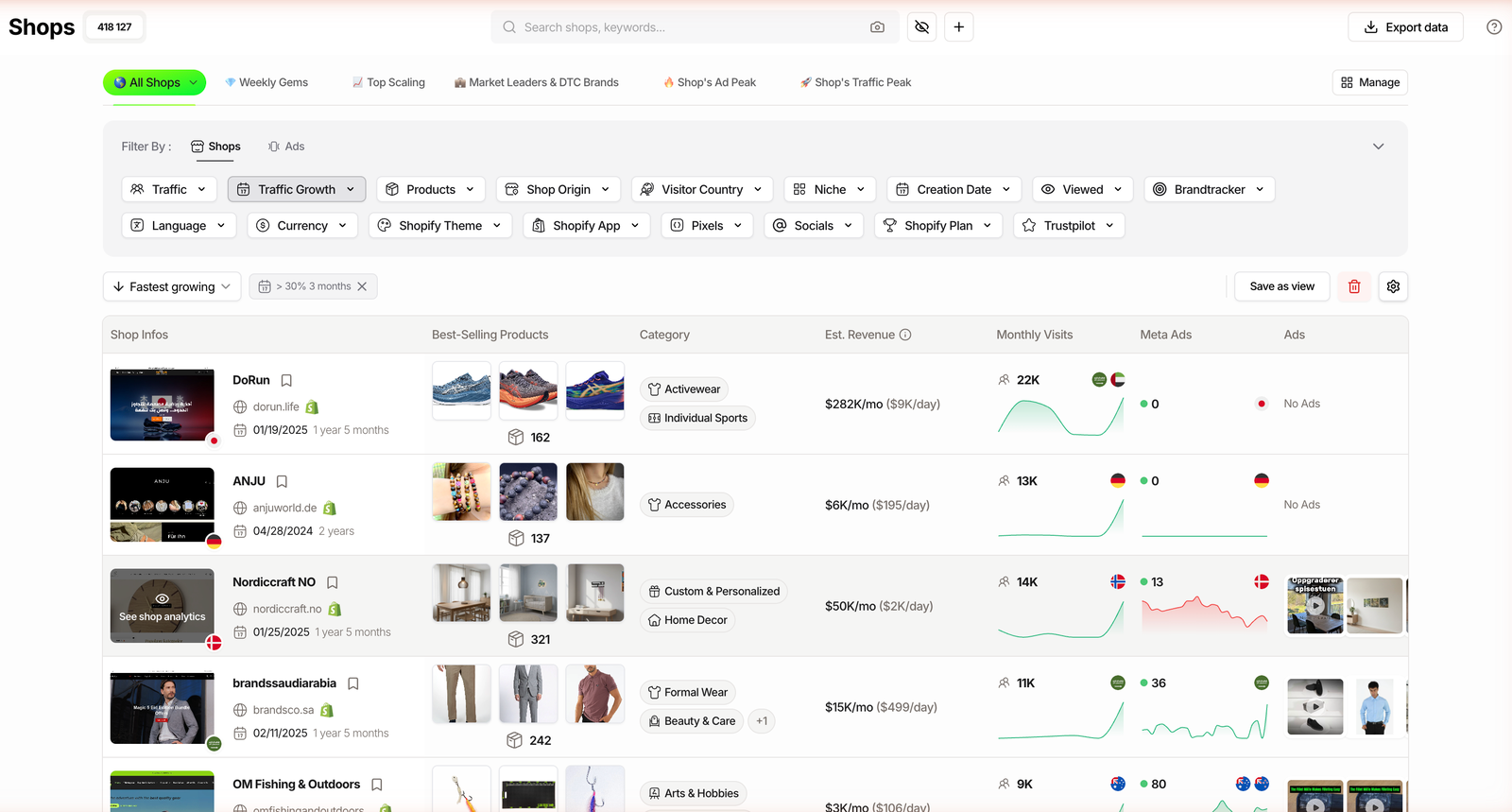
Cross-check the store’s estimated revenue trend and its best-seller price. Keep in mind Est. Revenue is an estimate read from the outside, not audited revenue, so treat it as directional. A store that is growing, running ads and pricing the product with margin room is a trend worth acting on.
Phase 2 checklist (store proof):
- At least one store selling the product has traffic set to Rising.
- Its monthly visits are accelerating, not flat or falling.
- The best-seller price leaves room for your margin.
Related guide
Dropshipping Product Research: Full Method
The end-to-end research workflow, from discovery to margin check.
Catch it early: the advanced momentum signals
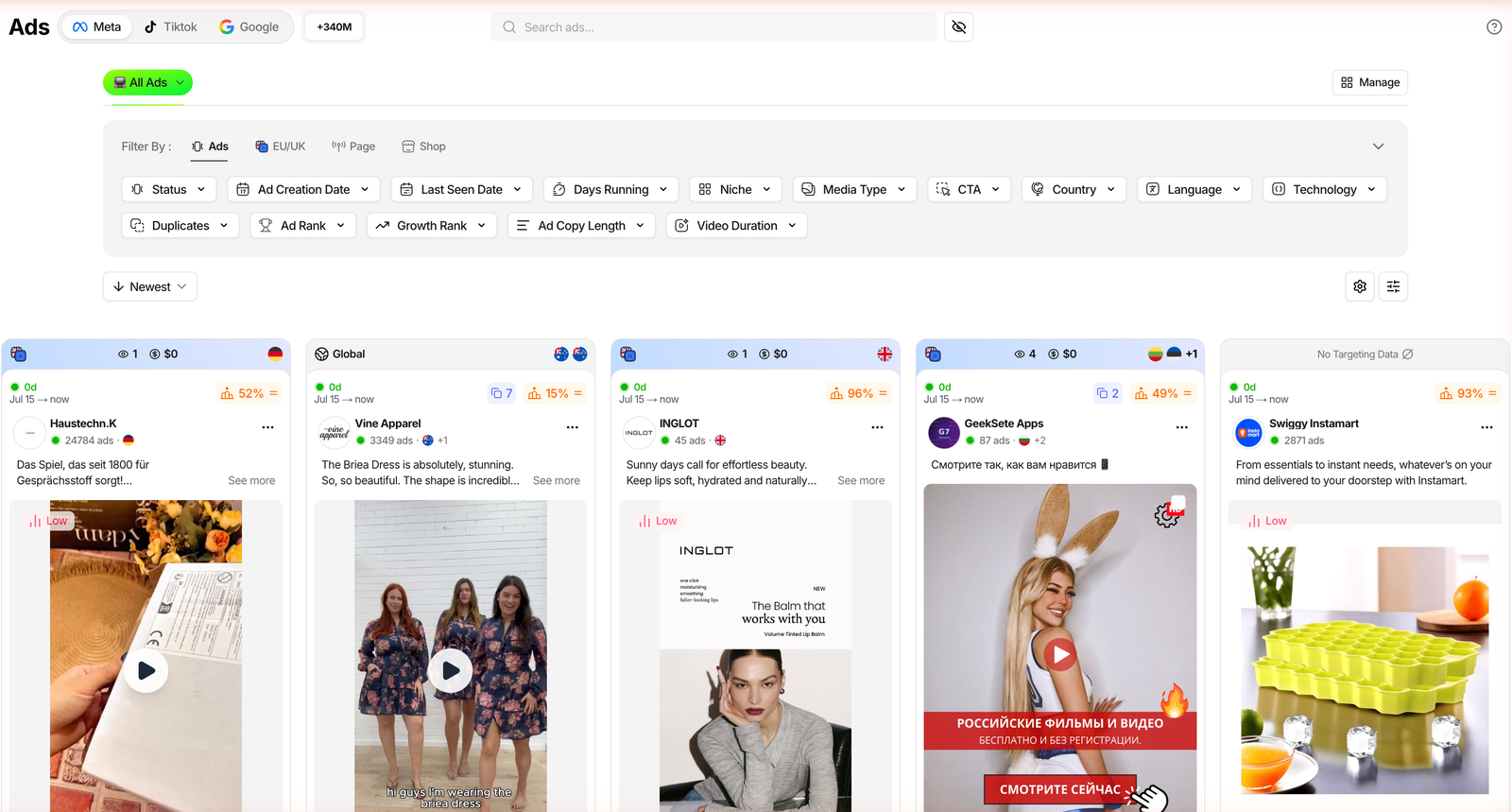
The earliest signal is not the product page, it is the ads. In the Ads module, sort by Newest or set Growth Rank to Rising. Fresh creatives with a short run time and a positive growth badge are angles gaining traction this week, not last year.
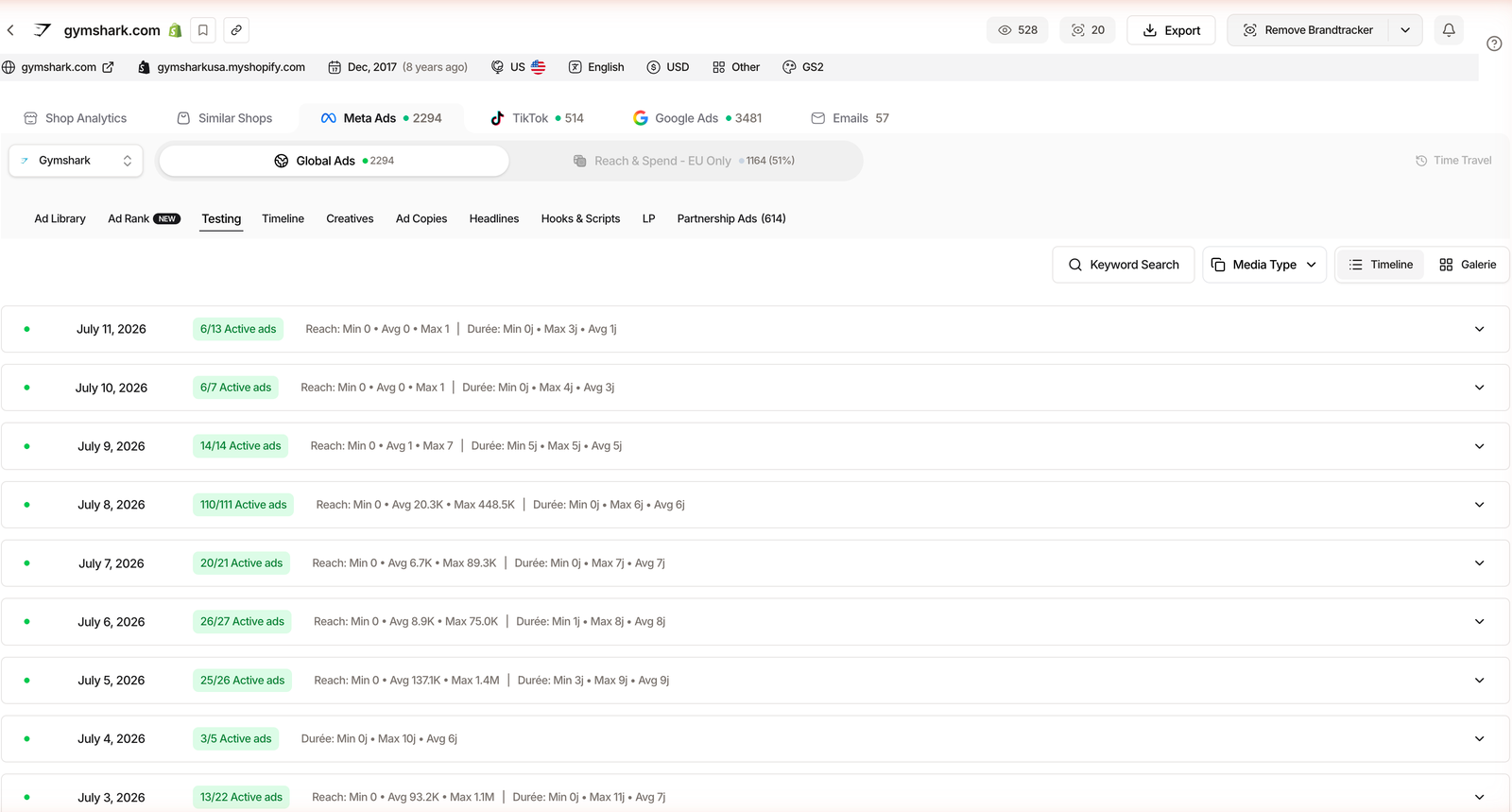
Go one level deeper with the Brandtracker. Its Testing tab lays out a brand’s test waves day by day, so you can read how aggressively it is trying new creatives around a product. When several brands start testing the same angle at once, something is heating up.
The Advertisers module adds a lead indicator: its “ads launched last 14 days” column flags pages ramping up spend fast. And since the July 2026 Brandtracker notifications shipped, you can get an email or in-app alert the moment a tracked brand launches new ads, so you catch the wave instead of reading about it later.
Traffic momentum closes the loop. A store whose visits are accelerating, cross-referenced with the ad activity above, is the clearest “still climbing” read you can get.
Related guide
Fastest-Growing Shopify Stores
Sort the 1.87M-store index by pure traffic momentum.
Screen trending stores in TrendTrack
Shops from $59/mo (or $41/mo billed annually). Live-ad data starts on Pro ($89/mo).
Phase 3 checklist (early momentum):
- Multiple advertisers are launching fresh ads on the angle.
- Newest or rising-rank creatives are appearing, not just old ones.
- A tracked brand shows recent test waves around the product.
The trend-signal checklist
Put it together and a real trend lights up several rows at once. Read this table top to bottom: the more signals pointing up, the safer the timing.
| Signal | Where to read it | Good sign | Access |
|---|---|---|---|
| Search demand | Google Trends line | Rising over 3 to 6 months | Free |
| Social traction | TikTok Creative Center | Hashtag and views climbing | Free |
| Store traffic | Shops, Traffic Growth Rising | Monthly visits accelerating | Starter |
| Fresh live ads | Ads, Newest or Growth Rank | New creatives, rank rising | Pro |
| Test waves | Brandtracker, Testing tab | Daily testing on the angle | Starter |
| Launch surge | Advertisers, ads last 14 days | Pages ramping spend fast | Pro |
Trend traps to avoid
The biggest trap is confusing saturation with opportunity. If the product is already in every ad you scroll and every store you open, the window is closing and margins are usually thin.
A single viral clip is not demand either. One TikTok doing numbers can fade in a week, which is why you want the signals to stack rather than betting on one.
Two more that cost real money:
- Misreading seasonality: a spike that always happens in Q4 is not a new trend, it is a calendar.
- Ignoring margin: a trending product with no price room is a trend you cannot profit from.
FAQ
What is the difference between a trending product and a winning product?
A trending product has rising demand right now: its search, social or ad signals are climbing. A winning product has already proven it can scale and sell profitably. Trending is about momentum and timing; winning is about proven performance. The safest bets show both: a product that is trending up and already backed by stores running live ads and growing traffic.
Where can I find trending products for free?
Start with free demand signals. Google Trends shows the 12-month search curve and whether a query is a breakout or a fading peak. The TikTok Creative Center surfaces trending videos and hashtags. Amazon Movers and Shakers ranks fast-rising items. These tell you interest is rising, but not who is already selling it profitably; for that you need store and live-ad data.
How do I know a trend is rising and not already over?
Look for the slope, not the height. On Google Trends, a rising line over three to six months beats a single spike that already dropped. In TrendTrack, filter stores by Traffic Growth set to Rising and sort by fastest growing, and check the Ads module for fresh creatives with a positive growth badge. When several signals point up at the same time, the trend is still climbing.
Do I need a paid tool to find trending products?
No, you can start free with Google Trends, TikTok and marketplace rankings. Paid tools speed up validation. In TrendTrack, live-ad data sits in the Ads module, which starts on the Pro plan ($89/mo); the Starter plan ($59/mo) covers the Shops database and two Brandtrackers. The free Chrome extension x-rays any store. Free finds the idea; paid confirms someone is already scaling it.
How early should I jump on a trending product?
Early enough that a few stores are testing it, but not so early that there is zero proof of demand. The sweet spot is when you see rising search interest, a handful of advertisers launching fresh ads, and at least one store with growing traffic. If the product is already in every ad you scroll, the window is closing and margins are usually thin.
Bottom line
Finding trending products is not about spotting one viral clip. It is about reading momentum across four signal types and acting while the slope is still pointing up.
Start free with search and social curves, then confirm with store traffic growth and fresh ad activity. Remember the gating: store filtering works on Starter ($59/mo), but the live-ad signals sit on Pro ($89/mo). Stack the signals, respect the margin, and you catch the wave instead of chasing it.